CRM with LinkedIn Integration: The 5 Levels of Depth to Look For
LinkedIn is where B2B buying happens, but most CRMs know nothing about it. This guide maps the five levels of CRM LinkedIn integration, from cosmetic display to guided, signal-driven action, so you can pick a tool that changes how your team sells.
Share this article
- Timing. Signals like a new role or a funding mention reach the rep while they still matter.
- Context. Every message is grounded in what the person actually cares about, not a generic template.
- Accountability. LinkedIn touches finally show up in the pipeline, so managers can coach on the full picture.
A CRM with LinkedIn integration should do more than show a profile photo next to a contact. For most B2B teams, LinkedIn is where the real buying conversation happens, yet the CRM often knows nothing about it. The result is a split brain: your reps live on LinkedIn while your pipeline data lives somewhere else. This article explains what true LinkedIn integration looks like, the five levels of depth to look for, and how to judge whether a tool will actually change how your team sells.
We will keep the language plain and the focus strategic. The goal is not to add another feature to your stack. It is to make sure the place your buyers spend their time and the place your revenue is tracked are finally the same system.
Why a CRM with LinkedIn integration matters now
Buyers research on LinkedIn before they ever reply to an email. They read posts, check who works where, and warm up long before a form is filled. If your CRM cannot see any of that, your sellers are working blind. They log a call, but they miss the job change that made the account ready. They send a sequence, but they do not know the prospect just liked a competitor's post.
When LinkedIn and the CRM are one flow, three things improve at once:
- Timing. Signals like a new role or a funding mention reach the rep while they still matter.
- Context. Every message is grounded in what the person actually cares about, not a generic template.
- Accountability. LinkedIn touches finally show up in the pipeline, so managers can coach on the full picture.
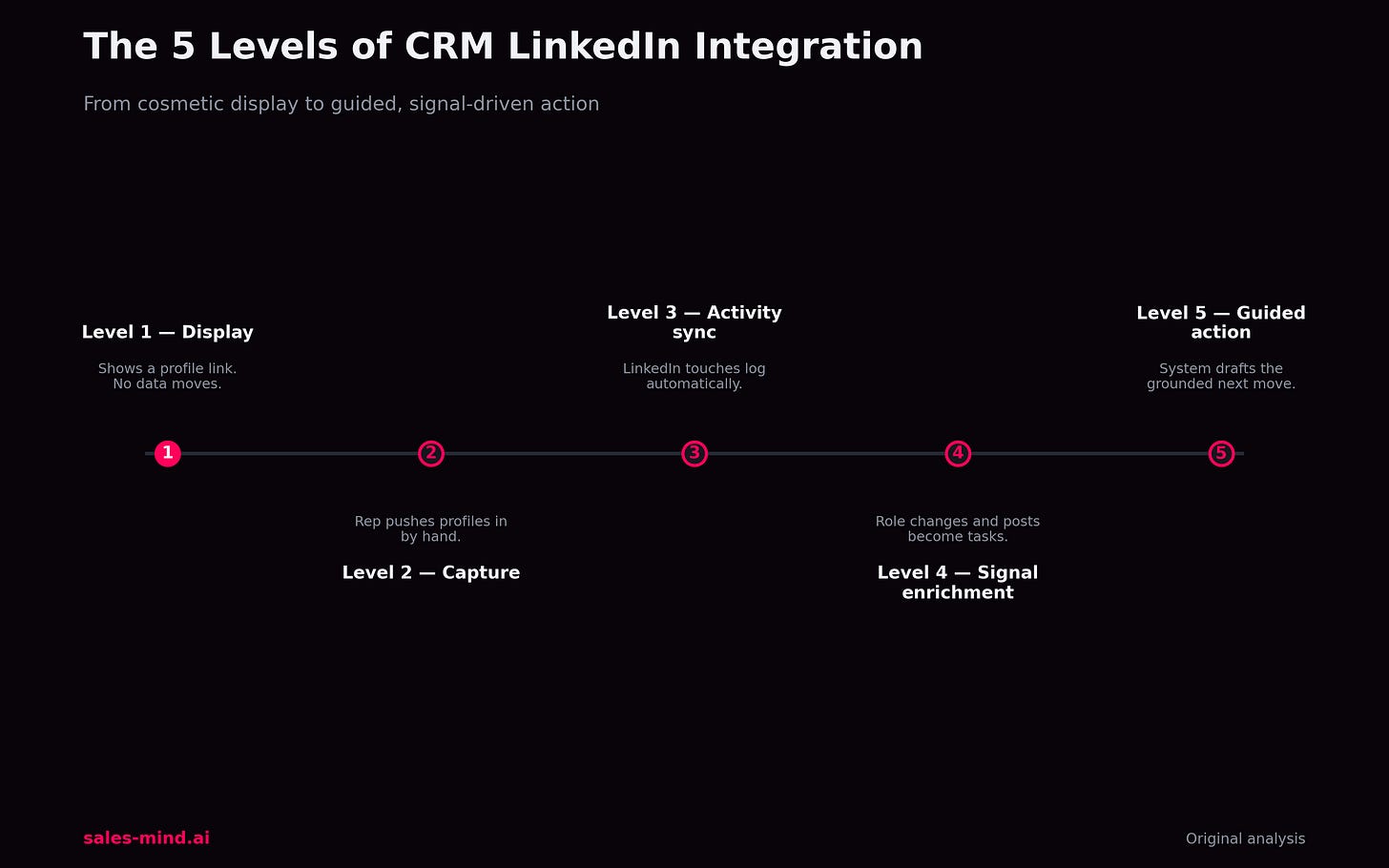
The 5 levels of LinkedIn integration depth
Vendors all say they "integrate with LinkedIn." That phrase hides a wide range. Use this ladder to see how deep a tool really goes. Each level is more useful than the one below it.
Level 1: Display
The CRM shows a LinkedIn link or embeds a profile card. It looks connected, but no data moves. This is the most common and the least useful. It saves a click, nothing more.
Level 2: Capture
A browser tool lets a rep push a profile into the CRM as a new contact. Data starts to flow, but only when a human remembers to click. Coverage is patchy and depends on rep discipline.
Level 3: Activity sync
Connection requests, messages, and replies sent through the system are logged against the CRM record automatically. Now managers can see LinkedIn activity next to calls and emails. This is where reporting starts to reflect reality.
Level 4: Signal enrichment
The system watches for meaningful changes on the accounts you care about, such as a role change or a new post that fits your topic, and surfaces them as tasks. The rep is told who to contact and why, today. This is where timing moves from luck to process.
Level 5: Guided action
The platform does not just show a signal; it recommends the next best move and drafts a grounded first line based on that person's real context. The rep reviews, personalizes, and sends. LinkedIn, enrichment, and outreach become one guided loop instead of three disconnected tabs.
Most tools stop at Level 1 or 2. The gap between "we display LinkedIn" and "we guide action from LinkedIn signals" is the difference between a nicer contact card and a genuinely different sales motion. When you evaluate a CRM with LinkedIn integration, ask which level it truly reaches, then ask for a live demo of that level, not a slide.
What to look for when you evaluate
Once you know the levels, judging a tool gets simpler. Focus on four things:
- Does activity sync happen without a manual click? If it needs a rep to remember, your data will always have holes.
- Are the signals specific and account-scoped? A firehose of generic alerts is noise. You want signals tied to your target accounts and your topics.
- Is the recommended action grounded in real context? A draft that reads like a mail merge is worse than nothing. It should reference the actual reason to reach out.
- Does it respect the platform and the buyer? Safe sending pace and genuine personalization protect both your accounts and your brand.
If you want to see what Level 4 and Level 5 look like in practice, our team can walk you through it on your own accounts. Book a strategy call and we will map your current motion to these levels.
Common mistakes teams make
Three patterns quietly waste the value of a LinkedIn-connected CRM:
- Buying at Level 1 and expecting Level 5 results. A display link will not change timing or context. Match the tool to the outcome you want.
- Treating signals as vanity data. A signal that does not create a task is just trivia. The value is in the action it triggers.
- Skipping the human review. Automation should draft and suggest, but a rep should still read and personalize. The blend of machine timing and human judgment is what wins replies.
What this looks like in a rep's day
Picture a rep who owns forty target accounts. At Level 1, they open the CRM, see a static LinkedIn link, and still have to guess who is worth a message today. At Level 4 and 5, their morning starts with a short list: three accounts changed in a way that matters, and each already has a suggested opening line tied to the real reason. The rep spends their time on judgment and relationship, not on hunting for who is ready. That shift is small to describe and large in practice. It is the difference between a seller who reacts and a seller who arrives early, with context, while the buyer is still forming an opinion.
For a sales leader, the same depth changes coaching. When LinkedIn activity, signals, and outcomes sit in one record, a manager can see why a deal moved, not just that it did. That makes reviews about cause and effect instead of guesswork, and it makes your best plays repeatable across the team.
Frequently asked questions
What is a CRM with LinkedIn integration?
It is a customer system that connects to LinkedIn so profile data, outreach activity, and buying signals flow into your pipeline instead of staying trapped on the platform. The depth ranges from a simple display link to guided, signal-driven action.
Why not just use LinkedIn on its own?
LinkedIn is strong for finding and reaching people, but it does not track your pipeline, sync activity for managers, or connect touches across a whole account. Pairing it with a CRM gives you the memory and reporting LinkedIn lacks.
Does deeper integration risk my LinkedIn account?
Not when it is built to respect the platform. Look for safe sending limits, warm-up, and real personalization. The risk comes from blasting, not from connecting your data.
How do I know which level a vendor actually reaches?
Ask for a live demo on a real account, not a marketing slide. Watch whether activity logs itself, whether signals are account-specific, and whether the tool suggests a grounded next step.
The bottom line
The value of a CRM with LinkedIn integration is not the logo on the integrations page. It is how deep the connection goes. Cosmetic links save a click; signal-driven, guided systems change your timing, your context, and your close rate. Decide which level your team needs, then hold vendors to it. If you want help mapping your motion and seeing guided action on your own accounts, book a strategy call with our team.
Get AI Sales Insights Weekly
