AI Prospecting Tools: The 7 Capabilities That Separate Meeting-Bookers From Data Scrapers
Most AI prospecting tools are judged on database size — the wrong axis. This guide gives you a 7-capability framework (signal-based targeting, real research, reply-aware messaging, channel orchestration, account safety, human handoff, and compounding learning) to score any platform on whether it actually books meetings, plus a demo scorecard.
Share this article
- 18-21: a genuine meeting-booker. Prioritize the pilot.
- 11-17: capable, but you will fill gaps with process or people.
- 0-10: a data tool wearing an AI label. Fine for enrichment, not for pipeline.
Most AI prospecting tools are judged by the wrong thing. Buyers ask how many contacts a tool can scrape, when the question that actually predicts pipeline is whether the tool can turn those contacts into booked meetings. Volume is easy. Relevance, timing, and a message a buyer wants to answer are hard — and that is where the real difference between tools lives.
If you are evaluating AI prospecting tools in 2026, this guide gives you a capability framework instead of a feature list. We rank the seven capabilities that separate tools that book meetings from tools that just fill a database, so you can score any platform on the axis that matters. Use it as a scorecard on your next demo.
Why "more data" stopped being the advantage
Ten years ago, access to contact data was the moat. Today every serious platform can find the same emails and titles, so a bigger database no longer wins deals. What wins is judgment: knowing which of those contacts is worth a message this week, and what to say. That shift is why AI sales prospecting has moved from a data problem to a decision problem.
The tools that struggle treat AI as a faster way to send more. The tools that work treat AI as a way to send less, better — fewer touches, aimed at the right accounts, at the moment intent appears. Keep that distinction in mind as you read the seven capabilities below. Each one moves a tool from "scraper" toward "meeting-booker."
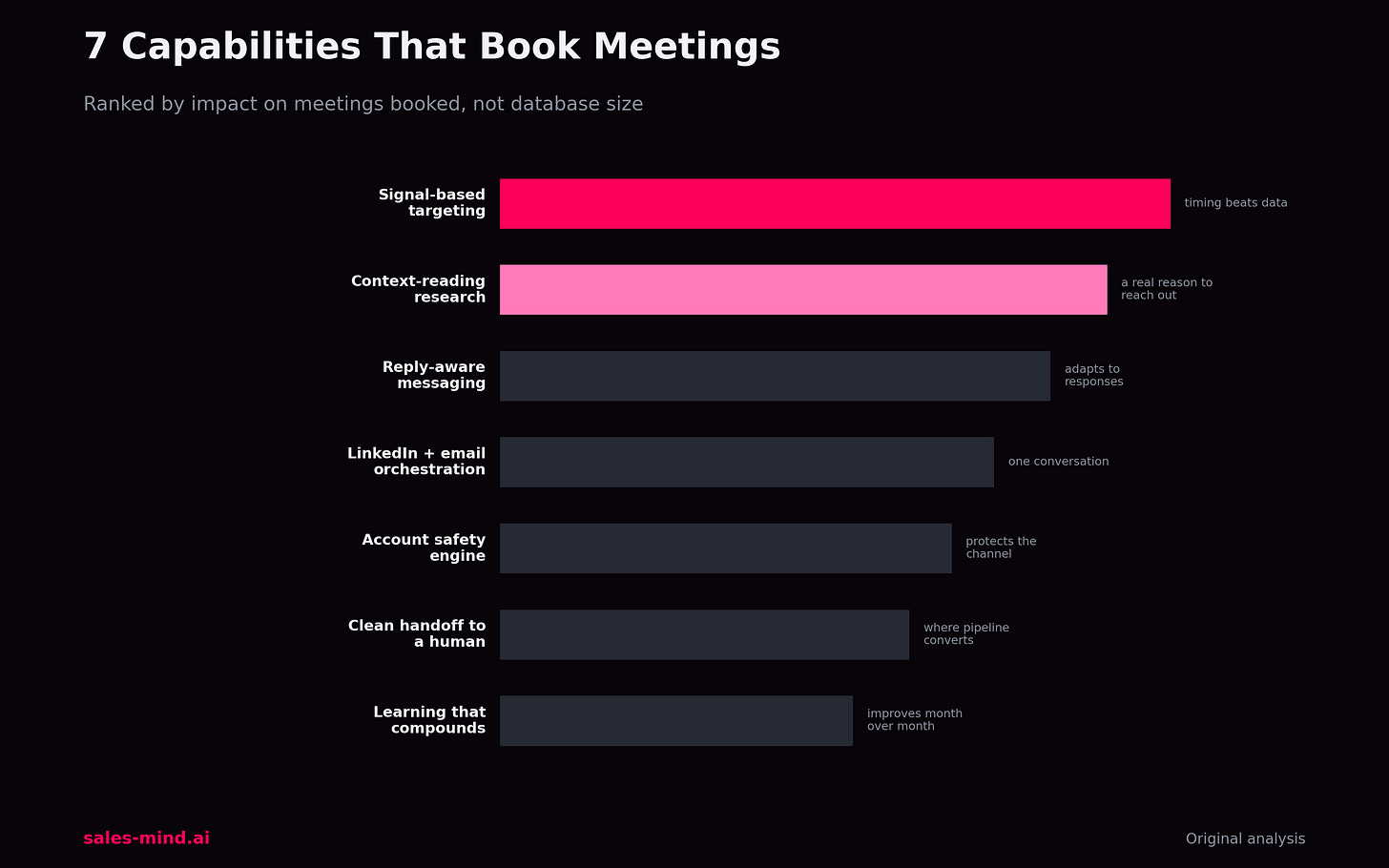
The 7 capabilities that separate the tools
1. Signal-based targeting, not just filters
A static filter finds companies that match a profile. Signal-based targeting finds the ones showing intent right now — a new hire in the buying role, a funding round, a technology change, a competitor mention. This is the single biggest lever, because timing beats personalization. A good-enough message at the right moment outperforms a perfect message sent cold. When you demo a tool, ask what triggers it can watch and how quickly it acts on them.
2. Research that reads context, not tokens
Plenty of tools drop a first name into a template and call it personalization. Real research reads a prospect's recent posts, role, and company situation and forms a reason to reach out that a human would recognize as relevant. The test is simple: could a smart SDR defend why this account got this message today? If the tool cannot answer that, it is guessing at scale.
3. Messaging that adapts to the reply
Booking a meeting rarely happens on the first touch. It happens across a conversation. Strong tools adjust the next message based on what the prospect did — opened but silent, replied with a question, or went quiet. Weak tools run the same fixed sequence no matter what. Look for branching logic tied to real responses, not just a timer between steps.
4. Channel orchestration across LinkedIn and email
Buyers do not live in one inbox. A tool that can move a conversation from LinkedIn to email to a well-timed follow-up — without you rebuilding the sequence by hand — keeps momentum that single-channel tools lose. The capability to watch is coordination: does the tool treat LinkedIn and email as one conversation, or two disconnected campaigns?
5. Account safety built into the engine
Aggressive automation gets accounts restricted, and a restricted account books zero meetings. The best tools model human behavior — sensible daily limits, warm-up ramps, natural timing — so growth never costs you the channel. Ask directly how a platform protects a sending account, and be wary of any tool that treats volume as the headline metric.
6. A clean handoff to a human
AI prospecting should end where a human conversation begins. The moment a prospect shows real interest, the tool should surface that context to a rep with everything they need to continue — not bury it in a dashboard. A missed handoff is where automated pipeline quietly dies. Judge the tool on how obvious and fast that transition is.
7. Learning that compounds over time
A tool that performs the same in month six as it did in week one is not really using AI. The capability that separates leaders is feedback: the system watches which angles, segments, and sequences produce meetings, and shifts effort toward what works. This is what turns prospecting from a fixed cost into a compounding asset.
How to score a tool on your next demo
Turn the seven capabilities into a scorecard. Rate each one from 0 to 3 during the demo — 0 if the tool cannot do it, 3 if it does it convincingly — and total the score. A tool that scores high on signals, research, and safety will out-book a tool that only scores high on database size, every time.
- 18-21: a genuine meeting-booker. Prioritize the pilot.
- 11-17: capable, but you will fill gaps with process or people.
- 0-10: a data tool wearing an AI label. Fine for enrichment, not for pipeline.
The point of the scorecard is to stop comparing tools on the axis vendors want you to use — record counts — and start comparing them on the axis your pipeline cares about. If you want a second opinion on your shortlist and how it maps to your motion, book a strategy call and we will walk through it with you.
Where SalesMind fits
SalesMind was built around this framework rather than around a bigger contact database. It reads buying signals, researches each account for a real reason to reach out, orchestrates LinkedIn and email as one conversation, and hands warm prospects to your team with context attached. See how the approach works on the AI sales agent and prospect intelligence pages, or explore the wider AI lead generation approach.
FAQ
What are AI prospecting tools?
They are platforms that use AI to find the right prospects, research them, and reach out in a way that earns replies. The strongest ones focus on booking meetings, not just building a list of contacts.
What should I look for in an AI prospecting tool?
Prioritize signal-based targeting, genuine research, reply-aware messaging, channel orchestration, account safety, a clean handoff to a human, and a system that learns over time. Database size matters far less than these seven capabilities.
Do AI prospecting tools replace SDRs?
No. They remove the repetitive work — finding, researching, and first-touch outreach — so your team spends its time on the conversations that actually close. The best results come from AI and people working the same pipeline.
How do I know a tool is actually using AI, not just automation?
Look for adaptation. Automation repeats a fixed sequence; AI changes what it does based on signals and replies, and improves as it learns which approaches book meetings.
The bottom line
The best AI prospecting tools are not the ones with the most data — they are the ones that turn data into booked conversations. Score your shortlist on the seven capabilities, weight signals and safety heavily, and you will pick the tool that grows pipeline instead of just growing your database. When you are ready to pressure-test the shortlist against your motion, book a strategy call.
This article was written with AI assistance and edited by the SalesMind team.
Get AI Sales Insights Weekly
