AI in CRM: How Sales Teams Use It in 2026
AI in CRM now writes emails, scores deals, forecasts the quarter, and enriches records. Here is what actually works in 2026 and a 30-day plan to start.
Share this article
- Bad data in, bad AI out. If half your records are stale, the model learns from noise. Clean the base first.
- It invents when unsure. An AI draft can state a fact that was never true. Always check numbers and names before they reach a customer.
- It cannot read the room. Tone, timing, and a prospect's mood still need a human. The AI hands you a draft; you decide if today is the day to send it.
- Privacy rules apply. Feeding customer data into a model means checking where that data goes and who can see it.
AI in CRM used to mean a chatbot bolted onto a contact list. In 2026 it means something different. Your CRM can now read a deal, spot the risk, draft the next email, and tell a rep where to spend the next hour. This guide explains what AI in CRM really does today, where it helps, where it still falls short, and how a small sales team can start without a giant rebuild.
We will keep the language plain. No hype, no buzzwords. Just the parts that change how a rep or a founder works each day.
What "AI in CRM" means now
A customer relationship management tool stores who you talk to and what happened. AI in CRM adds a layer on top that reads all that history and acts on it. Think of it as a junior teammate who never sleeps and has read every note in the system.
Three shifts made this practical. First, language models can now summarize a messy email thread in one line. Second, CRMs finally hold enough clean data to be worth analyzing. Third, the cost of running these models dropped enough to put them inside everyday tools instead of a lab.
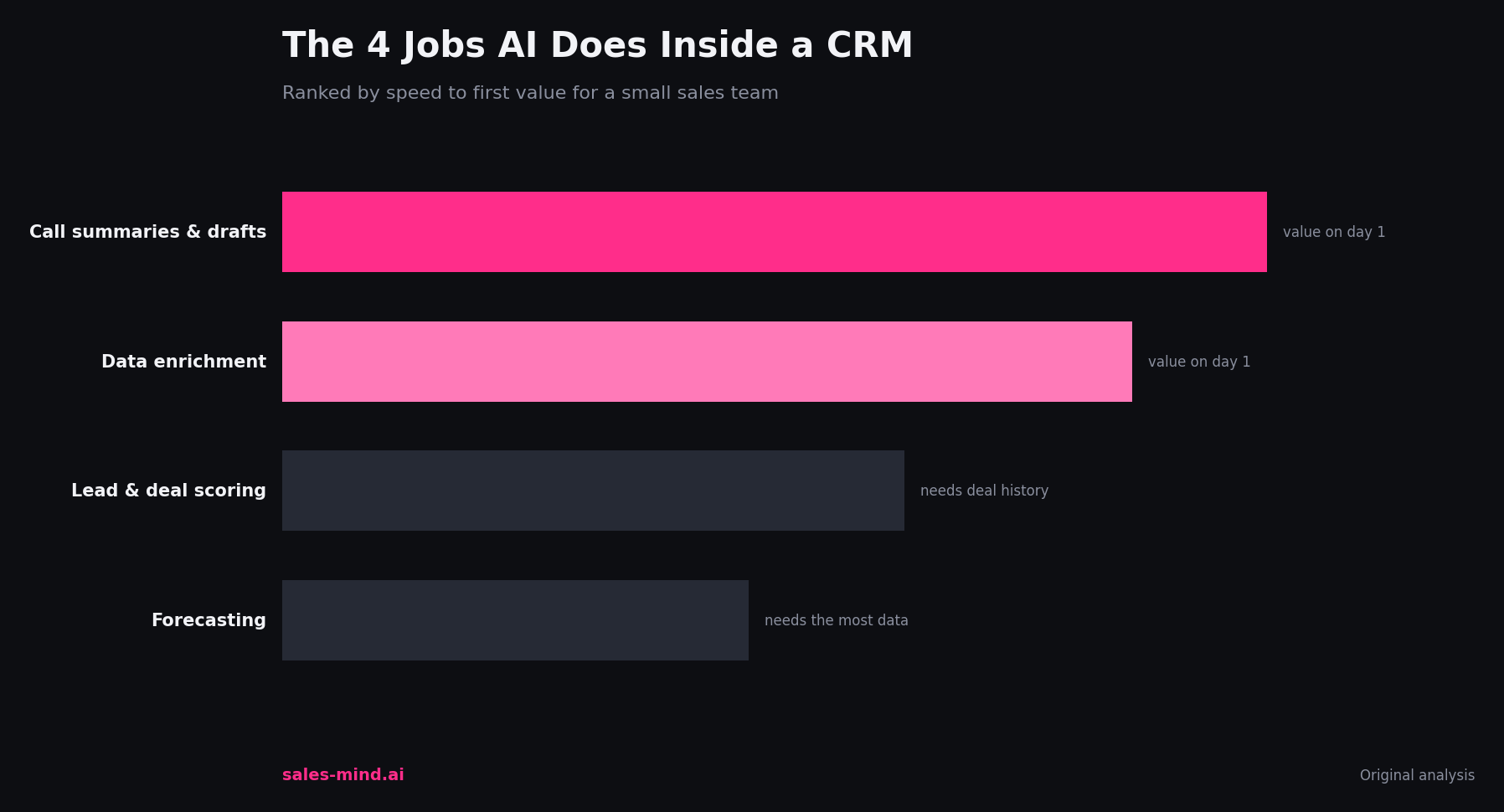
So when people say AI and CRM together, they usually mean one of four jobs: writing, scoring, forecasting, and enrichment. We will walk through each.
The four jobs AI does inside a CRM
1. Writing and summarizing
This is the job most reps feel first. The AI reads a long thread and gives you a two-sentence recap. It drafts a follow-up email in your voice. It turns a call recording into notes and next steps. A rep who used to spend an hour a day on admin can get most of that time back.
The catch: you still edit. AI CRM software writes a solid first draft, but it does not know the side comment your prospect made on the call last week unless it was logged. Treat the draft as a start, not a send.
2. Lead and deal scoring
An AI powered CRM looks at past won and lost deals and learns the pattern. Then it ranks your open pipeline by how likely each deal is to close. Reps stop guessing which of forty leads to call first. The model points at the ten that look most like past wins.
Scoring is only as good as your history. A team with fifty closed deals gets rough guesses. A team with two thousand gets sharp ones. Start using it early anyway, because the model improves as your data grows.
3. Forecasting
Ask most sales managers how the quarter will land and you get a gut number. AI in CRM replaces the gut with math. It watches deal age, email replies, meeting counts, and stage changes, then predicts the close date and the odds. When a deal goes quiet, it flags the slip before the rep notices.
4. Enrichment and research
Cold records are useless. AI fills the gaps: job title, company size, recent funding, tech stack. It reads public signals and attaches them to the contact so the rep opens a record that is already briefed. This is where AI in CRM meets prospecting, and it is one of the biggest time savers for outbound teams.
Where AI in CRM still falls short
Honesty matters here. A few limits are worth knowing before you trust the output.
- Bad data in, bad AI out. If half your records are stale, the model learns from noise. Clean the base first.
- It invents when unsure. An AI draft can state a fact that was never true. Always check numbers and names before they reach a customer.
- It cannot read the room. Tone, timing, and a prospect's mood still need a human. The AI hands you a draft; you decide if today is the day to send it.
- Privacy rules apply. Feeding customer data into a model means checking where that data goes and who can see it.
How a small team starts without a rebuild
You do not need to rip out your CRM. Start with one job and prove value, then add the next.
- Pick the loudest pain. If reps drown in admin, start with writing and summaries. If pipeline is a guessing game, start with scoring.
- Clean one segment of data. Fix the fields for your active accounts, not the whole database. The AI needs a clean sample, not perfection.
- Run it beside a human for two weeks. Let the AI score deals while your best rep also ranks them. Compare. Trust grows when the model agrees with your gut and explains the times it does not.
- Measure one number. Time saved per rep, reply rate, or forecast accuracy. Pick one and track it before and after.
AI in CRM vs a standalone AI sales tool
Some teams add AI inside the CRM. Others run a separate sales intelligence layer that plugs into the CRM. Both work. The CRM route keeps everything in one screen. The layered route often brings sharper research and outreach, then writes the result back to your records. Many teams end up with both: the CRM holds the truth, and a focused tool does the heavy prospecting.
If your bottleneck is finding and reaching the right people, a dedicated AI lead generation layer usually beats a general CRM add-on. If the bottleneck is keeping deals moving, an AI sales agent that lives next to your pipeline earns its keep faster.
A simple 30-day plan
Week one: clean your active accounts and connect one AI feature. Week two: run summaries and drafts on real threads, edit every one. Week three: turn on scoring and compare it to a rep's ranking. Week four: pick the metric that moved and decide what to add next. Small steps beat a big launch that stalls.
Frequently asked questions
Does AI in CRM replace sales reps?
No. It removes admin and points reps at the right work. The human still runs the call, reads the room, and closes. AI handles the parts a rep never enjoyed anyway.
How much data do I need before AI CRM software is useful?
Writing and enrichment help on day one. Scoring and forecasting need history; a few hundred closed deals give useful signal, and accuracy climbs from there.
Is an AI powered CRM safe with customer data?
It can be, if you check where data is processed and who can access it. Ask your vendor where the model runs and whether your data trains it. Keep sensitive fields out of any tool you cannot verify.
What is the fastest win?
Call summaries and email drafts. They save time in week one and need no model training, which makes them the easiest way to build trust in the rest.
The bottom line
AI in CRM is no longer a demo feature. It writes, scores, forecasts, and enriches, and it does each well enough to change a rep's day. It is not magic, and it needs clean data and a human check. Start with one job, measure one number, and grow from there.
Want a second opinion on where AI fits your pipeline? Book a strategy call and we will map the highest-leverage step for your team. You can also see how the pieces fit on our prospect intelligence overview.
Get AI Sales Insights Weekly
