AI Timing for LinkedIn Campaigns
Use AI to schedule LinkedIn outreach at optimal windows (Tue–Thu mornings) to boost opens, replies, and conversions.

Use AI to schedule LinkedIn outreach at optimal windows (Tue–Thu mornings) to boost opens, replies, and conversions.
Use AI to schedule LinkedIn outreach at optimal windows (Tue–Thu mornings) to boost opens, replies, and conversions.
Table of Contents
AI Timing for LinkedIn Campaigns
Timing is everything for LinkedIn campaigns. Messages sent at the right moment can boost response rates from 12% to 32%. The best times? Tuesdays to Thursdays, 9:00 AM–12:00 PM ET. But manual scheduling often misses key engagement windows, especially across time zones.
AI solves this by analyzing historical data and user activity to pinpoint the perfect time for outreach. Tools like SalesMind AI take it further, adjusting schedules dynamically and optimizing for individual habits. The result? Up to 35% higher open rates and 28% more responses.
Key takeaways:
- Best days/times: Weekdays (Tues–Thurs), 8:00 AM–12:00 PM.
- Worst times: Mondays (inbox overload) and weekends (low activity).
- AI tools use data to target specific engagement windows by industry, role, and location.
- Example: A SaaS company improved response rates by 20% with AI-optimized timing.
AI-driven platforms streamline scheduling, track engagement, and adapt in real-time, making LinkedIn outreach more effective and less time-consuming.
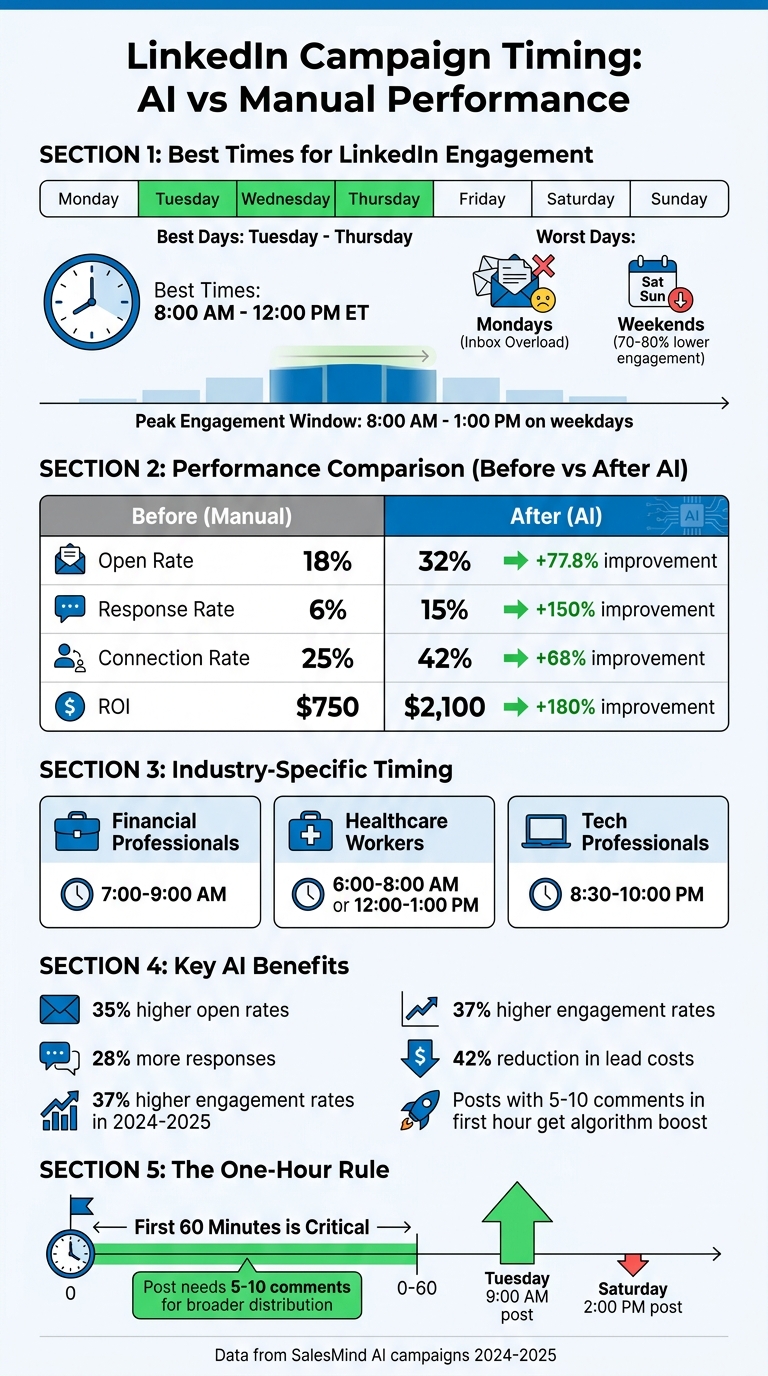
LinkedIn Campaign Timing Statistics: Best Days, Times, and AI Performance Metrics
Why Timing Matters in LinkedIn Campaigns
LinkedIn User Activity Patterns
LinkedIn operates differently from consumer platforms, aligning more with professional work routines. Engagement typically peaks between 8:00 AM and 1:00 PM on weekdays when users are in "work mode." During this time, decision-makers are actively scrolling through feeds, replying to messages, and interacting with posts.
Timing plays a huge role in performance. Posts published between Tuesday and Thursday, from 8:00 AM to 12:00 PM, tend to outperform others, generating 60% more clicks and 80% more comments compared to identical posts shared on weekends. In contrast, weekend activity drops significantly, with engagement levels 70–80% lower than on weekdays [6].
Different industries also follow unique patterns. For example:
- Financial professionals are most active early in the morning, between 7:00–9:00 AM.
- Healthcare workers engage during shift breaks, typically 6:00–8:00 AM or 12:00–1:00 PM.
- Tech professionals often scroll LinkedIn at night, between 8:30–10:00 PM [5][6].
Skipping these specific engagement windows could mean your message lands when your audience isn’t paying attention.
"A mediocre post on Tuesday at 9:00 AM outperforms your best post on Saturday at 2:00 PM." - Jamie Partridge, Founder, PostEverywhere.ai [6]
LinkedIn’s algorithm further amplifies the importance of timing through the "One-Hour Rule." Essentially, your post has about one hour to show it’s worthy of broader distribution. Posts that gather 5–10 comments in the first hour are pushed to more feeds, while even highly engaging posts that take longer to gain traction often miss this amplification window [5][6]. This makes early engagement critical - and it all hinges on getting your timing right.
Problems with Manual Timing
With such specific patterns, relying on manual scheduling is risky. Manual methods often fail to align with the precise timing windows your audience follows. Time zone differences and varying industry schedules make it tough to hit the mark consistently.
One major issue is the "9:00 AM rush." When everyone posts at the same time, your content faces stiff competition. Interestingly, slightly off-peak times like 8:15 AM or 10:30 AM can yield better results simply because there’s less noise [6].
Another challenge is LinkedIn’s preference for recent activity. The platform prioritizes posts with immediate engagement, meaning your content is far more likely to succeed if posted during peak hours. Missing that window - even by an hour - can drastically reduce visibility. Managing these nuances manually across multiple industries, time zones, and roles is overwhelming, which is why tools like SalesMind AI have become essential for optimizing LinkedIn strategies.
sbb-itb-817c6a5
How SalesMind AI Optimizes LinkedIn Outreach Timing
AI-Powered Timing Analysis
SalesMind AI leverages advanced machine learning models - like time-series forecasting and clustering algorithms - to determine the best times to engage with prospects. By analyzing LinkedIn activity patterns, such as login habits, post interactions, and response behaviors, alongside historical campaign data, the platform pinpoints ideal outreach windows for maximum engagement [1].
It further refines these insights by segmenting prospects based on factors like industry, job role, and location. For instance, finance professionals are more likely to respond around 8:00 AM on Mondays, while tech leads tend to show a 25% higher reply rate on Thursday afternoons. In one case study, targeting U.S. marketers at AI-recommended times boosted response rates from 12% to 28% after assessing over 5,000 interactions [1].
"From the very first week, SalesMind AI boosted my productivity in lead prospecting by 10×." – Alex Lossing, CTO – Software Services, Slash [7]
The platform also enhances open rates - up to 30% - by suggesting precise send times. For example, it might recommend reaching out to B2B decision-makers on Tuesdays at 10:00 AM, aligning with a typical 9:00 AM–5:00 PM workday. It even accounts for U.S. federal holidays and time zone differences, automatically adjusting schedules to ensure messages hit the mark [1].
By identifying these engagement windows, SalesMind AI streamlines the scheduling process, allowing users to focus on building relationships rather than timing logistics.
Automatic Scheduling Based on Data
Once the platform identifies optimal timing patterns, it takes over scheduling. SalesMind AI continuously tracks engagement metrics like open and reply rates. If an initial outreach underperforms - say, a message sent at 7:00 PM only achieves a 20% open rate - it adjusts follow-up timings. For example, it might reschedule a follow-up for 10:00 AM or wait 48 hours, leading to a reported 35% lift in conversions [2].
"The results were sometimes almost too good - connection rates and responses were way above what I expected." – Nick Heijman, Chief Executive Officer, HypotheekXperts [7]
Users can also tailor scheduling preferences, such as targeting specific U.S. time zones, avoiding weekends, or focusing on "golden hours" like 8:00–10:00 AM EST. This adaptability ensures campaigns are fine-tuned to both broader industry trends and the unique habits of individual prospects [1].
Beyond scheduling, the platform integrates communication and lead insights to further enhance outreach efforts.
Unified Inbox and Lead Scoring Integration
SalesMind AI’s unified inbox consolidates LinkedIn messages, emails, and follow-ups into one dashboard. Using natural language processing, it identifies response patterns, such as a two-day average reply time for sales directors, and incorporates these insights into its timing recommendations.
The platform also features integrated lead scoring on a 0–100 scale, factoring in profile relevance, engagement history, and intent signals. Leads scoring 80 or higher prompt immediate follow-up suggestions. For example, if a lead scoring 92 responds at 3:00 PM, the system might recommend a follow-up at 4:00 PM, a strategy that has increased close rates by 22%. Additionally, users have reported faster response times, with averages dropping from 72 hours to 36 hours after optimization [3].
"SalesMind AI has proven very useful to our sales team in reducing the massive pain points of manually tracking each and every lead interaction." – Rahul Pushkarna, Senior Advisor – Marketing Services, Bounty Media [7]
The unified inbox also provides timely reminders and AI-generated responses, ensuring consistent engagement and helping users stay on top of high-priority leads during peak activity times.
Step-by-Step Guide to Implementing AI Timing Optimization
Step 1: Connect Your LinkedIn Accounts
Start by logging into your SalesMind AI dashboard. Head over to Settings > Integrations, then click Connect LinkedIn. Follow LinkedIn's OAuth flow to authorize access. You'll need to grant permissions for messaging, profile access, and connection management. If you're connecting a company page, ensure your LinkedIn account is verified and you have admin access.
"Easy Frontend, an easy setup." – Nicholas Rosen, CEO, Exaris Solutions [7]
If you encounter issues like "invalid scope" during authorization, try clearing your browser cache or switching to incognito mode. Once connected, the unified inbox feature allows you to manage multiple LinkedIn accounts in one place.
Step 2: Set Campaign Goals and Target Audience
Navigate to the Campaign Builder and set specific goals, such as "Increase response rates by 30% in 30 days." Use SalesMind AI's segmentation tools to filter your audience by role (e.g., CEO, VP Sales), industry (e.g., SaaS, Healthcare), and location. This data is crucial for the AI timing engine, which identifies peak engagement times for your selected audience. For instance, tech executives often engage most actively on Tuesdays between 9:00–11:00 AM ET.
Step 3: Turn On AI Scheduling Features
Go to Campaign Settings and enable AI Optimization. Toggle on Auto-Schedule and configure parameters like time zones (use ET for U.S. audiences), daily message limits to comply with LinkedIn's restrictions, and A/B testing options to experiment with different send times. The AI-Powered Timing Analysis feature will recommend the best times to send messages and dynamically adjust schedules for optimal performance.
"Very easy to implement and received wonderful support from the SalesMind team." – Philippe WEIL, Partner and Sales Director, Zeebra Agile Change Platform [7]
Once you've set up AI scheduling, you're ready to move forward with your campaign.
Step 4: Launch and Track Campaigns
Upload your leads, customize your messages, and hit Launch. Use the unified inbox to monitor key metrics like open and response rates. You can filter results by the time messages were sent to pinpoint the most effective engagement windows. The platform also sends notifications for replies and provides the option to export CSV reports for a more detailed analysis.
Step 5: Improve Strategy Using AI Data
After your campaign is live, tap into AI-driven insights to fine-tune your strategy. Check the Insights tab for engagement heatmaps that highlight peak response times for different audience segments. Review A/B test results to see how various send times perform. For example, if data shows a 35% higher response rate from U.S. sales managers on Wednesdays, adjust your schedule to prioritize those windows.
SalesMind AI's lead scoring system (on a scale of 0–100) helps you identify high-value prospects. Filter your inbox to focus on leads with scores above 70 and use AI suggestions for immediate follow-ups. Make it a habit to refine your audience segments weekly and retrain the AI with new data to keep improving your results. Use these insights to enhance future campaigns and maximize the platform's potential.
Measuring and Improving AI-Optimized Campaigns
Comparing Before and After AI Campaign Performance
To truly understand the value of AI-optimized scheduling, you need to measure its impact on your campaigns. Start by setting up a baseline period of 2–4 weeks using your current manual scheduling methods. During this time, track key metrics like open rates, response rates, click-through rates, and ROI[1]. Once you've gathered this data, switch to AI-optimized campaigns for 30–60 days and compare the results.
A comparison table can make it easier to see the changes. Here's an example of what those results might look like:
| Metric | Baseline (Pre-AI) | AI-Optimized | Improvement % |
|---|---|---|---|
| Open Rate | 18% | 32% | 77.8% |
| Response Rate | 6% | 15% | 150% |
| Connection Rate | 25% | 42% | 68% |
| ROI | $750 | $2,100 | 180% |
The formula for calculating improvement is straightforward: ((AI-Optimized - Baseline) / Baseline) × 100. During the first 60–90 days of using AI, review your metrics weekly to spot any issues early on and make adjustments as needed[1][4].
To streamline performance tracking, centralized response monitoring is invaluable. It simplifies analysis and ensures you're capturing all relevant data. Additionally, advanced lead scoring can help you assess the quality of responses, showing that better timing doesn’t just increase volume but also attracts more qualified prospects[1][2].
Once you've confirmed the performance boost, it's time to take these strategies to the next level.
Expanding Successful Campaigns
When you've identified the timing patterns that deliver the best results through A/B testing, the logical next step is to scale those campaigns. Start by running parallel campaigns on similar audience segments for 2–4 weeks. This helps you pinpoint peak engagement times. For instance, if you find that messages sent between 9:00 and 11:00 AM from Tuesday to Thursday consistently outperform, you can apply that timing to similar profiles.
SalesMind AI simplifies this process with automation tools that let you replicate successful campaigns with just one click. It even adjusts send times automatically based on historical data. To minimize risk, test these strategies on 20–30% of your audience first. If the results hold up, expand to the full audience[2].
Schedule quarterly reviews of your strategy to ensure it stays effective. During the initial rollout, monitor metrics bi-weekly so you can quickly address any performance dips. Export your data to CSV files for deeper analysis in spreadsheet tools, and use those insights to further refine your AI-driven approach. This continuous feedback loop ensures your campaigns stay sharp and effective.
Conclusion: The Future of AI-Driven LinkedIn Outreach
AI-powered timing is reshaping B2B lead generation. Recent data reveals that LinkedIn campaigns using AI achieved 37% higher engagement rates compared to traditional methods during 2024-2025, while also cutting lead costs by 42%[9]. These aren't just small gains - they mark a major transformation in outreach strategies.
Unlike manual approaches that rely on generalized best practices, AI adapts with pinpoint accuracy. It analyzes individual behaviors, past engagement, and real-time activity to determine the perfect moment to initiate contact. As Single Grain explains:
"The most successful AI-driven LinkedIn ABM campaigns don't just replace human decision-making. They amplify human strategic thinking by handling the data-intensive optimization work that would otherwise consume entire marketing teams"[9].
Tools like SalesMind AI take these insights further by automating outreach timing and refining strategies. With features like timing analysis, automated scheduling, and continuous optimization, your sales team can focus on what they excel at: building relationships and closing deals. The platform’s unified inbox and advanced lead scoring ensure that every outreach is not only well-timed but also directed at the right prospects, enhancing results through ongoing data-driven adjustments.
The rise of AI-driven discovery is also impossible to ignore. With 60% of searches in the US and EU now being "zero-click" searches[8], visibility in AI-driven environments is critical. Perfect timing ensures your messages land when prospects are most engaged, giving you a competitive edge.
Getting started is simple: connect your LinkedIn accounts, set campaign goals, and activate AI scheduling. Track performance and watch as engagement and ROI improve. By seamlessly integrating AI-driven timing, your team can focus on creating meaningful connections while making the most of every interaction.
FAQs
How does AI pick the best send time for each lead?
AI uses data to pinpoint the ideal time to reach out to each lead. By analyzing factors like behavior, activity patterns, time zones, and engagement signals - such as profile views, post interactions, and message replies - it predicts when a lead is most likely to respond or engage.
How do I handle time zones and holidays in scheduling?
AI tools such as SalesMind AI take the guesswork out of LinkedIn outreach by analyzing prospect activity and identifying the best times to send messages. For example, they can automatically schedule messages during active hours - typically weekdays between 10:00 AM and 4:00 PM in the recipient's local time zone. Additionally, these tools recognize regional or industry-specific holidays, pausing or rescheduling campaigns to avoid reaching out on non-working days. This approach not only ensures timely communication but also respects local norms, leading to better engagement rates.
What metrics prove AI timing is actually working?
Metrics showcasing how effective AI timing can be include a jump in response rates - from 8% to 27% in certain scenarios - and increased engagement, such as improved reply rates and lead conversions. These numbers emphasize how AI fine-tunes outreach timing to enhance campaign results.