AI for LinkedIn Profile Photos: What Works
AI headshot tools can produce a professional LinkedIn photo without a photographer, but results vary significantly by tool. This comparison covers the main options for editing, background removal, lighting correction, and full AI generation. It includes pricing, quality benchmarks, and honest pros and cons so you pick the right tool for your situation.
 JG
JGShare this article

- AI Editing Tools (e.g., Canva): Offers features like wardrobe changes, background removal, and lighting adjustments. Costs range from free to $120/year for premium access.
- Photo Analysis Platforms: Tools like Snappr and Photofeeler analyze how your photo is perceived and suggest improvements. Many are free or cost under $30.
- Technical Optimization Tools: Services like HeadshotPro and BetterPic ensure your photo meets LinkedIn’s resolution and framing standards. Prices range from $4.47 to $79.
Your LinkedIn profile picture is more than just an image - it’s a key factor in making a strong first impression. Research shows that professional headshots can boost profile views by 21x, connection requests by 9x, and messages by 36x. With AI tools, you can now create polished, professional-quality photos for LinkedIn in minutes, often at a fraction of the cost of traditional photoshoots.
Here’s a quick overview of three AI-driven solutions to improve your LinkedIn photo:
- AI Editing Tools (e.g., Canva): Offers features like wardrobe changes, background removal, and lighting adjustments. Costs range from free to $120/year for premium access.
- Photo Analysis Platforms: Tools like Snappr and Photofeeler analyze how your photo is perceived and suggest improvements. Many are free or cost under $30.
- Technical Optimization Tools: Services like HeadshotPro and BetterPic ensure your photo meets LinkedIn’s resolution and framing standards. Prices range from $4.47 to $79.
Key takeaway: AI tools provide fast, budget-friendly ways to create professional LinkedIn headshots, helping you stand out in today’s digital-first job market. This is the first step in scaling your LinkedIn prospecting efforts.
How to Create a Professional LinkedIn Profile Picture with AI (FREE in 3 Mins)
1. Canva AI Headshot Generator
Canva has become a go-to platform for professionals looking to upgrade their LinkedIn photos quickly and effectively. With over 220 million monthly active users worldwide as of 2025 and adoption by nearly 95% of Fortune 500 companies, Canva's AI-driven tools are reshaping how people enhance their images[9].
What It Can Do
The Magic Edit tool is Canva's standout feature for LinkedIn photo transformations. It allows users to highlight specific areas of their image and make changes using simple text prompts. For example, you can replace a casual t-shirt with a "professional blouse" or "navy blazer" just by typing it in. The tool generates four variations per prompt, and if none work, you can keep generating new options until you're satisfied[7][1].
"Canva's Magic Edit tool helps circumvent both issues by creating a perfect headshot from an image you already have and like." - Sabrina Ortiz, Senior Editor, ZDNET[7]
In addition to wardrobe changes, Canva offers the ProfilePhoto app for fine-tuning lighting and adjusting backgrounds to create a polished look, which is a key part of AI-powered LinkedIn profile analysis[6]. Other helpful tools include Magic Eraser, which removes distracting elements, and Background Remover, which replaces cluttered settings with clean, professional backdrops[7]. You can also manually tweak lighting, warmth, and saturation for a studio-quality finish[7][8].
Costs and Availability
Canva provides two pricing options for its AI headshot tools. The free version includes one AI-generated headshot credit per day through select tools , making it one of many free AI sales tools available to professionals.[8]. For unlimited access to features like Magic Edit, Magic Eraser, and premium stock media, you can upgrade to Canva Pro for $120 annually, which comes with a 30-day free trial[7].
User-Friendly Design and Workflow
Canva makes the editing process straightforward. To start, you can use an "Instagram Post" template to create a square PNG that fits LinkedIn's circular crop perfectly[7]. From uploading your image to downloading the final version, the entire process takes less than five minutes[7].
AI Headshot Reviews gave Canva's generator a 7/10 for quality and a perfect 10/10 for ease of use. Reviewers highlighted its beginner-friendly interface and realistic results, noting it avoids the "weird AI glitches" seen in some other tools[8]. Plus, since LinkedIn profile photos are displayed at a smaller size, minor flaws that might be noticeable in high-resolution images are unlikely to catch a recruiter's eye[7].
2. Dedicated LinkedIn Photo Analysis Tools
When it comes to presenting a professional image on LinkedIn, dedicated photo analysis tools use machine learning to evaluate how others might perceive your profile picture. These tools not only provide a score but also suggest ways to improve your photo for maximum impact. Let’s take a closer look at how these tools work and what they offer.
Photo Evaluation Features
Photo analysis tools assess your images across several dimensions. For example, Snappr Photo Analyzer relies on data from 60,000 ratings of 800 profile photos to evaluate traits like competence, likability, and influence[11]. Similarly, ProfilePicReview, which boasts a 4.9 out of 5 rating from over 3,200 users[10], focuses on technical aspects such as resolution, lighting, and composition. These tools also ensure your face occupies the ideal portion of the frame while meeting quality standards for resolution and lighting.
Some tools dive deeper into psychological perceptions. Photofeeler, for instance, evaluates how your facial expressions and smile influence others’ impressions of you. Their research highlights:
"a huge, laughing smile can reduce perceived competence and influence, and make viewers think you're younger and less experienced than you actually are"[4].
They also explore subtle cues like "squinching" (a slight squint that conveys confidence) versus wide-open eyes, which may come across as nervous or uncomfortable[4].
Enhancement Capabilities
Beyond analysis, several tools offer enhancement features. PFPMaker and BetterPic can remove distracting backgrounds and apply subtle refinements to your photo. Their AI-powered adjustments address common LinkedIn profile mistakes like harsh shadows or poor lighting, making your profile picture look polished and professional with minimal effort.
Pricing and Accessibility
Many of these tools are either free or come with affordable pricing plans. For example, Snappr Photo Analyzer and ProfilePicReview are free to use, while enhancement-focused tools like BetterPic and AI SuitUp range from $27 to $79[11][13]. ProfileMagic offers premium styling and high-resolution downloads for a one-time fee of $29.99[5], which can be a cost-effective alternative to professional photoshoots, saving up to 90%[14].
| Tool | Primary Function | Pricing | Key Feature |
|---|---|---|---|
| Snappr Photo Analyzer | Evaluation | Free | Uses 60,000 ratings to assess competence and likability[11] |
| ProfilePicReview | Analysis | Free | Technical quality checks; 4.9/5 user rating[10] |
| PFPMaker | Enhancement | Free | Instant background removal and replacement[12] |
| BetterPic | Enhancement | $35–$79 | AI enhancement with human retouching options[13] |
These tools provide a budget-friendly way to elevate your LinkedIn profile without the need for expensive photoshoots.
Integration and User Experience
User-friendly and fast, these tools are designed to fit seamlessly into your workflow. PFPMaker, for instance, allows you to swap backgrounds instantly without requiring a signup[13]. BetterPic, on the other hand, completes AI-powered photo enhancements in just 25 minutes, with optional human editing for added polish[13]. Privacy is also a priority - ProfilePicReview processes your photos without storing them[10], offering real-time feedback while eliminating the need to rely on subjective opinions from friends or family.
These tools make it easy to refine your LinkedIn photo, ensuring you leave a strong and professional first impression.
3. AI Photo Resizing and Technical Optimization Tools
While some tools focus on enhancing the artistic aspects of your photo, technical optimization tools tackle a different challenge: making sure your photo meets LinkedIn's specific requirements. These AI-driven platforms handle resolution, framing, and other technical details to ensure your image looks sharp and professional.
Enhancement Capabilities
These tools go beyond aesthetics, focusing on meeting LinkedIn's precise technical standards. For example, many of these platforms apply the "60% rule", which centers your head and shoulders in the frame. They can also upscale images to high-definition or even 4K resolution, ensuring a minimum of 400×400 pixels for a polished appearance [2] [16]. AI lighting features simulate natural highlights and reduce harsh shadows [5]. Additionally, advanced face mapping technology identifies key facial features - like your jawline and cheekbones - to improve symmetry and clarity [5]. These technical tweaks work alongside aesthetic enhancements, helping you create a professional profile photo that stands out as you explore AI tools for LinkedIn prospecting.
Pricing and Accessibility
Most of these tools are budget-friendly and operate on a one-time payment basis. Here are some examples:
- HeadshotPro: Costs range from $29 to $59 per session, generating over 120 upscaled images [3].
- BetterPic: Offers 20–60 headshots for $35 to $39, with an option for human editing [3].
- AI SuitUp: Provides 50–150 headshots priced between $27 and $57 [3].
- Fotor: A wallet-friendly choice, charging $4.47 to $6.43 for 20–80 images with over 35 style combinations [3].
- Headshot.kiwi: Designed for high-volume needs, offering 40–250 headshots for $29 to $59 [3].
Integration and User Experience
These tools are designed to be simple and efficient. Typically, you upload a few varied photos, and the AI processes them to deliver optimized images in just a few minutes [15]. Many platforms also provide presets tailored to specific industries, such as "Executive", "Creative", or "Tech", to match the aesthetic expectations of your field [12]. Privacy is a priority - most reputable services delete your photos after processing [3]. Since LinkedIn accepts files up to 8 MB, it's a good idea to download the highest resolution version to ensure your photo looks great on any device [2].
Pros and Cons
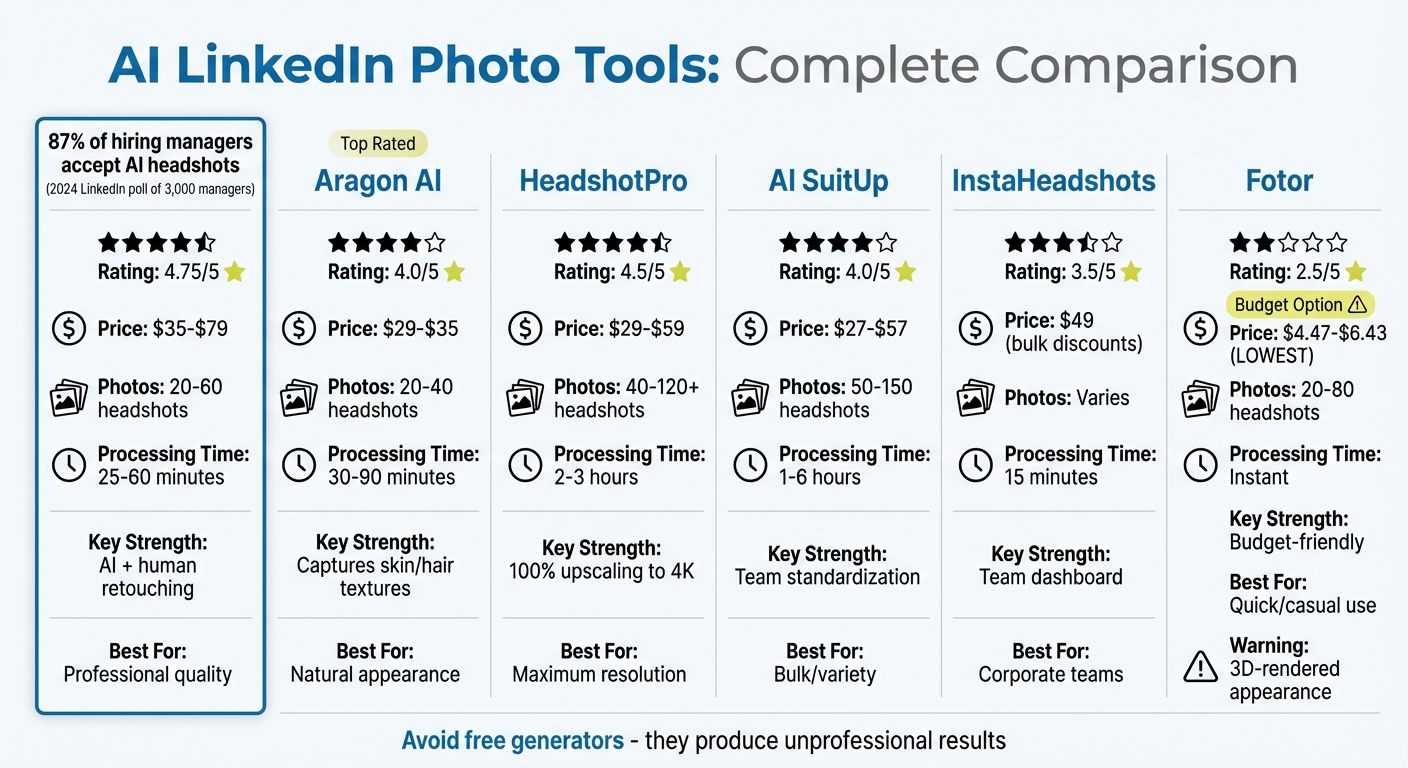
AI LinkedIn Photo Tools Comparison: Features, Pricing & Performance
Here’s a quick look at the strengths and weaknesses of the tools mentioned earlier. The table below highlights their photo evaluation accuracy, editing features, pricing, and overall user experience.
| Tool | Photo Evaluation & Accuracy | Editing Features | Pricing & Accessibility | User Experience |
|---|---|---|---|---|
| BetterPic | Blends AI speed with human precision | AI edits for attire, eyes, and background, plus human retouching [3] | $35–$79 | 25–60 minutes; delivers realistic results [13][17] |
| Aragon AI | Captures skin and hair textures effectively [3] | AI tweaks for backgrounds and object removal [13] | $29–$35; handles 20–40 photos | 30–90 minutes; occasional distorted poses [13] |
| HeadshotPro | Delivers professional quality with 100% upscaling [3] | Includes background swaps and professional lighting [13] | $29–$59; processes 40–120 photos | Takes 2–3 hours for upscaling; ensures sharp clarity [17][3] |
| AI SuitUp | Produces solid results without over-airbrushing [3] | Offers standardized lighting and backgrounds for team photos [17] | $27–$57; supports 50–150 photos | 1–6 hours; provides good variety [13][3] |
| InstaHeadshots | Maintains natural skin and hair textures but with occasional inconsistencies [19] | Focuses on uniform head-and-shoulder framing [18] | $49; offers bulk discounts for teams [18] | 15-minute turnaround; features a team dashboard [18] |
| Fotor | Basic evaluation but often creates "3D-rendered" appearances [17][3] | Simple background changes and basic enhancements [13] | $4.47–$6.43; processes 20–80 images | Instant results; lacks professional realism [13][17] |
BetterPic is a standout choice for its blend of AI efficiency and human quality control. As Artturi Jalli, an AI expert, puts it: "BetterPic combines the speed of AI with human precision, so if the first result isn't quite right, BetterPic makes sure the final photo is spot on" [13]. This attention to detail gives it a 4.75/5 rating, but its pricing starts at $35, making it a pricier option [13].
If you’re looking for a budget-friendly tool, Fotor has the lowest starting price at $4.47. However, users often report that the results resemble "3D-rendered" images, which may not be ideal for professional platforms like LinkedIn [17][3].
For teams, InstaHeadshots offers useful features like centralized dashboards and bulk pricing to create consistent profiles across employees [18][20]. However, individual users might compare LinkedIn automation tools or lean toward those with human editing, even if it means waiting longer for the final results.
Conclusion
In this analysis, we explored various AI tools designed to enhance LinkedIn headshots by focusing on style, technical quality, and overall presentation.
BetterPic stands out as the top-rated option for LinkedIn profiles, earning a 4.8/5 rating for its lifelike results and the added benefit of precise human editing [21]. Artturi Jalli, an AI headshot specialist, shares:
"BetterPic is hands down my favorite AI headshot generator for LinkedIn... The real game-changer is the human editing option" [13].
For those prioritizing speed, team-wide consistency, or budget-friendly solutions, there are tools that deliver results in minutes, offer centralized dashboards for uniform branding, or provide affordable pricing in the $25–$50 range.
The importance of a high-quality headshot cannot be overstated. Research shows that strong headshots can improve perceptions of likeability, competence, and influence [3]. A 2024 LinkedIn poll of 3,000 hiring managers revealed that 87% are open to AI-generated headshots, provided they accurately reflect the individual’s real-life appearance [22].
However, one golden rule applies: steer clear of free generators for professional purposes. Tools like AIEase and Supawork often produce results that fall into the "uncanny valley", with distorted features or overly artificial textures that could harm your credibility [3]. Opting for paid tools in the $25–$50 range ensures polished, LinkedIn-ready results that maintain your professional image.
With the right source photos and a well-chosen tool, you can achieve results comparable to traditional studio photography - at a fraction of the cost. Whether your priority is speed, consistency, or affordability, selecting the right AI tool can help your LinkedIn profile exude professionalism and enhance your LinkedIn outreach best practices.
FAQs
How can AI tools enhance LinkedIn profile photos compared to traditional methods?
AI tools offer a quicker and more budget-friendly way to create professional LinkedIn profile photos compared to hiring a photographer. Instead of booking studio sessions or investing in pricey equipment, these tools can take a casual selfie or an existing photo and transform it into a polished, high-quality image. Using advanced algorithms, they fine-tune lighting, enhance facial features, and refine backgrounds, producing results that look professional while still feeling natural.
What’s more, these tools make customization simple. You can easily swap backgrounds or adjust outfits to better match your personal brand or fit the expectations of your industry. And the best part? They deliver these results in just minutes - far faster than the hours or even days traditional methods might require. By making it so easy to create a professional and credible online presence, AI tools help you stand out on LinkedIn with minimal effort.
What should I look for in an AI tool to create professional LinkedIn headshots?
When selecting an AI tool for your LinkedIn headshot, prioritize features that deliver realistic, professional, and high-quality images. The tool should create a headshot that accurately represents your appearance while complementing your personal or professional brand. Options to adjust backgrounds, lighting, and outfits can help craft a polished and trustworthy image.
User-friendly tools with fast processing times and consistent results are key. Advanced capabilities like facial retouching, background removal, and style customization can take your headshot to the next level. For an extra layer of precision, consider tools that include manual editing or human review, ensuring the final result aligns perfectly with your expectations. These features can help you create a standout profile photo for LinkedIn and other professional platforms.
Are AI-generated LinkedIn profile photos accepted by hiring managers?
AI-generated LinkedIn profile photos are gaining traction and can help your profile catch attention with a polished, professional appearance. But not everyone views them the same way. While a sharp, well-crafted image can leave a great first impression, some hiring managers might question its genuineness, especially as awareness of AI-generated visuals grows.
To make your profile photo work for you, aim for a natural and professional look that feels authentic. Small, subtle tweaks are usually more acceptable than overly edited or artificial-looking images. After all, trust and sincerity are essential when building meaningful professional connections on LinkedIn.
JGGet AI Sales Insights Weekly