Unified Inbox for Real-Time LinkedIn Responses
Consolidate LinkedIn messages into one dashboard with AI replies, lead scoring, real-time updates and automated follow-ups to speed responses and close deals.
 Julien Gadea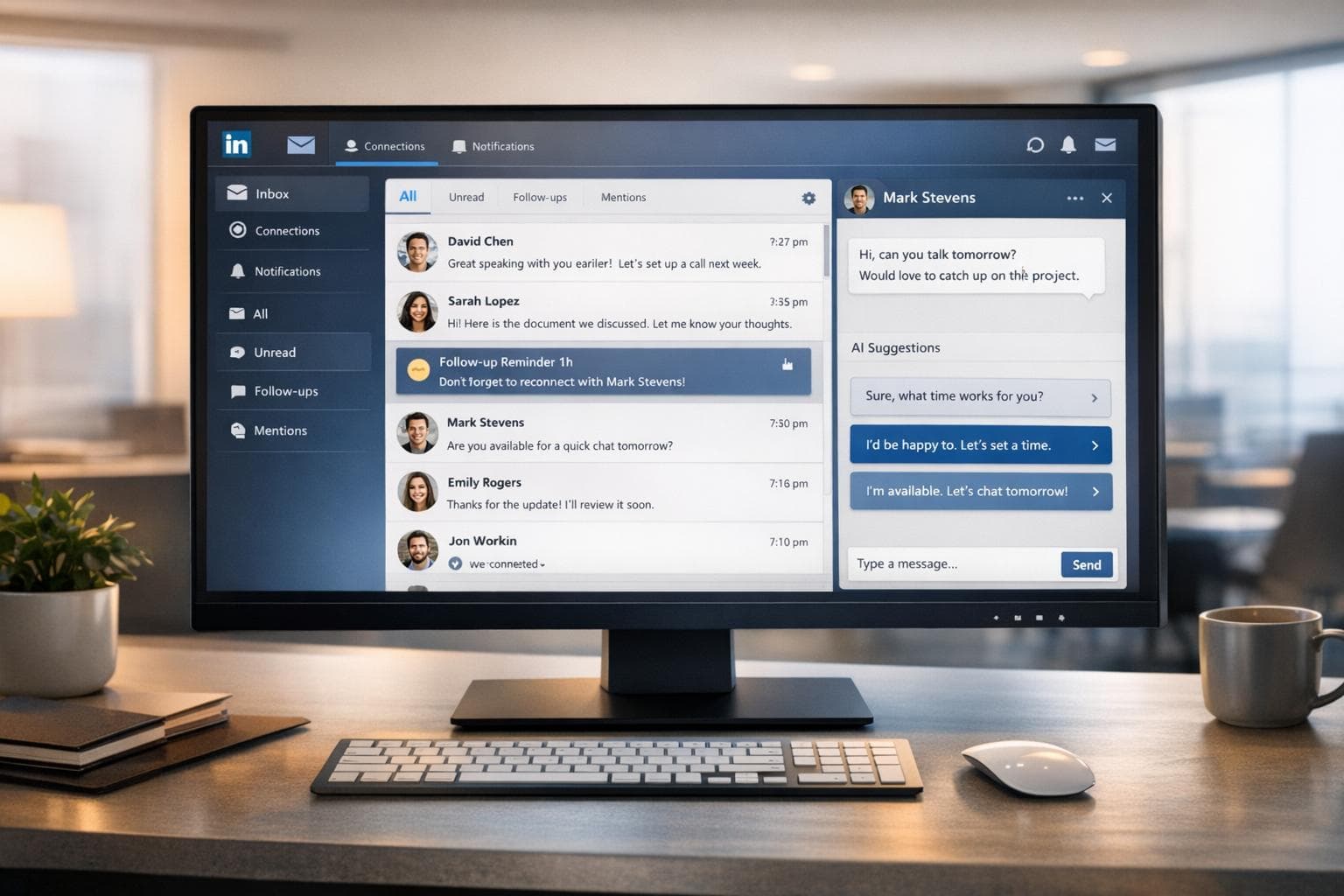
Consolidate LinkedIn messages into one dashboard with AI replies, lead scoring, real-time updates and automated follow-ups to speed responses and close deals.
Centralizes communication: View all conversations in one place.
Speeds up responses: AI tools suggest replies and automate follow-ups.
Organizes leads: Use tags, filters, and reminders to prioritize prospects.
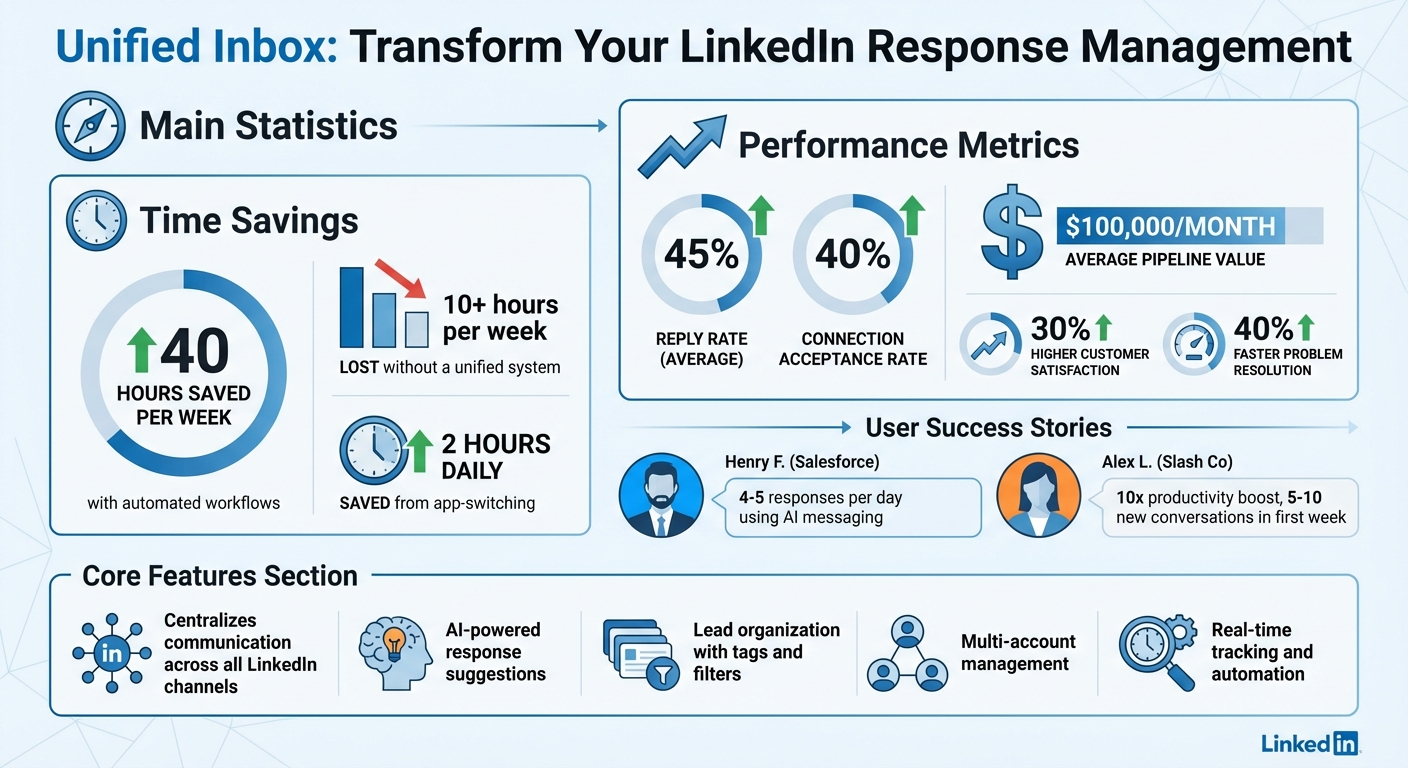
Boosts efficiency: Save up to 40 hours per week with automated workflows.
Table of Contents
Slow LinkedIn responses lose deals. A message left unanswered for days risks missed opportunities and wasted effort. Managing multiple accounts without a system? That’s 10+ hours a week lost to chaos.
The solution? A unified inbox. It consolidates all LinkedIn messages - InMails, Sales Navigator chats, and more - into one dashboard. Here’s what it does:
- Centralizes communication: View all conversations in one place.
- Speeds up responses: AI tools suggest replies and automate follow-ups.
- Organizes leads: Use tags, filters, and reminders to prioritize prospects.
- Boosts efficiency: Save up to 40 hours per week with automated workflows.
Companies using tools like SalesMind AI report 30% higher customer satisfaction, a 45% reply rate, and pipeline values averaging $100,000/month.
Unified inboxes don’t just simplify LinkedIn management - they help you close deals faster and stay ahead of competitors.
Unified Inbox ROI: Key Performance Metrics and Time Savings
CRM Unified LinkedIn Inbox - Manage your LinkedIn Messages
What is a Unified Inbox for LinkedIn?
A unified inbox is like a one-stop shop for all your LinkedIn conversations. Instead of bouncing between different tabs or tools, you get a single dashboard where every message - whether it’s a LinkedIn message, InMail, or Sales Navigator conversation - lives. Think of it as your messaging command center, where everything is neatly organized and easy to access.
This setup doesn’t just group your messages; it organizes them in a way that makes sense. For example, it doesn’t just show you the latest message - it displays a full interaction history with each prospect, complete with details like their job title, location, shared connections, and even personality insights. This way, you’re never left scrambling to remember past conversations or asking someone to repeat themselves.
How a Unified Inbox Works
The unified inbox pulls messages from multiple sources and keeps track of every response in real time. Let’s say a prospect replies to your outreach - the system updates their status automatically and logs the interaction. You can also set reminders, apply tags to organize leads (like “Interested” or “Follow-up”), and use filters to quickly find what you need, whether it’s unread messages or archived conversations.
Here’s where it gets even better: many unified inboxes come with built-in AI tools. These AI assistants can suggest pre-written responses tailored to your prospect and their company. For instance, during an 8-day trial in December 2024, Henry F., an Enterprise Account Executive at Salesforce, used AI-recommended messaging and managed to get 4–5 responses per day by leveraging these curated replies [2].
The system also syncs with your CRM, so managing leads becomes seamless. Plus, if you’re using Sales Navigator, you can keep an eye on your remaining InMail credits directly within the inbox, ensuring you’re always prepared mid-campaign.
| Feature | What It Does |
|---|---|
| Multi-Account Support | Manage multiple LinkedIn profiles from one login |
| Message Consolidation | Combine LinkedIn, InMail, and Sales Navigator messages into one stream |
| Lead Organization | Use tags, reminders, and filters to manage conversations efficiently |
| AI Assistance | Craft personalized pitches and responses based on prospect data |
| Team Collaboration | Share lead lists and interaction histories with your team |
These tools ensure that every interaction is handled efficiently, paving the way for faster responses and better engagement.
Why Real-Time Responses Matter
By centralizing your communications, a unified inbox helps you respond faster and stay organized - two things that are crucial for keeping prospects engaged. Quick replies not only boost response rates but also ensure conversations don’t fizzle out.
Here’s the proof: users of AI-powered unified inboxes report an average reply rate of 45% [4], with connection acceptance rates hovering around 40% [3]. Some businesses even see pipeline values of up to $100,000 per month using these systems [3].
Real-time tracking also eliminates the headache of juggling conversations manually. In June 2025, Alex L., CTO of Slash Co, shared how adopting a unified inbox boosted his lead prospecting productivity tenfold. Within the first week, the system helped him initiate 5 to 10 new conversations, opening doors to connections he couldn’t previously reach [2]. Rahul P., Senior Advisor at Bounty Media, highlighted the impact:
"SalesMind AI has proven very useful to our sales team in reducing the massive pain points of manually tracking each and every lead interaction. To have one master dashboard not just for yourself but for our entire team and try different lead lists, sequences, and track them all in real time is fantastic." [2]
Fast responses aren’t just about speed - they show prospects that you’re attentive and professional. When you’re quick and organized, they’re more likely to trust you and move forward. On the flip side, delays can make you seem disinterested or unprepared, which can stall progress or even lose the deal.
Benefits of Using SalesMind AI Unified Inbox
SalesMind AI’s unified inbox isn’t just a tool - it’s a game-changer for managing LinkedIn engagement. By centralizing communication, it offers features that streamline workflows and improve results.
Multi-Account Management
Juggling multiple LinkedIn profiles? SalesMind AI simplifies this by bringing all your accounts into one master dashboard. This setup makes it easy to track conversations, campaigns, and lead interactions without the hassle of switching between profiles. For teams managing outreach across various accounts or regions, having real-time access to the same data enhances coordination and efficiency.
What’s more, the platform ensures your accounts stay secure while scaling. It uses local IP addresses for each profile, mimics human behavior with office-hour detection, and incorporates advanced scheduling features [3]. On average, users save 40 hours per week by consolidating their workflows through this system [4].
Real-Time Response and Campaign Automation
SalesMind AI doesn’t just collect messages - it actively manages them. For instance, when a prospect replies, the system automatically pauses their outreach sequence to prevent redundant follow-ups. Plus, the AI co-pilot crafts personalized responses using key prospect data, ensuring every message feels tailored and human.
Henry F., an Enterprise Account Executive at Salesforce, shared his success with SalesMind AI during a free trial in December 2024. By leveraging the platform’s AI-generated messaging, he consistently received 4 to 5 daily responses, eliminating the need to write messages manually [2]. Repetitive tasks like scheduling follow-ups and tagging leads are also handled automatically, allowing you to focus on high-value interactions.
AI-Powered Lead Scoring and Prioritization
Not all leads are created equal, and SalesMind AI helps you focus on the best ones. Its lead scoring system evaluates behavior and profile data to rank leads, making it easier to spot those most likely to convert. By tracking intent signals and categorizing conversations based on interest, the platform ensures warm leads take priority.
Svit Babarovic from MountainDrop praised this feature, saying:
"The lead scoring system is particularly impressive, providing clear insights into lead quality." [2]
With an average reply rate of 45%, an acceptance rate of 40%, and a pipeline value averaging $100,000 per month, SalesMind AI takes the guesswork out of prospecting [8]. This means you can spend your time where it matters most - on leads ready to move forward.
sbb-itb-817c6a5
How to Set Up SalesMind AI Unified Inbox
Get your unified inbox up and running in just a few steps to take advantage of real-time LinkedIn engagement and improve team collaboration.
Connecting Your LinkedIn Accounts
Start by installing the official SalesMind AI Chrome extension. This allows you to securely sync your LinkedIn li_at cookie using the "Session Sync" feature - no password needed. Once synced, the system stays active in the cloud, even if you close your browser [5].
SalesMind AI supports multiple LinkedIn accounts, each with its own security settings [6]. Nick Heijman, CEO of ExtractTech, shared his experience:
"I initially missed a few handy features, like the reminder function and the option to connect multiple accounts - both of which, as I later learned, are actually available." [2]
Once your accounts are connected, the next step is integrating your CRM to streamline your workflows.
Enabling CRM and Team Collaboration Features
With your LinkedIn accounts linked, you can integrate your CRM to export lead data and campaign interactions directly into platforms like Salesforce or HubSpot [3]. This integration ensures that your team has access to up-to-date information without manual data entry.
SalesMind AI’s master dashboard provides real-time visibility into lead interactions, sequences, and lead lists for the entire team. Rahul P., Senior Advisor at Bounty Media, highlighted its impact:
"To have one master dashboard not just for yourself but for our entire team and try different lead lists, sequences, and track them all in real time is fantastic." [2]
You can also share lead lists imported from tools like Sales Navigator with team members, making it easier to scale your outreach efforts [4].
Customizing Filters, Tags, and Notifications
The inbox automatically tags responses, accepted connections, and conversions [3][6]. You can also create custom tags to organize prospects by stage or priority.
The AI lead scoring system identifies high-potential leads, while reminders ensure no conversation slips through the cracks [2]. These tools are a big reason why users report saving an average of 40 hours per week [4][5] and generating an average pipeline value of $100,000 per month [4][5].
Best Practices for Optimizing LinkedIn Responses
Optimizing LinkedIn responses goes beyond just using powerful tools - it’s about applying smart strategies to make every interaction count. By leveraging a centralized dashboard and refining your messaging, you can significantly boost engagement.
Creating Personalized Message Templates
SalesMind AI’s co-pilot generates message templates by analyzing data from your website and LinkedIn profiles, ensuring each message feels relevant without requiring extensive manual research. Keep your templates short and polite, using bullet points or brief paragraphs to make them easy to read [9].
Incorporate specific details like shared connections, recent posts, or mutual interests to make your messages stand out [9]. The AI can adapt your tone to suit different audiences - for instance, a message to a CFO will have a different tone than one intended for a marketing director [1]. You can also create standardized templates for common inquiries, such as pricing or service details, to save time while maintaining consistency [10].
Using Data Insights to Improve Engagement
A unified inbox allows you to monitor performance across all your LinkedIn accounts in one place. You can access real-time metrics, including reply rates, accepted connection requests, and conversions [2][3].
With an automatic tagging system, you can organize leads based on their responses, such as "Interested" or "Follow-up needed" [3]. This segmentation helps you pinpoint which outreach strategies are most effective and where prospects tend to drop off. Svit Babarovic from MountainDrop shared:
"The lead scoring system is particularly impressive, providing clear insights into lead quality" [2].
By focusing on prospects with the highest AI-generated scores, you can allocate your time more effectively and improve conversion efficiency [2]. These insights also pave the way for automating follow-up processes, making conversions smoother and more efficient.
Automating Follow-Ups for Better Conversions
Set up automated follow-ups based on lead scores to prioritize your most promising prospects [2]. The system automatically halts sequences when a prospect replies, ensuring that interactions feel natural and not overly mechanical [6].
In follow-ups, reference recent activity or shared interests to show genuine engagement [11]. Roberto K., Chief Product Officer at aCommerce, highlighted the system’s ease of use:
"Ready integrated with LinkedIn, it was easy to set up in terms of selecting the audience and setting up the sequence of follow-up messages until the LinkedIn member reacts. It means we can reach out to hundreds or thousands of prospects without losing control" [2].
Conclusion
Juggling LinkedIn responses across multiple accounts doesn't have to be a time-draining ordeal. A unified inbox streamlines the process by consolidating all your messages into one central dashboard. This simple shift can save professionals up to 10 hours a week and cut down daily app-switching by 2 hours [7].
What really takes this to the next level is AI-powered prioritization and automation. Tools like SalesMind AI’s unified inbox go beyond just organizing messages - they enable quick, AI-driven responses, lead scoring, and automated reminders to ensure no high-priority prospect slips through the cracks [2]. Teams using these systems report solving problems 40% faster and achieving a 30% boost in customer satisfaction [7].
For growth-focused businesses, the results speak volumes. Users have reported a reply rate of 45%, connection acceptance rates of 40%, and pipeline values averaging an impressive $100,000 per month [12]. Mark’s success story highlights how a unified inbox transforms chaotic messaging into a well-organized, actionable system [7]. These metrics underscore the value of shifting from scattered responses to a streamlined, AI-driven approach.
FAQs
How can a unified inbox help me respond faster on LinkedIn?
A unified inbox simplifies your LinkedIn communication by consolidating all your messages and responses into a single, user-friendly view. Features like automatic tagging and suggested replies make it easier to manage conversations efficiently, eliminating the hassle of switching between accounts or platforms.
This streamlined approach not only cuts down response times but also ensures you never overlook critical messages. It helps you stay connected with prospects in real time, ultimately enhancing your productivity.
What AI-powered tools are included in the SalesMind AI unified inbox?
The SalesMind AI unified inbox comes with an AI co-pilot that makes managing LinkedIn engagement a breeze. It offers pre-written responses, tags conversations automatically, and even sets reminders - so you never miss a beat in your interactions.
Thanks to AI-powered tagging and response analysis, the inbox keeps your LinkedIn conversations neat and structured. This allows you to manage replies effortlessly and concentrate on fostering meaningful connections in real time.
How does a unified inbox improve LinkedIn lead management?
A unified inbox makes managing LinkedIn conversations a breeze by pulling messages from all your profiles into one easy-to-navigate view. This way, you’ll never miss a response and can jump on new leads right away. Handy features like automatic tagging, follow-up reminders, and real-time updates keep you organized and on top of your game, minimizing the chances of losing valuable opportunities.
With AI-powered tools, the inbox gets even smarter. It can suggest tailored replies, highlight the most engaged leads, and sync every interaction directly to your CRM. This gives you a complete history for each contact, saving you time and letting you focus on building relationships with high-potential prospects. The result? Shorter sales cycles and better conversion rates.
What’s more, a unified inbox doesn’t stop at LinkedIn. It can bring in messages from other channels like email and web chat, giving you a full picture of every prospect. This not only streamlines your workflow but also boosts collaboration and ensures consistent communication across all platforms.
 JG
JG