Predictive Timing For LinkedIn Outreach
The best time to send LinkedIn outreach is Tuesday through Thursday, between 9 and 11am in your prospect's local time. Predictive AI goes further by analyzing individual activity patterns to find the exact window when each person is most likely to respond. This article explains how to implement timing intelligence in your outreach.
 Julien Gadea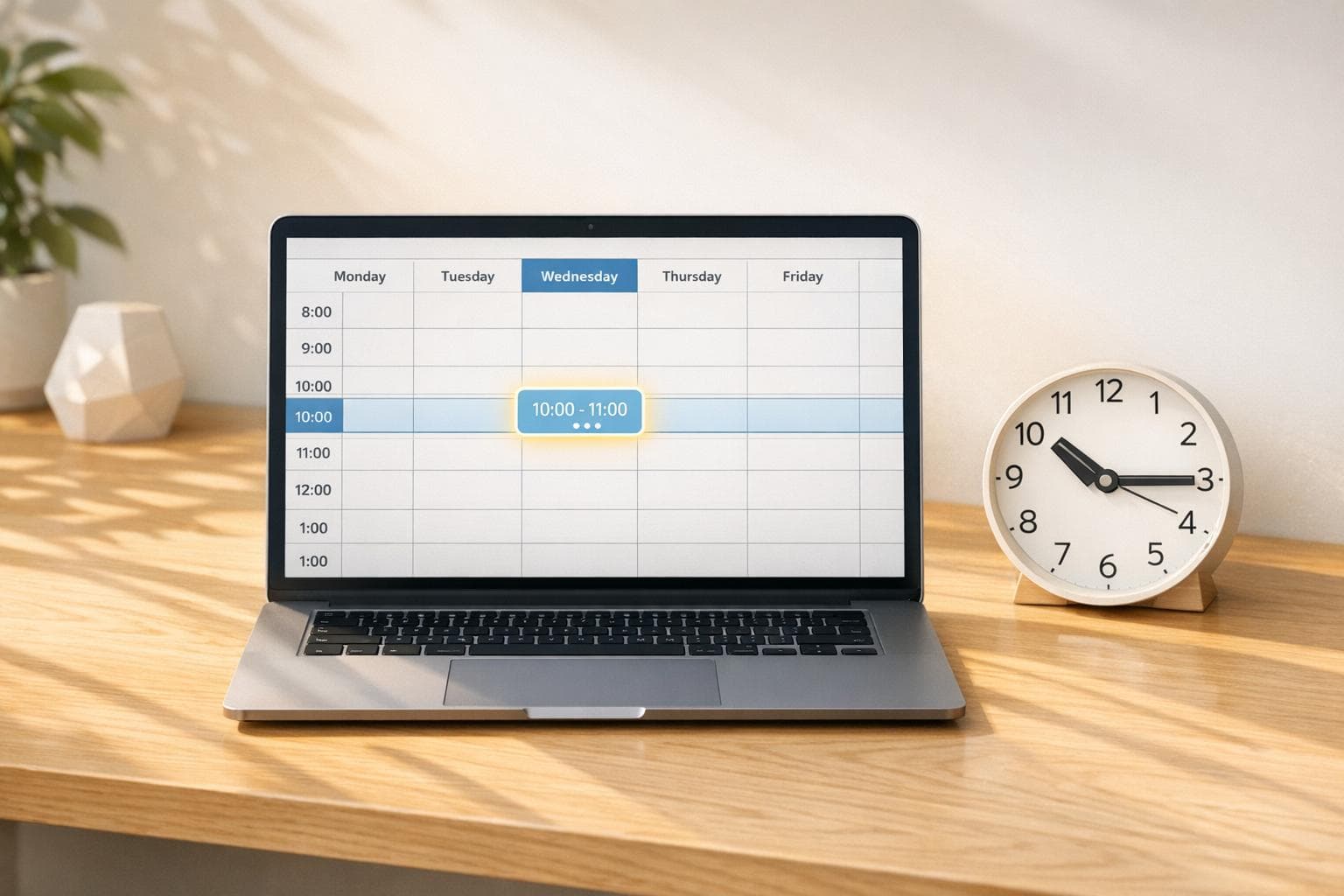
The best time to send LinkedIn outreach is Tuesday through Thursday, between 9 and 11am in your prospect's local time. Predictive AI goes further by analyzing individual activity patterns to find the exact window when each person is most likely to respond. This article explains how to implement timing intelligence in your outreach.
The best time to send LinkedIn outreach is Tuesday through Thursday, between 9 and 11am in your prospect's local time.
Predictive AI goes further by analyzing individual activity patterns to find the exact window when each person is most likely to respond.
This article explains how to implement timing intelligence in your outreach.
Table of Contents
Timing is everything in LinkedIn outreach. Research shows that sending messages on Tuesdays or Wednesdays between 9:00 AM and 4:00 PM can boost response rates by 50% and engagement by 10%. Yet, 76% of sales reps still rely on guesswork to determine the best time to contact prospects. Predictive AI tools solve this by analyzing LinkedIn activity, professional schedules, and engagement patterns to pinpoint the perfect outreach moments.
Key findings:
- Best days for outreach: Tuesday–Thursday.
- Best times (local): 8:00–10:00 AM for LinkedIn messages.
- Behavioral triggers: Responding within 90 minutes of prospect activity greatly increases response rates.
- Engagement trends: Professionals are most active during mid-morning breaks, lunch hours, and midweek.
AI-driven tools like SalesMind AI automate this process, helping sales teams focus on conversations rather than timing. For example, users report 40% connection acceptance rates and 45% reply rates, with some achieving a 10× boost in productivity. By aligning outreach with professional schedules and engagement signals, these tools make LinkedIn outreach more effective and efficient.
Takeaway: To maximize LinkedIn outreach, focus on midweek mornings, track prospect activity, and leverage AI tools for precise timing.
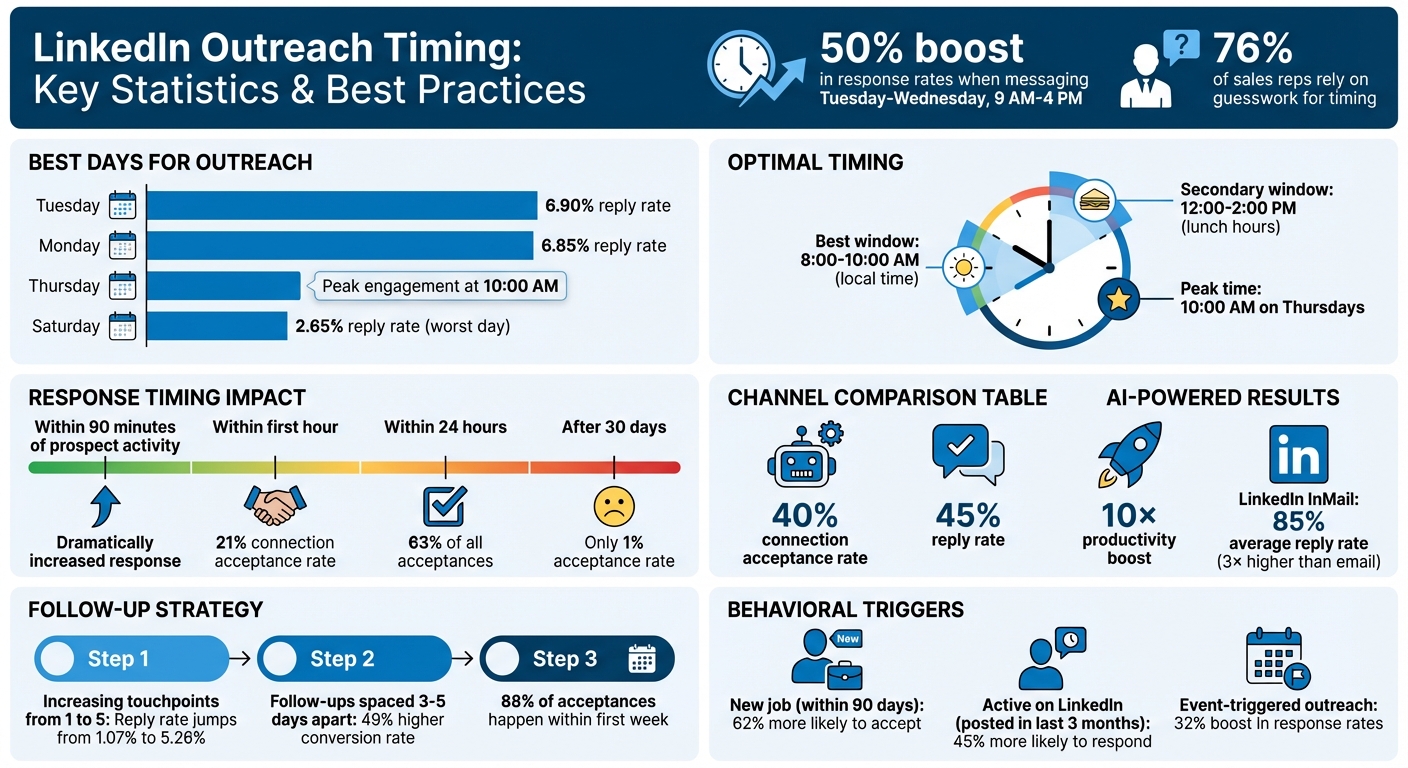
LinkedIn Outreach Timing Statistics: Best Days, Times, and Response Rates
LinkedIn Outreach 2025: The Perfect AI Stack for Qualified B2B Leads
Why Timing Matters in LinkedIn Engagement
Timing is everything when it comes to LinkedIn outreach. A poorly timed message can mean even the most promising prospect ignores or forgets about it. Here's why this matters: LinkedIn InMails are three times more likely to be accepted than a cold call and six times more likely than a standard email, but only if they align with when professionals are actively using the platform [6].
For example, Tuesday sees a 6.90% reply rate, closely followed by Monday at 6.85%, while January boasts the highest response rate at 7.51%, compared to October's lower 6.36% [5]. Timing isn't just about the day or month, though. Prospects who recently started a new position - within the past 90 days - are 62% more likely to accept an InMail than others [6].
Yuriy Boyko, Head of Account Management at Belkins, puts it best:
"Professionals are most likely to review and respond to messages early in the workweek, when their schedules are more structured and motivation is higher" [5].
Tying your outreach to events like job changes or company news shows you're paying attention. Messages linked to such activity see a 32% boost in response rates [11]. It's not just about catching someone online - it's about reaching out when they're most open to engaging.
LinkedIn Activity Patterns
To time your outreach effectively, it's crucial to understand how professionals use LinkedIn throughout the day. People don’t scroll LinkedIn aimlessly - they follow patterns that align with their work routines. Engagement spikes during "in-between" moments, like mid-morning coffee breaks, lunch hours, or time between meetings. The peak? 10:00 AM on Thursdays [4][8][9].
The workweek also influences activity. Early in the week, professionals focus on setting goals and tackling tasks, while mid-to-late week (Wednesday and Thursday) shifts toward networking and external collaboration [5][7]. On the flip side, Saturday is the least effective day for outreach, with reply rates plummeting to 2.65% [8].
Gen Z professionals are shaking things up. This group, LinkedIn's fastest-growing demographic, interacts with the platform in short bursts throughout the day and often outside the typical 9-to-5 schedule [4]. With remote work becoming the norm, the best outreach times increasingly depend on the recipient's local time zone, not the sender's [4][9].
These insights highlight the importance of syncing your outreach with professionals' daily habits.
Aligning Timing with Professional Schedules
To get the most out of LinkedIn outreach, focus on aligning your efforts with your prospect's workday. Messages sent during business hours see significantly higher response rates. LinkedIn messages boast an average reply rate of 85% - three times higher than traditional email - but this advantage disappears if you send messages after hours [8]. A cold message during dinner or on a weekend? Likely to be ignored or, worse, flagged [3].
The data is clear: Tuesday through Thursday between 8:00 AM and 10:00 AM (local time) is the sweet spot for LinkedIn messaging [3]. This is when professionals are reviewing their inboxes and planning their day. Plus, prospects who have posted on LinkedIn at least once in the past three months are 45% more likely to respond, as they're already active on the platform [6].
| Channel | Best Days | Best Times (Local) |
|---|---|---|
| LinkedIn Messaging | Tuesday–Thursday | 8:00 AM–10:00 AM |
| Cold Calls | Tuesday–Thursday | 10:00 AM–11:30 AM |
| Tuesday or Thursday | 9:00 AM or 1:00 PM |
Behavioral triggers can be even more powerful than timing. For example, responding within 90 minutes of a prospect's activity, like a profile visit or content interaction, can dramatically increase response rates [10]. Combining outreach methods - like following up on an InMail with a comment on a recent post - further improves results [5].
Consistency and follow-up matter just as much as timing. Increasing the number of touchpoints from one to five can raise reply rates from 1.07% to 5.26% [5]. Additionally, follow-up messages spaced three to five business days apart lead to a 49% higher conversion rate than one-off attempts [11].
How Predictive AI Determines the Best Outreach Times
Predictive AI takes the guesswork out of outreach by analyzing data to identify the best times to connect with each prospect. Instead of relying on generic rules, these models focus on behavior-driven insights, offering precise recommendations for when prospects are most likely to engage. This approach is the foundation of scalable and effective LinkedIn engagement strategies.
Nick Heijman, CEO of HypotheekXperts, shared his experience:
"The results were sometimes almost too good - connection rates and responses were way above what I expected." [2]
What sets predictive AI apart is its ability to combine real-time data with historical patterns. While traditional scheduling methods rely on static datasets, modern systems continuously process live customer actions, adjusting recommendations on the fly [13]. This dynamic capability provides a deeper understanding of how these models function.
How Predictive AI Timing Models Work
Timing is everything, and predictive AI takes it to the next level by analyzing multiple signals across various systems to pinpoint the exact moment a prospect is most likely to respond. These models use "goal-focused reasoning", a method that evaluates context in real time and adjusts recommendations accordingly [14].
By integrating data from sources like CRM systems, email interactions, and LinkedIn activity, AI creates a unified view of each prospect. Unlike older systems prone to delays and errors, these models operate with speed and precision [14]. It's estimated that by 2026, 40% of enterprise applications will include AI agents, compared to less than 5% in 2025 [14].
Real-world examples highlight the impact of these systems. In 2025, Sarah Chen, a B2B SaaS Sales Executive, used an AI-driven LinkedIn outreach strategy to automate personalized messaging. This allowed her to reach 500 prospects weekly - a 400% increase - boost response rates from 8% to 27%, and achieve a 35% jump in conversions to sales-qualified leads within six months [12]. Similarly, a cloud software provider that integrated real-time data into its predictive AI strategy saw a 15x Return on Ad Spend (ROAS) and added $54 million to its sales pipeline, maintaining a 60–80% contact rate over four years [13].
Maria Akhter, Editor at Revenue Best Practices & Outreach Insights Group, explains the shift:
"AI agents for sales change this by autonomously perceiving customer signals across all your systems, reasoning about optimal actions, and surfacing multi-step workflow recommendations." [14]
Businesses using live data in their AI outreach strategies report 20% higher accuracy in lead scoring and faster conversion rates - 15–20% quicker than those relying on static datasets [13]. These systems don't just predict using past behavior; they adapt to what's happening in the moment.
Data Points AI Models Analyze
AI timing models rely on various data signals to determine the best outreach moments. One of the basics is identifying office hours. By analyzing local time zones and standard business hours, these models ensure messages reach prospects when they are most likely to be active [2].
Activity-based signals are another critical factor. AI tracks behaviors like attendance at LinkedIn events, engagement with posts, comments on industry-related content, and following competitor pages to time outreach effectively [2].
Linguistic and behavioral mapping adds another layer of precision. By studying a prospect's writing style and engagement patterns, AI can tailor messages to align with their communication preferences and professional priorities [12]. Advanced models even monitor specific signals such as visits to pricing pages, changes in key roles at a company, or recent news, helping identify the perfect outreach window [14].
Continuous scenario planning allows AI to refine its predictions over time. Companies leveraging these insights report a 25% increase in conversion rates and a 15% boost in customer satisfaction [15].
InsideUp emphasizes the importance of high-quality data:
"Predictive AI models are only as effective as the data they use. Real-time inputs ensure these models account for current behaviors, preferences, and external factors." [13]
These insights lay the groundwork for more targeted outreach strategies, which will be explored in the upcoming section on best practices.
Best Practices for LinkedIn Outreach Timing
Timing is everything when it comes to LinkedIn outreach. Research shows that 21% of all connection acceptances happen within the first hour, and 63% occur within the first 24 hours. After 30 days, the odds drop significantly, with only 1% of invitations being accepted. Clearly, there’s a small but crucial window for making an impact [17].
Midweek Business Hours for First Contact
The best time to send connection requests? Tuesday through Thursday during business hours, specifically between 10:00–11:00 AM. Jason Gong, Head of Growth at Bardeen, explains:
"Requests sent on Tuesdays through Thursdays between 10-11am and 5-6pm in the recipient's time zone have the highest success rates" [16].
Why does this work? These times coincide with peak LinkedIn activity during the workweek. Avoid sending requests on Friday afternoons, weekends, or Monday mornings when inboxes are often overloaded [16][17].
Midweek outreach also takes advantage of LinkedIn’s "My Network" feature, which highlights only the three most recent connection requests. By targeting active times, your request is more likely to stay visible. Additionally, mid-morning and lunchtime (12:00 PM to 2:00 PM) are great windows when professionals are likely taking breaks and checking LinkedIn [4].
Engaging Within 90 Minutes of Prospect Activity
Timing your outreach shortly after a prospect interacts on LinkedIn - whether they post, like, or comment - can significantly improve your response rates. A study from October 2025 by Botdog analyzed 16,492 LinkedIn invitations and revealed a 21% acceptance rate within the first hour, largely due to timely mobile notifications [17].
The same study reported an overall acceptance rate of 37%, which translated into 45 qualified meetings and approximately $45,000 in revenue for a B2B company with an average deal size of $5,000 [17].
To identify active prospects, use LinkedIn filters like “posted on LinkedIn in the last 30 days.” Another effective strategy is engaging with a prospect’s content - such as liking or commenting on their posts - before sending a connection request. This approach helps warm up the interaction, making your outreach feel more personal [16][18].
Spacing Follow-Ups 3–5 Days Apart
Once you’ve made initial contact, timing your follow-ups is just as important. Here’s a simple timeline to follow:
- Send a thank-you message within 24 hours of connecting.
- Share relevant content or resources 3–4 days later.
- Transition into a direct business conversation after 7–10 days [18].
If your connection request hasn’t been accepted after seven days, it’s often best to withdraw it. With 88% of acceptances happening within the first week, removing stale requests keeps your acceptance-to-sent ratio healthy and ensures you’re focusing on active leads [17].
These strategies, when applied consistently, can help you maximize your LinkedIn outreach efforts and build stronger professional connections. By leveraging precise timing and thoughtful engagement, you can create opportunities that lead to meaningful results.
sbb-itb-817c6a5
Using SalesMind AI for Automated Predictive Timing
Timing is everything in outreach, and SalesMind AI simplifies the process by automating when and how you connect with LinkedIn prospects. Instead of spending hours manually deciding the best time to engage, this tool handles it for you, letting you focus on closing deals.
AI-Powered Unified Inbox
SalesMind AI brings all your LinkedIn replies into one easy-to-use interface. It tracks real-time activity, offers reminders, and even lets you tag responses - making sure you never miss a chance to engage at the right moment. Rahul Pushkarna, Senior Advisor at Bounty Media, shared:
"SalesMind AI has proven very useful to our sales team in reducing the massive pain points of manually tracking each and every lead interaction" [1]
By centralizing replies and monitoring peak LinkedIn activity times, the platform ensures you’re always in sync with your prospects. On top of that, it prioritizes leads, helping you focus on what matters most.
Advanced Lead Scoring for Prioritization
Not all prospects are created equal. SalesMind AI uses a scoring system to rank leads based on their suitability, filtering out less promising ones so you can zero in on those most likely to convert. Jure Grabljevec, CEO of Jure Design, emphasized:
"The concept as well as the automation are good and I like that it shows you a score on what the lead suitability with your filters is" [1]
This system evaluates engagement signals to determine which prospects are ready for immediate outreach and which ones need more nurturing. It’s a smarter way to align your efforts with prospect behavior.
Automated Message Sequences
SalesMind AI doesn’t stop at timing - it also automates personalized connection requests and follow-ups. For instance, in June 2025, Alex Lossing, CTO of Slash, shared:
"From the very first week, SalesMind AI boosted my productivity in lead prospecting by 10×" [1]
Similarly, Steven Huibers, COO of Policereports.ai, reported in August 2024 that he achieved 3x better results compared to other LinkedIn tools. On average, users secure 10+ sales calls per month with these features. The platform is highly rated, with a 4.7/5 on G2 and 5/5 on Chrome Store [1].
Building and Improving Your Timing Strategy
Using automated insights as a foundation, you can fine-tune your approach to better align with your audience's behavior. While predictive AI offers a strong starting point, your specific audience and industry will always have distinct patterns that are worth uncovering and adapting to.
Customizing Timing for Your Target Audience
Every target audience has its own rhythm when it comes to engagement. Take Gen Z professionals, for instance - they're mobile-first and often active on LinkedIn outside the traditional 9-to-5 workday. On the other hand, decision-makers like C-suite executives are more likely to engage during mid-morning breaks or lunchtime.
To maximize your reach, consider segmenting your audience by region and staggering your messages to hit early morning or midday activity in each time zone. This way, your outreach aligns with when prospects are most likely to be alert and available. Keep in mind that many professionals today follow flexible schedules, so being adaptable is key.
Timing is only part of the equation, though. Pair your strategy with messaging that’s tailored to each prospect’s needs for the best results.
Tracking and Adjusting Performance Metrics
To measure how well your timing strategy is working, focus on key performance metrics. Start with open rates - this will tell you if your subject lines are grabbing attention during peak activity times. Then, track response rates to see if your messages are landing at times when recipients are most likely to engage. Finally, monitor conversion rates to evaluate how effectively your outreach is driving actions like booking meetings or scheduling calls.
| Metric to Track | What It Indicates | How to Optimize |
|---|---|---|
| Open Rate | Effectiveness of subject lines | Experiment with different lengths, tones, and value propositions |
| Response Rate | Message relevance and timing | Adjust send times and increase personalization |
| Conversion Rate | Success in driving actions (e.g., meetings booked) | Refine your call-to-action (CTA) |
Use LinkedIn InMail Analytics to regularly review these metrics. If you notice that response rates are lower during certain times, try shifting your send times to mid-morning, lunch hours, or mid-afternoon - periods when professionals are more likely to check their messages. In fact, the window between 12:00 PM and 2:00 PM has shown strong engagement potential.
Conclusion
Timing can make or break your outreach efforts. Reaching out at just the right moment not only respects your prospect's time but also significantly boosts engagement. Predictive AI takes the guesswork out of this process by analyzing vast amounts of data to determine when someone is most likely to respond. This level of precision transforms timing into actionable insights.
Across industries, well-timed outreach has consistently shown to improve response rates. For example, advanced automation tools can increase response rates by 30% compared to manual efforts by optimizing outreach timing .
SalesMind AI takes this a step further with its AI-powered unified inbox. It automates timing strategies, delivering results like a 40% acceptance rate, a 45% reply rate, and an average monthly pipeline of $100,000 [2]. As Alex Lossing, CTO at Slash, shared:
"From the very first week, SalesMind AI boosted my productivity in lead prospecting by 10×" [1].
The platform goes beyond just messaging. Its cloud-based system supports continuous outreach by managing profile visits, likes, follows, and connection requests at optimal intervals. This approach builds rapport before you even send a direct message [2].
To maximize your outreach, keep refining your timing strategies using real engagement data. Monitor metrics like open rates, response rates, and conversions, and adjust your approach based on what works best for your audience. With predictive AI, your LinkedIn outreach becomes more than just a shot in the dark - it becomes a well-timed connection that resonates with your prospects.
FAQs
How does predictive AI find the best times to reach out on LinkedIn?
Predictive AI takes the guesswork out of LinkedIn outreach by analyzing crucial data points like user activity, engagement trends, and behavioral patterns. It processes signals to determine when your prospects are most active or likely to respond, identifying the perfect timing for your messages.
By reaching out when prospects are most receptive, this method boosts response rates and ensures your communication is as effective as possible.
What are the advantages of using AI tools for LinkedIn outreach over traditional methods?
AI tools bring a lot to the table when it comes to LinkedIn outreach, offering clear advantages over traditional manual methods. One standout benefit is personalization. By analyzing data like a prospect's behavior, industry trends, and recent activities, AI can craft messages that feel tailored and relevant. This kind of personalization often translates to higher response rates since recipients are more likely to engage with messages that resonate with their specific needs or interests.
Another big plus is efficiency. AI takes over time-consuming tasks like sending connection requests, following up, and qualifying leads. It doesn’t just save time - it also minimizes errors. Plus, with features like predictive scoring, AI can identify and prioritize high-potential leads, allowing sales teams to focus their energy on prospects who are more likely to convert.
In short, AI-powered tools make LinkedIn outreach more streamlined, targeted, and scalable, changing the way businesses connect with potential clients or partners.
What’s the best way to time my LinkedIn outreach for better engagement?
Timing your LinkedIn outreach wisely can make a big difference in engagement rates. Studies suggest that professionals are most active on weekdays, particularly during mid-morning (9:00–11:00 AM) and early afternoon (1:00–2:00 PM). Reaching out during these hours can boost your chances of getting a response.
Tools like SalesMind AI can help by analyzing factors like activity patterns, time zones, and engagement trends. These tools can automatically schedule your messages to go out at the best times, ensuring your outreach feels timely and relevant. To make the most of this, focus on crafting short, personalized messages sent during work hours. This approach can help you stand out and build stronger connections with your prospects.
 JG
JG