How to Measure LinkedIn Outreach ROI
A five-step guide to track costs, measure key metrics, calculate ROI, and optimize LinkedIn outreach to turn connections into profitable B2B revenue.
 Julien Gadea
A five-step guide to track costs, measure key metrics, calculate ROI, and optimize LinkedIn outreach to turn connections into profitable B2B revenue.
A five-step guide to track costs, measure key metrics, calculate ROI, and optimize LinkedIn outreach to turn connections into profitable B2B revenue.
Table of Contents
LinkedIn outreach ROI measures how much revenue your LinkedIn efforts generate compared to what you spend. In simple terms, it tells you if your investment in messaging, connection requests, and tools is paying off. A strong ROI means you're turning LinkedIn leads into real revenue.
Here’s how to calculate and improve your LinkedIn outreach ROI in five steps:
- Set Revenue-Focused Goals: Track metrics like booked calls, qualified leads, and closed deals instead of vanity stats like profile views.
- Calculate Total Costs: Include platform fees, tools, labor, and overhead to get a clear picture of your spend.
- Track Key Metrics: Focus on connection acceptance rates, response rates, meeting conversions, and revenue from LinkedIn leads.
- Analyze ROI: Use the formula:
((Revenue Generated - Investment) ÷ Investment) × 100%to measure success. - Optimize Campaigns: Double down on strategies that drive results and automate repetitive tasks for better efficiency.
For B2B campaigns, aim for $3–$5 in revenue for every $1 spent. By tracking costs, focusing on meaningful metrics, and refining your approach, you can ensure LinkedIn becomes a profitable lead generation channel.
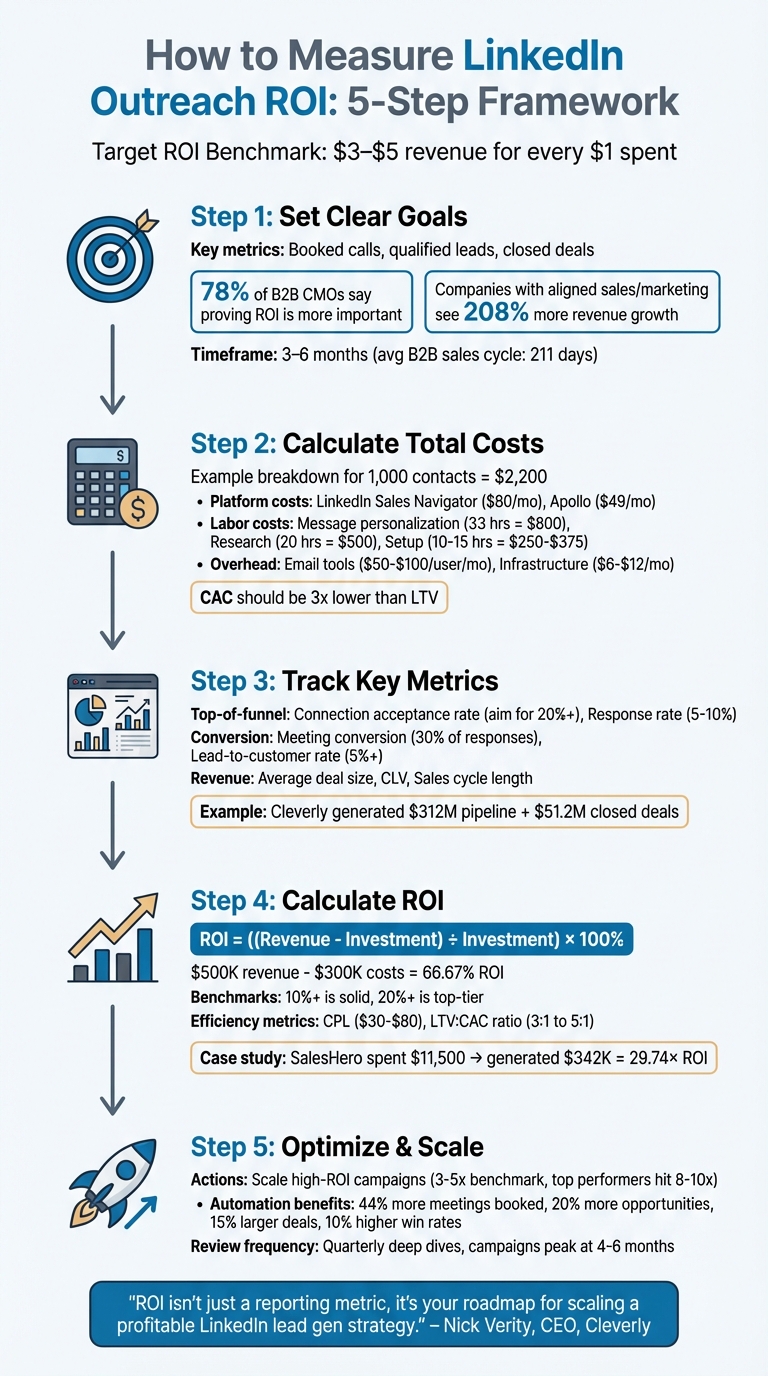
5-Step Process to Measure and Optimize LinkedIn Outreach ROI
9 Metrics you SHOULD Measure for LinkedIn Cold Outreach Campaigns [+FREE ROI Calculator]
Step 1: Set Clear Goals for Your Outreach
78% of B2B CMOs report that proving ROI has become more important over the last two years, yet 87% of marketers struggle to measure the long-term impact of their campaigns [4]. The main issue? Many teams focus on metrics like connection requests and profile views, which don’t tie directly to revenue. To address this, start by setting clear, revenue-focused goals.
Define Revenue-Linked Goals
Prioritize metrics that directly influence revenue, such as booked calls, qualified leads, and closed-won deals. Use your revenue targets to shape these outreach goals, ensuring every LinkedIn activity connects to a measurable dollar outcome.
It’s also important to distinguish between Marketing Qualified Leads (MQLs) - those who express interest - and Sales Qualified Leads (SQLs), who are vetted and ready to buy. This distinction helps avoid inflated performance metrics and gives a clearer picture of which strategies generate high-intent prospects [2].
Connect LinkedIn Activities to Business Results
Once you’ve set your revenue goals, align each LinkedIn outreach action with your sales pipeline. For example, connection requests can lead to meetings, meetings can create opportunities, and those opportunities can close as deals. Companies with well-aligned sales and marketing teams experience 208% more revenue growth and 27% faster three-year expansion [4].
To track this alignment, use your CRM to monitor each stage with specific lead source tags (e.g., "LinkedIn – Outreach") and UTM parameters (e.g., utm_source=linkedin&utm_medium=outreach) [2]. This way, when a deal closes months later, you can trace it back to its LinkedIn origin.
Set Timeframes and Attribution Models
With an average B2B sales cycle lasting 211 days [4], it’s essential to evaluate campaigns over 3–6 months. This timeframe accounts for lead nurturing and deal progression [2]. Using multi-touch attribution is especially effective for B2B, as it credits all touchpoints in the buyer’s journey. This approach ensures LinkedIn’s role in nurturing leads isn’t overlooked, even if prospects convert through other channels later [1][2].
Step 2: Calculate Total Outreach Costs
Once you've set clear revenue goals, the next step is to figure out exactly how much you're spending on outreach. This step is crucial before diving into ROI calculations. Many teams make the mistake of focusing only on tool subscriptions, forgetting to account for labor and overhead. For example, running an in-house LinkedIn and email campaign targeting 1,000 contacts typically costs around $2,200 [6].
Track Platform and Tool Costs
Start by listing all fixed platform expenses. For instance, LinkedIn Sales Navigator costs about $80 per month, while data-enrichment tools like Apollo begin at $49 per month [6]. If you're using automation platforms like SalesMind AI to handle personalized outreach and follow-ups, include those subscription fees too. Email automation tools generally range between $50–$100 per user per month. Don't forget additional infrastructure costs, such as Google Workspace accounts ($6–$12 per month) and dedicated domains ($10 per year), especially if you're running multi-channel campaigns [6].
Include Labor and Overhead Costs
Labor costs can add up quickly. Personalizing 1,000 messages takes about 33 hours (roughly 2 minutes per contact), which translates to $800 if you're paying an SDR $25 per hour [6]. Add to this 20 hours for contact research and verification (another $500), 10–15 hours for technical setup ($250–$375), 8 hours for managing follow-up sequences ($200), and 8 hours for processing responses and scheduling meetings ($200) [6]. Since sales professionals typically spend only about one-third of their time actively selling [7], it’s essential to track how much time is dedicated to LinkedIn activities to ensure accurate cost allocation.
Break Down Costs Per Lead and Campaign
After calculating your total outreach costs, break them down to assess efficiency. For example, determine your Cost Per Lead (CPL) by dividing the total spend by the number of qualified leads generated [2]. You can also calculate metrics like cost per reply, cost per meeting booked, and ultimately your Customer Acquisition Cost (CAC). To maintain accurate tracking, tag contacts in your CRM with labels like "LinkedIn – Outreach." This ensures proper attribution when calculating these metrics later [2]. For a LinkedIn channel to make sense in the long run, your CAC should ideally be at least three times lower than your Customer Lifetime Value (LTV) [6]. With these cost metrics in place, you’ll be ready to move on to tracking performance metrics that directly influence ROI.
Step 3: Track Key Performance Metrics
Now that you've nailed down your cost metrics, it's time to shift your attention to tracking performance from the first interaction to closed revenue. This step zeroes in on the numbers that turn your LinkedIn efforts into tangible results.
Measure Top-of-Funnel Metrics
Start by keeping an eye on your connection acceptance rate - aim for at least 20% to ensure you're on the right track [3]. Once connections are made, the next metric to watch is your response rate, which typically ranges between 5% and 10% for initial outreach messages [3]. But don’t get sidetracked by vanity metrics like profile views or post likes - they might look good on paper but rarely lead to meetings or revenue [2][5].
The real goal here is to turn those initial interactions into meaningful opportunities.
Monitor Conversion Metrics
Next, focus on how well your responses are converting into booked meetings or demos. A solid campaign should see at least 30% of responses turning into scheduled meetings [3]. After that, measure your lead-to-customer rate - this tells you what percentage of qualified leads actually close. Even a 5% deal conversion rate (turning meetings into sales) indicates you're on the right path [3].
If you're using tools like SalesMind AI for follow-ups and lead scoring, make sure your CRM correctly separates Marketing Qualified Leads (MQLs) from Sales Qualified Leads (SQLs). This distinction ensures you're not inflating your ROI by counting leads that aren't yet ready to buy [2].
Analyze Revenue Metrics
Finally, dive into the revenue results. Use CRM tags like "LinkedIn – Outreach" to track revenue from closed deals [2]. Calculate your average deal size for LinkedIn-sourced leads - higher deal values can often justify spending more on acquisition. Also, track your Customer Lifetime Value (CLV) to understand the long-term revenue each customer brings in. Don’t forget to measure your sales cycle length, which is the time from the first LinkedIn interaction to closing the deal. Shorter cycles mean faster returns and give your team bandwidth to handle more opportunities [2].
For B2B campaigns, a healthy ROI benchmark on LinkedIn typically ranges from 3x to 5x, meaning you’re generating $3–$5 in revenue for every $1 spent [2]. To put it into perspective, by December 2025, the B2B lead generation agency Cleverly reported that their LinkedIn outreach strategies - used by over 10,000 clients, including Amazon, Google, and Slack - produced $312 million in pipeline revenue and $51.2 million in closed deals. Their success came from prioritizing metrics like booked calls over vanity numbers [2].
sbb-itb-817c6a5
Step 4: Calculate and Analyze ROI
Now that you've identified your costs and tracked key metrics, it's time to calculate your LinkedIn outreach ROI. This involves comparing the revenue generated to the total investment. The formula is straightforward: ROI = ((Revenue Generated - Investment) ÷ Investment) × 100% [8]. Make sure to include every expense - platform fees, tools, content creation, and labor costs [9]. Then, sum up the revenue from deals tagged as "LinkedIn – Outreach" during your tracking period.
Since B2B sales cycles often take around six months, you'll need to wait at least that long after launching a campaign to assess the full impact [8]. For instance, if your sales team brings in $500,000 in revenue with total costs of $300,000, the resulting ROI of 66.67% means every dollar invested earned an extra $0.67 [9]. As a rule of thumb, an ROI of 10% or higher is solid, while anything over 20% is considered top-tier [9].
Applying the ROI Formula
Start by adding up all revenue from LinkedIn-sourced deals closed during your selected timeframe. Subtract the total investment from the revenue, divide the result by the investment, and multiply by 100 to get your ROI percentage. For example, SalesHero spent $11,500 on a LinkedIn campaign that generated $342,000 in revenue, delivering a 29.74× ROI [8].
Assessing Efficiency Metrics
While ROI gives you the overall picture, efficiency metrics help pinpoint areas for improvement. One key metric is Cost per Lead (CPL), calculated by dividing the total campaign cost by the number of leads. On LinkedIn, CPL generally falls in the $30 to $80 range [8]. Another important metric is Customer Acquisition Cost (CAC), which you can compare to your Customer Lifetime Value (LTV). A healthy LTV-to-CAC ratio typically ranges from 3:1 to 5:1, meaning you should generate $3 to $5 in profit for every $1 spent on salaries and tools [9]. If your ratio is lower, it's a sign that acquisition costs might be eating into your profitability. By analyzing these metrics, you can refine your outreach strategies based on the groundwork laid in Step 2 (cost analysis) and Step 3 (performance tracking).
Comparing ROI Across Campaigns and Segments
Don't lump all your campaigns together. Break down ROI by campaign using UTM parameters and CRM tags [8]. To understand the true impact of your LinkedIn outreach, consider running incrementality tests. Compare revenue from a group exposed to your campaign with a control group that wasn't targeted - this helps isolate the actual lift your efforts are driving [1]. Additionally, distinguish between Marketing Qualified Leads (MQLs) and Sales Qualified Leads (SQLs) to avoid inflating your metrics with high-volume, low-quality leads [2]. Another useful metric is sales velocity, which tracks the time it takes to move from first contact to a closed deal. Faster cycles not only mean quicker returns but also reflect greater efficiency within your sales team [2].
Step 5: Optimize Outreach Based on ROI Data
Once you've calculated your ROI, it's time to take action. Use this data to double down on outreach strategies that deliver results and cut those that fall short. This step is all about refining your approach and scaling what works.
Identify and Scale High-ROI Campaigns
Dig into your conversion and revenue metrics to pinpoint which campaigns are consistently driving results. Pay close attention to traffic sources, form submissions, and messaging strategies that lead to conversions [1]. If one campaign stands out as a top performer based on ROI, consider shifting more budget and resources toward it. Don’t overlook "slow burn" leads - those prospects who take longer to convert but ultimately bring in high-value deals [2]. For B2B, a LinkedIn ROI benchmark often falls between 3–5x, but standout campaigns can hit 8–10x or higher [2]. Use these insights to make a case for increased budgets by directly linking social media efforts to measurable business outcomes [1].
Automate Outreach for Better Efficiency
Automation can be a game-changer for your outreach efforts. By integrating structured sales platforms, you can see a 44% boost in meetings booked each month and a 20% rise in opportunities created [9]. Tools like SalesMind AI can handle personalized messaging, follow-ups, and lead scoring, reducing manual work while improving results. Features like AI-driven inboxes and LinkedIn integrations streamline workflows, freeing up your team to focus on closing deals rather than routine tasks. Automation has the potential to increase average deal sizes by 15% and win rates by 10% [9].
Set Up Regular ROI Reviews
While daily metric tracking is essential, schedule in-depth ROI reviews quarterly to spot trends and fine-tune your strategy [1]. These audits should include checks on UTM links, CRM field mappings, and platform integrations to ensure data accuracy [1]. LinkedIn campaigns often hit their stride between months four and six, as networks expand and messaging sharpens through ongoing adjustments [2]. AI-powered analytics can help you stay ahead by flagging shifts in engagement or lead quality before they impact your revenue pipeline [1]. Revisit metrics like cost per lead and conversion rates regularly to keep your outreach efforts optimized and on track.
Conclusion
Measuring the ROI of your LinkedIn outreach boils down to creating a clear strategy: scale what works and cut what doesn’t. Start with revenue-focused goals and timelines that directly connect your LinkedIn efforts to measurable business outcomes. Be thorough in tracking all associated costs, and focus on metrics that truly matter - like cost per lead, conversion rates, and revenue generated. Avoid getting distracted by vanity metrics, such as profile views, that don’t reflect your bottom line.
To calculate your returns, stick to the standard ROI formula and compare results across campaigns to identify your top performers. A well-executed LinkedIn campaign can deliver returns of 3–5x your investment [2]. This approach provides a solid foundation for making informed decisions.
"ROI isn't just a reporting metric, it's your roadmap for scaling a profitable LinkedIn lead gen strategy." – Nick Verity, CEO, Cleverly [2]
Using this framework and the five-step process as a guide, you can make smarter, data-driven decisions. Double down on campaigns that perform well, use automation tools to streamline your workflow, and schedule regular check-ins to refine your strategy. Tools like SalesMind AI simplify this process by automating tasks like personalized messaging, lead scoring, and follow-ups, while also offering real-time tracking through an AI-powered unified inbox. This minimizes manual effort, allowing you to focus on closing deals rather than managing endless spreadsheets.
Regularly auditing tracking links, CRM integrations, and attribution models ensures your data stays accurate. Keep in mind that LinkedIn campaigns often take four to six months to hit their full potential as your network expands and your messaging improves [2]. Stay consistent, keep refining your approach, and let the data guide your next steps.
FAQs
How do I set clear revenue goals for LinkedIn outreach campaigns?
To set goals centered on revenue for LinkedIn outreach, start by pinpointing a clear financial target. For instance, aim for $150,000 in new sales over the next quarter. Break this goal into actionable steps, such as determining how many leads, meetings, and closed deals are necessary to reach that number. If your average deal size is $15,000, you’ll need to close 10 deals to hit $150,000. From there, calculate how many qualified leads and meetings are required based on your typical conversion rates.
Next, track your progress with key performance indicators (KPIs) like connection rates, response rates, and deal conversion rates. Tools like SalesMind AI can help you manage leads, automate follow-ups, and monitor how outreach efforts contribute to revenue. Don’t forget to regularly calculate your ROI using this formula: (Revenue – Total Cost) / Total Cost × 100. Review your performance data weekly and tweak your strategy as needed to stay on track with your revenue goals.
What expenses should I account for when calculating the ROI of LinkedIn outreach?
When evaluating the return on investment (ROI) of LinkedIn outreach, it's essential to account for several key expenses:
- Subscription fees: These include costs for LinkedIn tools and automation platforms, which can range anywhere from $6.99 to $489 per month.
- Labor costs: This covers the time and effort spent on tasks like researching and verifying leads, writing tailored messages, and managing outreach campaigns.
- Infrastructure expenses: Think about expenses like maintaining email domains, using automation tools, and managing follow-up sequences.
- Time and effort: This includes handling responses, qualifying potential leads, and coordinating meetings.
Taking all these factors into account will help you understand the full scope of your investment in LinkedIn outreach campaigns.
How can automation help improve the ROI of my LinkedIn outreach?
Automation can be a game-changer for your LinkedIn outreach. It helps you save time, maintain consistent follow-ups, and boost engagement rates. By automating tasks like sending connection requests, customizing messages, and scheduling follow-ups, you can shift your energy toward building real connections and closing more deals.
Take tools like SalesMind AI, for instance. They simplify the process with features like AI-powered messaging, dynamic templates, and a unified inbox to manage your interactions seamlessly. Plus, you can monitor essential metrics like connection and response rates to gauge your efforts. Here's a practical example: if automation saves you 15 hours a week and your time is worth $75 an hour, that's a potential $58,500 in annual savings - transforming efficiency into measurable growth.
 JG
JG