LinkedIn Trigger Automation: Benefits for B2B
Automate LinkedIn actions from profile views, job changes, and engagement to prioritize leads, scale personalized outreach and avoid missed follow-ups.
 Julien Gadea
Automate LinkedIn actions from profile views, job changes, and engagement to prioritize leads, scale personalized outreach and avoid missed follow-ups.
Automate LinkedIn actions from profile views, job changes, and engagement to prioritize leads, scale personalized outreach and avoid missed follow-ups.
Table of Contents
LinkedIn trigger automation is a game-changer for B2B sales teams struggling with unqualified leads, missed follow-ups, and generic outreach. By automating actions based on specific triggers like profile views, job changes, or post engagement, this approach streamlines prospecting and ensures timely, personalized communication. Tools like SalesMind AI help sales teams save time, focus on high-potential leads, and boost productivity by automating LinkedIn messaging, follow-ups, and lead scoring.
Key Takeaways:
- Automates repetitive tasks like connection requests, follow-ups, and data entry.
- Uses activity and event triggers (e.g., job changes, profile views) for timely outreach.
- AI-driven lead scoring prioritizes high-quality prospects for better results.
- Centralizes data for better pipeline visibility and fewer missed opportunities.
- Scales personalization across hundreds of prospects without losing relevance.
This system enables B2B teams to focus on meaningful tasks like discovery calls and closing deals, while ensuring no lead slips through the cracks. Perfect for U.S.-based teams, LinkedIn trigger automation simplifies prospecting and drives measurable growth.
LinkedIn Outreach 2025: The Perfect AI Stack for Qualified B2B Leads
B2B Problems That LinkedIn Trigger Automation Solves
LinkedIn trigger automation directly addresses several common pain points in B2B sales, making it easier for teams to focus their efforts where it matters most.
Unqualified Leads Waste Time
Sales teams often waste hours chasing leads that don't have the authority to make decisions or show any real buying intent. This not only inflates costs but also drags out sales cycles. The red flags are usually there - job titles that don't match your target, companies outside your ideal industry or size, no recent engagement with your content, or the absence of trigger events signaling interest.
For example, broad LinkedIn Sales Navigator searches often generate lists filled with dead-end contacts, especially when behavioral or firmographic filters aren't applied. AI-powered lead scoring steps in here, analyzing roles, company size, engagement behavior, and past interactions to spotlight high-intent accounts. This allows sales reps to focus their energy on prospects that are more likely to convert.
Delayed or Missed Follow-Ups
Timing is everything in B2B sales. Prospects engaging during U.S. business hours generally expect a response within 24 to 48 hours. Miss that window, and the chances of securing a meeting drop significantly. The problem gets worse when reps juggle multiple tools and lose track of follow-ups.
Common pitfalls include forgetting to follow up after a connection request is accepted, overlooking a "circle back next quarter" message, or missing InMail replies buried in a crowded inbox. Take a SaaS team running a campaign, for example - they might receive 30 positive replies in a week but only follow up with half due to manual tracking issues. Automated LinkedIn sequences with built-in reminders and stop rules ensure timely and consistent follow-ups, keeping warm leads engaged and moving through the pipeline.
Poorly-Timed or Generic Outreach
Generic outreach rarely resonates with prospects. Messages that fail to align with key sales triggers - like job changes, funding rounds, or content engagement - often come across as irrelevant. Sending the same message to a newly appointed VP and a long-standing director? That’s a missed opportunity for meaningful conversation.
While manual personalization works for a handful of accounts, scaling it across hundreds of prospects is nearly impossible. Dynamic fields and AI-generated message variations solve this by tailoring outreach to specific triggers and addressing individual pain points.
As one Enterprise Account Executive at Salesforce put it, "I was able to automate something that would have taken me days or weeks of consistent manual work... This takes a load off and allows me to do more of the things I enjoy vs cold outreach. Also, I've been impressed with some of the AI-recommended messaging. They pulled information from my website and other sources to curate recommended responses." [1]
Scattered Prospect Data
Disorganized data is another major hurdle. When contact info, notes, and activity logs are spread across LinkedIn, CRMs, spreadsheets, and email, reps waste valuable time searching for context. This disjointed approach often leads to duplicate entries, redundant outreach, and inaccurate pipeline forecasting.
For U.S.-based B2B teams, scattered data also makes compliance and reporting a nightmare. Determining how many qualified opportunities originated from LinkedIn versus other channels becomes guesswork. Automated syncing between LinkedIn tools and CRMs centralizes contact data and activity logs, giving teams a unified view and cutting down on manual data entry.
Difficulty Scaling Personalization
In the U.S., business communication demands outreach that's concise, relevant, and professional. While deep personalization works wonders for a small number of accounts, scaling it manually across hundreds of prospects is unsustainable. Burnout creeps in, and conversion rates drop as messaging becomes generic.
Overly familiar or intrusive outreach can also harm a brand’s reputation in the tightly connected U.S. business world. AI-powered platforms like SalesMind AI tackle this by using dynamic fields (like first name, company, role, and industry) and persona-specific templates. This ensures messages stay relevant and professional without crossing the line into spam.
A CEO from MountainDrop shared, "The lead scoring system is particularly impressive, providing clear insights into lead quality." [1]
How LinkedIn Trigger Automation Works
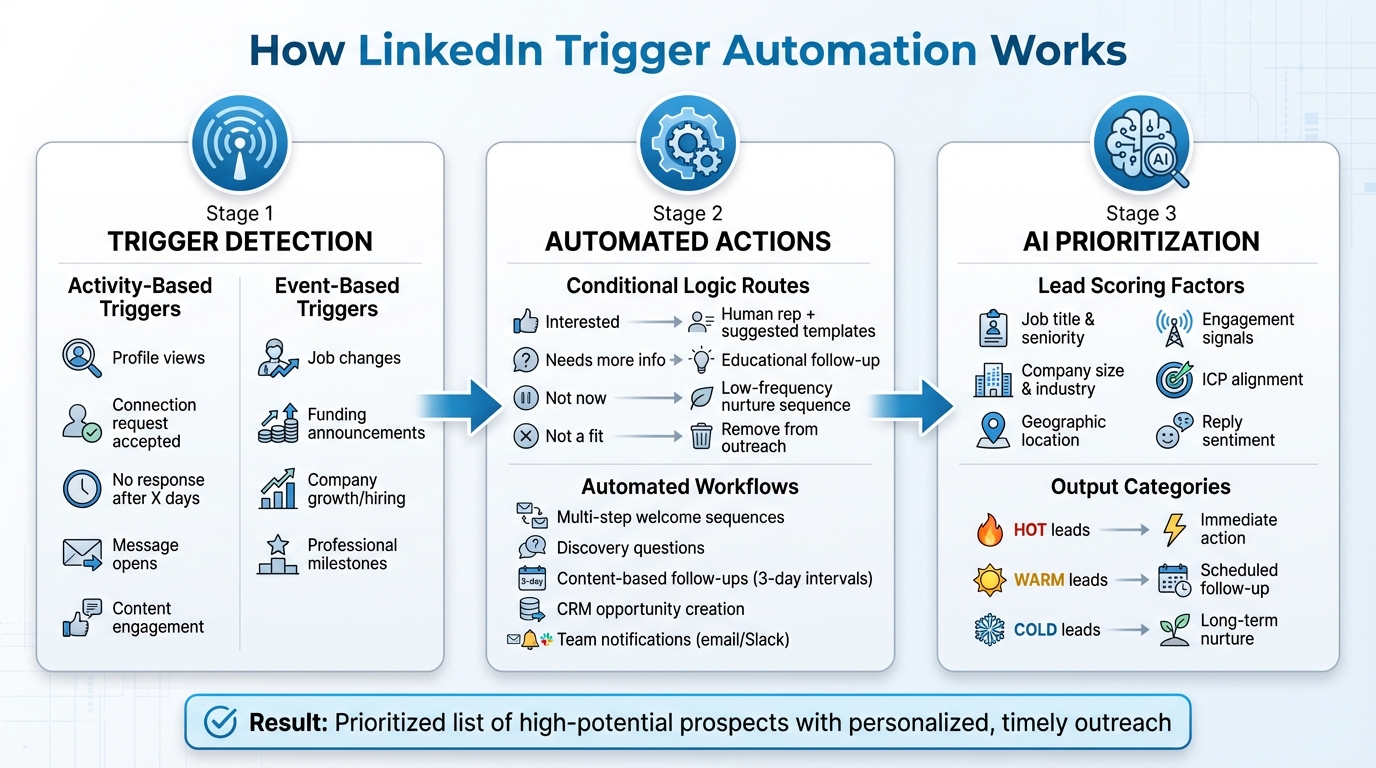
How LinkedIn Trigger Automation Works: From Signal to Action
LinkedIn trigger automation keeps an eye on prospect signals - both activity and event-based triggers - organizes them by priority, and directs leads through workflows designed for timely and relevant follow-ups. An AI layer steps in to personalize messages, sort responses, and spotlight the most promising opportunities for human attention. Here's a closer look at how these triggers translate into automated, impactful sales actions.
Activity and Event Triggers Explained
Activity-based triggers focus on how prospects engage with your LinkedIn profile or content. For instance, if someone views your profile, it’s a sign of interest and can trigger a short, personalized outreach message [2][3]. Another key trigger happens when a prospect accepts your connection request. The system can automatically send a welcome message and start a nurture sequence. If the request goes unanswered for a certain time, the automation might switch gears and follow up via InMail or email [3].
Event-based triggers, on the other hand, respond to changes in a prospect’s professional life - things like job changes, funding announcements, or company growth. These changes create prime opportunities for outreach, allowing sales teams to approach prospects at just the right time with messages that feel relevant rather than generic.
Mapping Triggers to Automated Actions
Each trigger is tied to specific automated actions aimed at advancing the sales process. For example, when a connection request is accepted, it can kick off a multi-step welcome sequence. This might start with a discovery question, followed by a content-based follow-up if there’s no reply within three days [2][3]. On the flip side, if the prospect responds positively, the system pauses further messages, creates a CRM opportunity, and notifies the account owner via email or Slack [3][4].
Conditional logic fine-tunes these workflows by categorizing responses into groups like "interested", "needs more info", "not now", or "not a fit." Based on these categories, leads are routed appropriately [3][4]. For example:
- Interested leads: Sent to human reps with suggested reply templates for scheduling calls.
- Neutral responses: Trigger an educational follow-up.
- "Not now" prospects: Shifted into a low-frequency nurture sequence.
- Unqualified leads: Removed from active outreach.
This system ensures a tailored approach for every prospect, improving efficiency and relevance.
AI-Powered Personalization and Lead Prioritization
To tackle the challenge of personalization, the AI layer customizes messages and ranks leads based on real-time engagement data. It uses information like job title, seniority, location, skills, company size, industry, and recent updates (e.g., funding or hiring news) to craft messages that resonate with each prospect [3][4][5]. The AI also examines historical data to determine which messaging styles and offers have been most effective in securing replies and meetings.
AI-driven lead scoring further simplifies the process by assigning priority scores to prospects based on their fit and behavior. This score - updated dynamically as new triggers occur - considers factors like role, company size, industry, region, and alignment with your ideal customer profile, along with engagement signals like profile views and reply sentiment [3][5]. Prospects are then categorized into tiers such as "hot", "warm", or "cold", ensuring sales reps focus on the most promising leads. Instead of manually sifting through LinkedIn or CRM data, reps get a clear, prioritized list of whom to contact, making their work more efficient and predictable [3][4].
Platforms like SalesMind AI bring it all together, combining trigger-based automation, AI personalization, lead scoring, and a unified inbox. The AI co-pilot offers ready-to-use responses, applies tags, and sets reminders to keep leads from slipping through the cracks. Meanwhile, the built-in lead scoring system provides clear insights into lead quality, helping teams focus on the best opportunities [1].
sbb-itb-817c6a5
Benefits of LinkedIn Trigger Automation for B2B
Faster Lead Qualification
Trigger automation helps identify and prioritize leads by analyzing engagement signals like profile views, message opens, and content interactions, alongside firmographic data such as job titles, company size, and industry. Tools like SalesMind AI use lead scoring to spotlight prospects most likely to convert, enabling sales teams to channel their efforts into high-potential opportunities.
Take Henry F., an Enterprise Account Executive at Salesforce, as an example. Within just eight days of using SalesMind AI, he began receiving 4–5 responses daily that he felt confident would turn into booked meetings and new business. Similarly, Alex L., CTO at Slash Co, shared that in the first week alone, the platform increased his lead prospecting productivity tenfold, with the AI initiating 5 to 10 new conversations weekly [1]. This kind of precise scoring ensures outreach is well-timed and impactful.
Better Outreach Timing and Relevance
Real-time triggers, such as job changes, funding announcements, or hiring updates, allow outreach to happen when prospects are most likely to engage. According to LinkedIn research, social selling leaders generate 45% more opportunities and are 51% more likely to meet their quotas compared to those using traditional cold outreach methods [1].
The AI also personalizes messages by pulling insights from profiles, recent news, and prior interactions. For example, Sébastien D., a freelance professional in Information Services, noted that automating conversations with direct profile insights led to more prospect meetings and closed deals. By combining personalized messaging with well-timed initial contact, automation ensures continued engagement and relevance.
Consistent Follow-Ups at Scale
Missed follow-ups can cost opportunities, but trigger-based workflows ensure no lead slips through the cracks. These workflows send predefined sequences, such as a welcome message after a connection request, a follow-up with value-added content, or a meeting request based on renewed engagement. Multi-touch automated follow-ups have been shown to increase booked meetings by 20–30%, eliminating the risk of human error.
Roberto K., Chief Product Officer at aCommerce, shared that SalesMind AI automated his team's LinkedIn prospecting entirely, allowing them to engage with hundreds or even thousands of prospects while maintaining control. He described the tool as "super powerful" for scaling lead generation and business growth seamlessly. Rahul P., Senior Advisor at Bounty Media, highlighted the convenience of a master dashboard for tracking lead lists and sequences in real time, adding that SalesMind AI works around the clock, significantly boosting team productivity [1].
Better Pipeline Visibility
Disorganized prospect data is a common challenge, but trigger automation consolidates everything into a centralized, real-time dashboard. This clarity allows B2B teams to forecast more accurately and refine strategies by identifying which triggers - like job changes or funding news - drive the most meetings. LinkedIn reports that users of Sales Navigator enjoy a 7% higher win rate and secure deals that are 11% larger than those achieved by non-users, emphasizing the value of leveraging LinkedIn signals in automated workflows [1]. With these insights, teams can redirect their saved time toward strategic, high-impact activities.
More Time for High-Value Tasks
By automating repetitive tasks - such as sending connection requests, logging activities, drafting first-touch messages, and scheduling follow-ups - SalesMind AI allows sales reps to focus on what truly matters: discovery calls, demos, and negotiations. Eugenie Masse, Senior Consultant at BDO, mentioned that the tool enabled her team to scale prospecting without the hassle of manually drafting messages. Similarly, Joey NanAI, Customer Value Architect at Houston Technology Group, praised the tool for simplifying the process of engaging ideal LinkedIn contacts, making it an effective solution for targeting and connecting with the right customers at scale [1].
How to Implement LinkedIn Trigger Automation in B2B Workflows
Identify High-Impact Triggers
Start by defining clear audience filters. Focus on factors like job titles, seniority, company size, industry, geographic location, and tech stack to ensure you're targeting the right prospects. These filters help your automation system zero in on leads that truly matter.
Next, prioritize triggers that indicate buying intent. Look for signs like job changes into key roles within your ideal customer profile (ICP), multiple profile views in a short time, or company news about funding or hiring growth.
Louis-Alban .B, CEO of Mobile Food Services at Yindii, shares: "I choose my target audience filters, and the system will reach out for me."
This level of precision ensures you're not wasting time on unqualified leads.
To refine your approach, use AI-driven lead scoring. This ranks prospects based on their engagement levels and firmographic details, helping you focus on those most likely to convert. Many leaders have highlighted how this approach aligns automation efforts with revenue goals by prioritizing high-quality leads.
Once you've identified impactful triggers, you can design workflows that take advantage of these signals to guide prospects through the sales funnel.
Design Trigger-Based Workflows
A well-thought-out workflow is essential for making the most of LinkedIn trigger automation. Match specific triggers to the appropriate stage in the sales funnel. For instance:
- Awareness stage: If someone changes jobs into an ICP role, send a personalized congratulatory connection request followed by a helpful resource.
- Consideration stage: For signals like multiple profile views, share case studies or invite them to a webinar.
- Decision stage: Pause automation here and notify a sales rep to schedule a meeting.
Incorporate branching logic so your workflow adapts to how prospects respond.
Roberto K., Chief Product Officer at aCommerce, explains: "Completely automated our sales prospecting on LinkedIn. Ready integrated with LinkedIn, it was easy to set up in terms of selecting the audience and setting up the sequence of follow-up messages until the LinkedIn member reacts."
To fine-tune your approach, run A/B tests on variables like message hooks, follow-up timing, and channel combinations. Implement the strategies that deliver the best results. Also, keep LinkedIn's engagement limits in mind and align your outreach with U.S. business hours to avoid overwhelming prospects.
Maintain Data Quality and Messaging Logic
Accurate data and thoughtful messaging are the backbone of successful automation. Start by documenting ICP attributes such as industry, employee count, revenue, seniority, geography, and buying roles. Make sure your CRM and LinkedIn data are synced, with standardized fields for job titles, company size, and industry. Regularly clean your database to remove duplicates and ensure prospects don’t get caught in multiple sequences.
Use dynamic fields like first name, company, and role to personalize messages, but don’t stop there. Add context by referencing a prospect’s recent activity, such as a post they shared, their company’s funding news, or a challenge their industry is facing.
Sébastien D., a freelance professional in Information Services, shares: "Amazing tool that allowed me to save so much time on my LinkedIn outreach. But that's not all, by automating all conversations and personalizing them with direct insights extracted from my prospect profiles, it gives accurate and high-quality outputs that helped me get more prospect meetings and thus close more deals! It's definitely a game changer, thanks for this great tool!"
Clearly document your messaging logic. Outline which templates are used for specific triggers, how many follow-ups each sequence includes, the timing between messages, and when to stop (e.g., after a positive reply or an unsubscribe). Regularly review and clean your data - merge duplicates, fix missing fields, and remove invalid records. This keeps your outreach effective and personalized.
Monitor and Optimize Automation Performance
Track key metrics for each trigger and workflow. These include connection request acceptance rates, reply rates, positive response rates, click-through rates on shared content, meetings booked per 100 prospects, and the time between a trigger and the first touchpoint.
Rahul P., Senior Advisor at Bounty Media, highlights: "To have one master dashboard not just for yourself but for our entire team and try different lead lists, sequences, and track them all in real time is fantastic."
Pay attention to negative signals, too, like low reply rates, high "not interested" responses, or spam complaints. Use this data to refine your targeting, messaging, and outreach frequency. Every quarter, audit your triggers and pause or remove those that aren’t delivering quality conversations. Add new triggers based on recent successes, such as prospects engaging with specific content or attending certain events.
Bennett Newhook, Founder at Outport, shares: "Their team not only assisted with implementation but also provided insights to fine-tune my campaigns, enhance my profile's appeal, and boost lead acquisition."
To streamline this process, consider tools like SalesMind AI. It offers LinkedIn outreach automation, AI-powered lead qualification, advanced lead scoring, and a unified inbox. These features make it easier to manage trigger-based workflows, allowing your sales team to focus on meaningful interactions that drive revenue growth.
Conclusion
LinkedIn trigger automation tackles common sales challenges like unqualified leads, missed follow-ups, and generic outreach by automating tasks such as connection requests, personalized messages, and multi-step sequences. This allows your team to focus on what really matters - discovery calls, demos, and closing deals.
By streamlining your sales process, this approach ensures no lead slips through the cracks. Automated, scalable follow-ups increase meeting rates and pipeline momentum, while centralized data and AI-powered lead scoring help your team prioritize high-conversion prospects. With less time spent on manual outreach, your team can redirect their energy toward meaningful, high-value conversations.
AI takes this a step further by analyzing behavior and firmographic data to pinpoint leads who are ready to buy. It crafts tailored messages based on each prospect's role, industry, or recent company updates. Over time, the system learns from outcomes, refining lead prioritization and outreach strategies to boost close rates and make better use of your sales resources - all within a unified platform.
SalesMind AI brings these capabilities together, combining LinkedIn outreach automation, a unified AI-powered inbox, advanced lead scoring, and trigger-based follow-up sequences. Forget the hassle of managing LinkedIn, spreadsheets, and your CRM separately. With automated workflows, you can define triggers like profile visits or job changes, send context-specific messages, score leads by behavior and fit, and ensure high-priority responses are routed to your team in real time. For U.S.-based teams tracking pipeline in dollars and measuring success by meetings booked, this solution simplifies the entire process.
To get started, audit your current LinkedIn outreach strategy, establish baseline metrics, and test trigger-based workflows over 30–60 days. Align these efforts with your revenue goals, and you’ll see how LinkedIn trigger automation can drive measurable growth.
FAQs
How can LinkedIn trigger automation enhance lead qualification in B2B sales?
LinkedIn trigger automation streamlines lead qualification in B2B sales by using AI to pinpoint and assess prospects that meet your predefined criteria. This way, your team can dedicate their energy to leads with the highest potential, cutting down on wasted time and effort.
By automating tasks such as lead scoring and follow-ups, it removes bottlenecks and keeps your sales process running smoothly. The result? Enhanced productivity and a better shot at turning those qualified leads into loyal, long-term customers.
What are the key LinkedIn triggers that optimize outreach timing for B2B sales?
LinkedIn automation works by using specific triggers to initiate outreach at optimal times. These triggers are usually tied to user activities, like when someone checks out your profile, replies to a message, accepts a connection request, or interacts with your posts or shared content.
By tapping into these triggers, businesses can set up automated, timely follow-ups that feel relevant and personal. This approach not only boosts the chances of creating genuine connections but also helps move leads smoothly through the sales process.
How does AI-powered personalization improve LinkedIn prospecting?
AI brings a game-changing edge to LinkedIn prospecting by enabling personalized messaging that speaks directly to each prospect's specific interests and needs. This kind of tailored outreach grabs attention, increases engagement, and improves response rates because it feels relevant and meaningful.
On top of that, AI-powered lead scoring takes the guesswork out of identifying the best prospects. By zeroing in on high-potential leads, you can save time, stay organized, and focus your energy where it matters most. These tools also streamline follow-ups, making it easier to manage your outreach while scaling your efforts effectively.
 JG
JG