LinkedIn Connection Requests: Personalization at Scale
Research prospects, use AI tools, and craft scalable, personalized LinkedIn connection requests to boost acceptance and response rates.
 Julien Gadea
Research prospects, use AI tools, and craft scalable, personalized LinkedIn connection requests to boost acceptance and response rates.
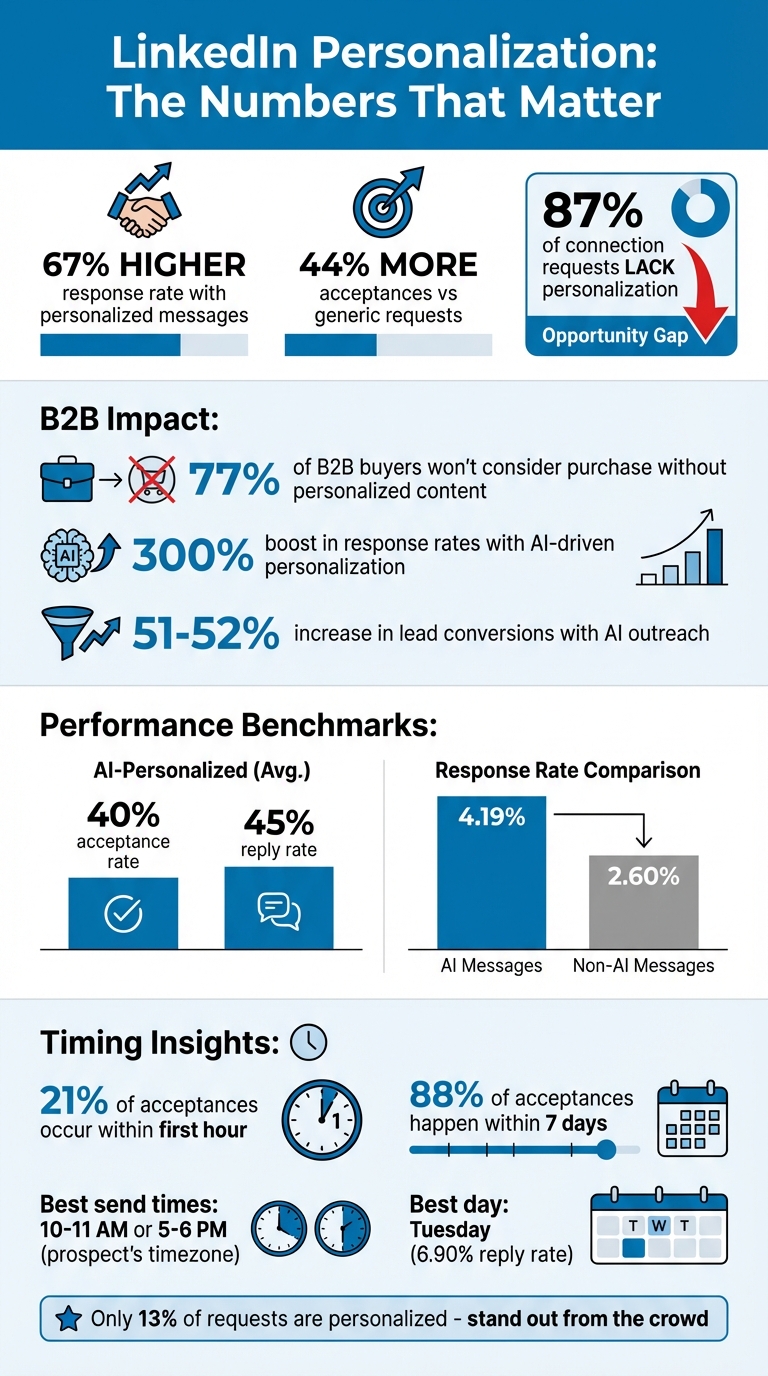
Why it matters: 77% of B2B buyers won’t consider a purchase without personalized content.
Proof it works: AI-driven personalization can boost response rates by 300%.
How to do it: Use tools like LinkedIn Sales Navigator or AI platforms to quickly find triggers like job changes, funding news, or shared connections.
Scalable strategy: Combine reusable templates (80%) with specific personalization (20%) to balance efficiency and relevance.
Personalized LinkedIn messages work. They achieve a 67% higher response rate and 44% more acceptance compared to generic ones. Yet, 87% of connection requests lack personalization, missing out on potential engagement. In B2B sales, personalization isn’t optional - it’s critical for building trust and driving results.
Key takeaways:
- Why it matters: 77% of B2B buyers won’t consider a purchase without personalized content.
- Proof it works: AI-driven personalization can boost response rates by 300%.
- How to do it: Use tools like LinkedIn Sales Navigator or AI platforms to quickly find triggers like job changes, funding news, or shared connections.
- Scalable strategy: Combine reusable templates (80%) with specific personalization (20%) to balance efficiency and relevance.
LinkedIn Personalization Statistics: Response Rates and Impact on B2B Sales
Personalization at Scale: Tools and Techniques
Researching Prospects: Finding Key Information Quickly
When it comes to scaling personalized outreach, the key is to quickly pinpoint one or two meaningful details about each prospect. These details should answer the question, "Why now?" Once you’ve found them, you can move on. The steps below will help you gather the insights needed to create personalized, AI-assisted messages.
Finding High-Value Triggers
Start by reviewing recent activity from your prospects. For example, job changes within the past 90–120 days can indicate openness to new solutions or vendors. Similarly, company milestones - like funding announcements, acquisitions, product launches, or even rapid hiring in specific departments (e.g., doubling the engineering team) - are excellent indicators of potential opportunities.
Engagement signals are another goldmine. If a prospect is sharing or commenting on content, it’s a natural opening to reference their activity and show you’ve been paying attention. Unlike generic outreach, this approach demonstrates that you’re tuned in to their world.
Shared context can also work wonders for establishing rapport. Whether it’s mutual connections, shared groups, or even following the same industry influencers, these small details can make your outreach feel relevant and familiar instead of cold and impersonal.
Using Tools for Prospect Research
To streamline this process, leverage automation tools that make personalized outreach scalable. Think of it as applying the 80/20 rule: use tools to gather data efficiently, then let AI craft one or two custom lines for each prospect. For instance, tools like Bardeen can scrape LinkedIn data and export it directly into your CRM [3].
For more in-depth research, LinkedIn Sales Navigator is indispensable. Its advanced search filters and lead recommendations help you uncover valuable insights. Additionally, platforms like Clay combine data from multiple sources, making it easier to identify buying signals across various channels. Just remember to keep your data clean - regularly update your lists to avoid relying on outdated job titles or incorrect company information [2].
Consider a tiered approach to prospecting:
- Tier A accounts: Conduct manual, in-depth research.
- Tier B accounts: Use AI to assist with personalization.
- Tier C accounts: Rely on segment-based templates for efficiency [2].
"Personalization at scale is how modern SDR teams keep volume high without sounding mass-produced." – SalesHive [2]
Timing is critical. Aim to reach out within 24–72 hours of identifying a key trigger. Beyond 72 hours, the relevance of that trigger diminishes significantly, and your message risks getting lost in the noise.
Writing Personalized Connection Requests with AI
Once you've done your homework on a prospect, the next step is turning that research into a meaningful, personalized message. This is where AI can really shine - if you give it the right guidance. Instead of relying on AI to dream up entire strategies, use it to execute proven frameworks. As Alexander J Brooks aptly says, "AI isn't great at creating outreach strategies, it can be effective at implementing them" [5]. This method ensures that even when you're scaling your outreach, your messages still feel personal and thoughtful.
Writing Effective AI Prompts
To get the best results from AI, your prompts need three key ingredients: prospect details, structure, and tone. Start by defining a character limit. For example, LinkedIn allows up to 200 characters for free accounts and 300 for Premium users [7][4]. Then, outline a clear framework for the AI to follow, such as:
- Hook: 50 characters
- Context: 100 characters
- Value: 100 characters
- Call-to-Action: 50 characters [4]
It's important to avoid language that sounds stiff or robotic. Instead, guide the AI to "sound like a cool person people want to connect with" [5]. Make sure to include a specific trigger from your research. For example:
"Write a 200-character LinkedIn connection request. Reference their recent post about AI in sales. Keep it casual and conversational. End with a soft question about their experience."
If you're having trouble finding personalization details, there's a simple fix: save the prospect's profile as a PDF and upload it to your language model. This allows the AI to quickly pull out relevant details, saving you the hassle of manual data extraction [5].
With these prompt structures in place, you're ready to move on to scenario-specific templates.
Templates for Common Scenarios
Crafting the right message depends on the situation. Below is a table to help you tailor your AI prompts for different scenarios:
| Scenario | AI Prompt Focus | Message Goal |
|---|---|---|
| Job Change | Congratulate on their new role, mention priorities | Build rapport during their transition |
| Company News | Reference funding or acquisitions | Connect your value to their growth phase |
| Post Engagement | Highlight an insight from their comment | Start a conversation around shared topics |
| Mutual Connection | Mention a shared contact by name | Build trust through social proof |
| Shared Group | Reference a professional association | Establish peer-level credibility |
For example:
- Job Change: "Compose a 250-character message congratulating Sarah on her new VP role at Acme Corp and asking about her first-quarter priorities."
- Post Engagement: "Reference John's recent comment about outbound sales challenges. Mention you've faced similar issues. Ask if he'd be open to exchanging ideas. 200 characters max."
It’s also a good idea to test variations, such as referencing a recent post versus mentioning a mutual connection, to see what resonates best [4]. According to SalesMind AI users, personalized, AI-assisted messages have an average acceptance rate of 40% and a reply rate of 45% [6]. Clearly, when done right, this approach can deliver results at scale.
Scaling Personalization with SalesMind AI
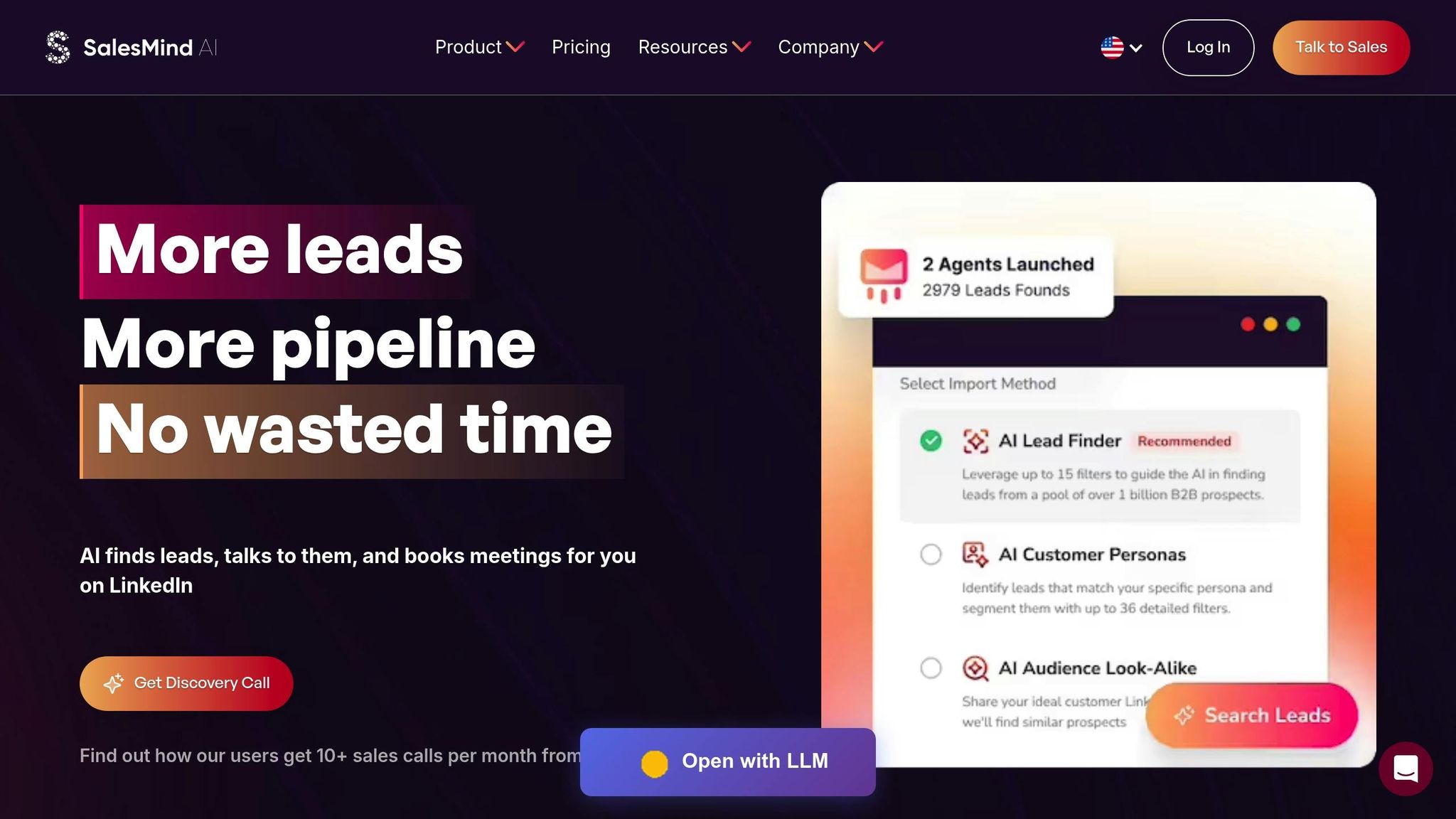
You’ve mastered how to research prospects and craft tailored messages using AI. Now comes the tricky part: scaling this process without losing that personal touch. That’s where SalesMind AI steps in. It automates outreach while ensuring every message remains relevant to each prospect. With its cloud-based automation running in the background, you’re free to focus on higher-priority tasks. Let’s take a closer look at how SalesMind AI makes scaling personalization not just possible, but efficient.
SalesMind AI: Key LinkedIn Outreach Features
At the heart of SalesMind AI is its Advanced Personalization Engine, which combines AI-driven insights with real-time triggers like job changes, funding announcements, and company growth phases. This ensures every message feels timely and specific. You can even link your landing pages to further refine the AI’s outreach strategy.
The platform’s unified AI inbox is another game-changer. It consolidates replies from all your LinkedIn accounts into one place, automatically tagging conversations, setting follow-up reminders, and offering suggested responses. This means you’ll never miss a critical interaction. Additionally, the lead suitability score feature evaluates prospects against your filters, helping you focus on those most likely to convert.
As Henry F., an Enterprise Account Executive at Salesforce, shared:
"SalesMind AI has proven very useful to our sales team in reducing the burdens of manual lead tracking" [8].
SalesMind AI also automates up to 10 steps in a sequence, mimicking natural behavior by detecting office hours and using unique local IP addresses for each account. Users have reported significantly higher connection and reply rates compared to industry norms, with many achieving pipeline values of $100,000 per month [6].
Setting Up Campaigns for Maximum Impact
With these features in place, setting up a campaign becomes a straightforward process to connect with hundreds of prospects - without losing the personal touch. Before launching your campaign, make sure your LinkedIn profile is optimized with strong engagement and a robust network. Clearly define the campaign’s goals, whether it’s booking meetings, driving sign-ups, or promoting events. These objectives guide the AI to tailor its strategy to your needs.
Leverage SalesMind AI’s smart prospecting feature to identify high-value leads. This tool can pull prospects from LinkedIn event attendees, people interacting with competitor posts, or followers of industry influencers. Segmenting contacts by persona and industry allows for even greater personalization. Once you’ve configured your AI datasets with relevant context about your product or service, you can set up multi-step sequences that guide prospects naturally from first contact to meaningful conversations.
For example, in June 2025, Alex L., CTO of Slash Co, used SalesMind AI to automate lead prospecting, achieving a 10× productivity boost in just one week [8]. Nick Heijman, CEO of ExtractTech, echoed this sentiment:
"The results were sometimes almost too good - connection rates and responses were way above what I expected" [8].
Optimizing and Measuring LinkedIn Outreach Campaigns
Once you've set up personalized campaigns, the next step is all about refining your outreach strategy. This involves figuring out the best timing, testing different approaches, and making adjustments based on performance. By doing so, you can maximize the effectiveness of your efforts. Building on tools like SalesMind AI, optimization becomes an ongoing process that drives better results.
Engagement and Timing Strategies
Timing plays a key role in LinkedIn outreach, and it's not just about when you send a message - it’s about catching your prospects when they’re most likely to engage. LinkedIn’s "My Network" section only shows the three most recent connection requests, so the timing of your message can determine whether it gets noticed. Research suggests that mid-week days, such as Tuesday, tend to perform better, with a reply rate of 6.90% [12].
For the best results, send your connection requests during 10–11 AM or 5–6 PM in your prospect’s local time zone. These time slots align with mid-morning breaks or the end of the workday, when people are more likely to check their notifications [9]. Here's an important stat: 21% of all connection acceptances occur within the first hour of sending the request, and 88% happen within seven days, largely due to mobile notifications [10]. After 30 days, only 1% of invitations receive a response [10].
Avoid sending requests during low-engagement periods. Monday mornings are often busy with catch-up tasks, Friday afternoons after 3:00 PM signal the start of the weekend, and weekends are generally reserved for personal time [9][10]. If a request isn’t accepted within seven days, withdraw it to maintain a strong acceptance-to-sent ratio. Additionally, use Sales Navigator filters to focus on prospects who have "posted on LinkedIn in the last 30 days", as active users are more likely to respond [10].
A/B Testing and Performance Tracking
A/B testing takes the guesswork out of LinkedIn outreach by using data to determine what works best. The key is to test one variable at a time - whether it’s the opening line, call-to-action, or message length - so you can clearly see what drives better results [14][15].
Start with a clear hypothesis, like "A shorter message will improve acceptance rates by 15%." Then, split your prospect list into two equal groups and test your variations for at least 14 days to ensure the data is statistically reliable [13][15]. Track key metrics such as:
- Connection Rate: The percentage of requests accepted.
- Response Rate: The percentage of prospects who reply.
- Meeting Conversion Rate: The percentage of prospects who schedule a call [11].
Personalized connection requests significantly outperform generic messages in terms of acceptance rates [4]. Similarly, AI-driven first messages achieve a 4.19% response rate, compared to 2.60% for non-AI messages [12].
Here’s an example of a testing framework:
| Variable to Test | Version A (Control) | Version B (Variation) | Primary Metric |
|---|---|---|---|
| Personalization | Generic: "Let's connect." | Trigger-based: "I enjoyed your article on [Topic]..." | Acceptance Rate |
| Message Length | Short: Under 150 characters | Long: 250–300 characters with context | Acceptance Rate |
| Call to Action | Soft: "Looking forward to connecting." | Hard: "Do you have time for a brief call Tuesday?" | Response Rate |
Yuriy Boyko, Head of Account Management at Belkins, offers valuable advice:
"If your primary goal is to expand your network, connection requests without a message perform just as well. However, if you aim to initiate conversations or generate leads, always include a short, relevant, and personalized message" [12].
Once you identify a winning variation, use it as your new baseline and continue testing new elements. For example, increasing nurturing actions from 1 to 5 has been shown to improve reply rates from 1.07% to 5.26% [12]. The goal is to keep refining your campaigns until they consistently achieve response rates between 5% and 10% and meeting conversion rates of over 30% [11].
Conclusion: Achieving Personalization at Scale
Scaling LinkedIn outreach is all about keeping that personal touch intact while expanding your reach. On your own, you might manage 20–30 personalized messages a day. But with AI-powered tools, you can craft hundreds of tailored messages without sacrificing quality [1]. The numbers back it up: personalized messages see a 67% higher response rate compared to generic ones, and AI-driven outreach can increase lead conversions by 51–52% [1].
To truly connect, go beyond just inserting a name - reference recent posts, company milestones, or shared connections. These behavioral insights help build trust. As Becca Eisenberg puts it:
"Brands and individuals who strike the right balance between leveraging AI and fostering human touch are the ones who truly succeed" [1].
This approach forms the backbone of scalable automation with tools like SalesMind AI.
Take SalesMind AI, for example. It uses detailed triggers to deliver impressive results: users report an average 40% acceptance rate and 45% reply rate, with pipelines averaging $100,000 per month [6]. Its personalization engine combines AI datasets with contextual clues, while smart prospect extraction identifies high-value profiles from LinkedIn events, post interactions, or even competitor followers [6]. Steven Huibers, COO at Policereports.ai, shared his experience:
"I've used a couple of other tools for LinkedIn outbound, but this has gotten me 3x the results" [6].
To scale effectively, focus on dynamic personalization that digs deeper than surface-level details. Mimic natural behavior for safety and use automation tools with protective features. When you strike the right balance between automation and authenticity, you'll see noticeable gains in engagement and conversions. The strategies shared in this guide are your blueprint for achieving personalization at scale.
FAQs
How does AI improve LinkedIn connection requests?
AI is transforming how we handle LinkedIn connection requests by turning raw profile data into customized outreach at scale. It digs into details like a prospect’s name, job title, recent activity, company updates, and mutual connections to create opening lines and value propositions that feel personal. This method doesn’t just save time - up to 60% compared to manual research - it also boosts response rates by replacing generic messages with ones that resonate.
Tools like SalesMind AI take this a step further by automating follow-ups based on how prospects interact with you, such as viewing your profile or responding to a message. These tools can even score leads in real time, helping you zero in on the connections most likely to turn into opportunities. By streamlining research, messaging, and follow-ups - all while keeping the communication personal - AI enables you to send hundreds of meaningful connection requests daily. Plus, it ensures you stay within LinkedIn’s limits, making it easier to grow your professional network effectively.
How can I find the right personalization triggers for LinkedIn connection requests?
Personalization begins by pinpointing triggers that highlight a prospect's needs or interests. Start by defining your Ideal Customer Profile (ICP) and organizing prospects into segments based on factors like industry, job title, company size, and seniority. These categories lay the groundwork for crafting relevant outreach.
Take it a step further by diving into each prospect's LinkedIn activity. Check out their recent posts, shared articles, endorsements, and comments to get a sense of what matters to them right now. Pay attention to real-time events like job promotions, funding rounds, or product launches - these moments are perfect opportunities to make your outreach feel timely and specific. For instance, mentioning a recent milestone or achievement can make your message stand out.
Lastly, tailor your tone to fit the prospect's style. A more formal tone might resonate better with executives, while a laid-back approach could be more fitting for startup founders. By blending these techniques, your LinkedIn connection requests can strike the perfect balance between being scalable and genuinely personalized.
Why does timing matter for LinkedIn connection requests?
Timing is everything when it comes to LinkedIn outreach. The moment you choose to send your message can determine whether it gets noticed or lost in the shuffle. Generally, weekdays during mid-morning, around lunchtime, or late afternoon are prime times when prospects are most active on the platform.
Here’s an eye-opening stat: 21% of connection requests are accepted within the first hour. Miss that window, and response rates take a nosedive. By syncing your outreach with your audience's active hours, you can increase the chances of your message being seen and acted upon.
 JG
JG