Custom LinkedIn Workflows with AI
Use AI to automate LinkedIn group and event outreach with personalized messages, automated follow-ups, lead scoring, and CRM sync to boost engagement.
 Julien Gadea
Use AI to automate LinkedIn group and event outreach with personalized messages, automated follow-ups, lead scoring, and CRM sync to boost engagement.
Use AI to automate LinkedIn group and event outreach with personalized messages, automated follow-ups, lead scoring, and CRM sync to boost engagement.
Table of Contents
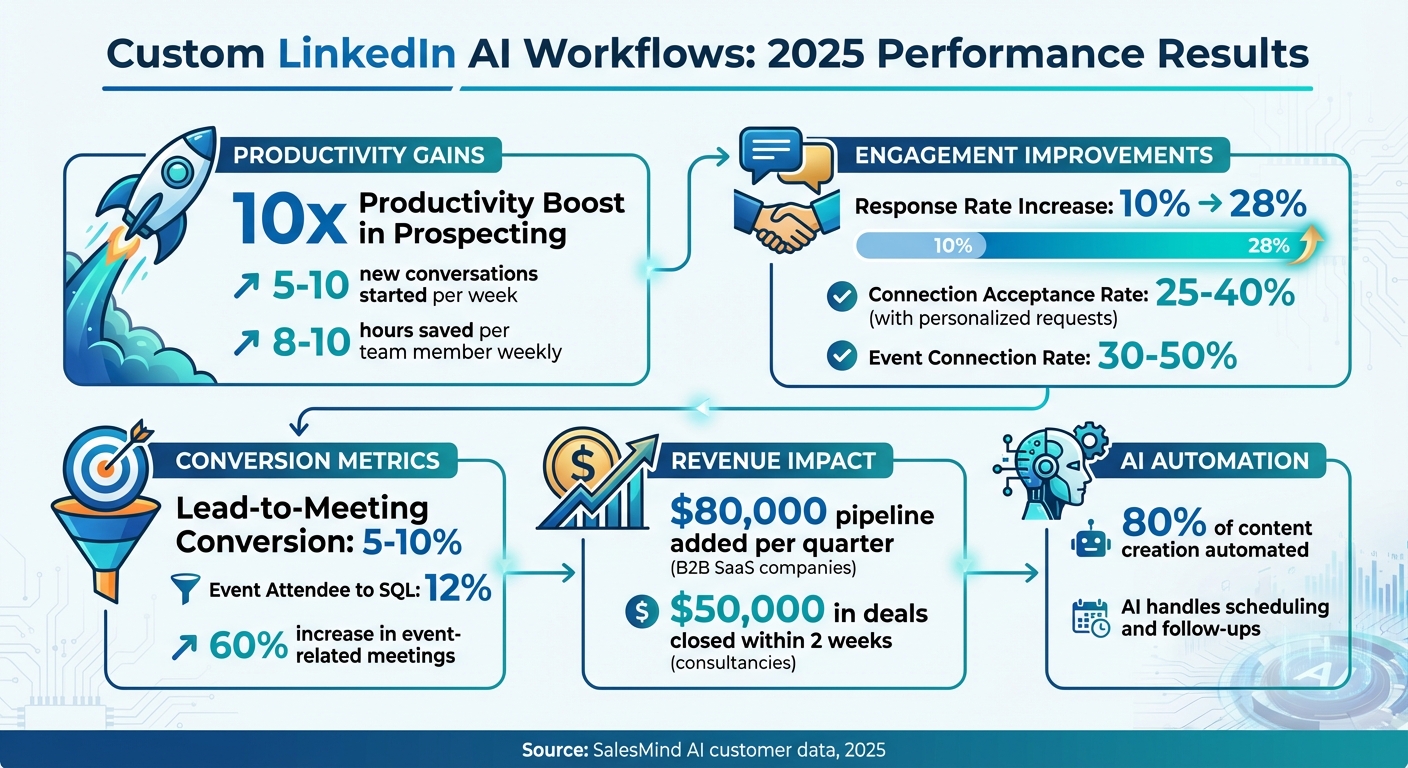
Custom AI workflows on LinkedIn can save hours of manual effort while boosting results. By automating tasks like personalized messaging, follow-ups, and lead tracking, businesses are seeing measurable improvements. For example, companies using SalesMind AI in 2025 reported:
- 10x productivity in prospecting: CTOs like Alex L. started 5–10 new conversations weekly.
- Higher engagement rates: Personalized outreach led to response rates increasing from 10% to 28%.
- Better lead management: AI-driven scoring identified high-value prospects faster.
Here’s how it works: AI analyzes profiles, group activity, and events to craft context-aware messages and automate follow-ups. This approach ensures every interaction feels relevant, leading to stronger connections and higher conversions. Before starting, you’ll need:
- A clear Ideal Customer Profile (ICP) to target the right audience.
- An optimized LinkedIn profile that builds trust.
- A reliable AI platform, like SalesMind AI, for automation and lead scoring.
Ready to improve your LinkedIn outreach? Start with one group or event, automate your messages, and track results over 30 days.
LinkedIn AI Workflow Results: Key Performance Metrics and ROI Statistics
Why Custom LinkedIn Workflows Matter for Groups and Events
The Problems with Manual and Generic Automation
Managing LinkedIn Groups and Events manually can feel like a full-time job. Tracking interactions, sending personalized messages, and following up with prospects can take days of effort. As Rahul P., Senior Advisor at Bounty Media, puts it:
SalesMind AI has proven very useful to our sales team in reducing the pain points of manually tracking every lead interaction.
On the other hand, relying on generic automation - such as mass messaging or basic connection requests - often backfires. These cookie-cutter methods lack context, resulting in low engagement and, worse, potential damage to your reputation. Roberto K., Chief Product Officer at aCommerce, highlights the importance of a smarter approach:
It means we can reach out to hundreds or thousands of prospects without losing control. It's super powerful and has helped us scale up our lead generation and thus our business effortlessly.
These challenges make it clear: intelligent, personalized automation is no longer optional - it’s essential.
How AI Creates Context-Aware Actions
AI is transforming how businesses engage on LinkedIn, especially when it comes to groups and events. Instead of sending the same generic message to everyone, AI uses real-time data to craft personalized outreach. By analyzing prospect profiles, company details, and recent group interactions, AI ensures each message feels relevant and timely.
What’s more, AI doesn’t stop at just personalizing messages. It actively monitors group activity and event schedules, triggering automated follow-ups at the perfect moment. This dynamic approach means your workflows can adapt to how members behave, leaving behind the rigid, one-size-fits-all scripts. The result? Smarter, more meaningful connections that drive better engagement.
Build This Automated AI LinkedIn DM System in 1 Hour (N8N)
What You Need Before Building AI-Driven LinkedIn Workflows
Before diving into automating LinkedIn groups and events, you need to have three key elements in place. Without these, even the most advanced AI workflows can fall short or end up targeting the wrong audience. These steps set the stage for effective, AI-powered LinkedIn strategies.
Define Your Ideal Customer Profile (ICP)
Your Ideal Customer Profile (ICP) is the foundation of any successful AI workflow. It’s all about knowing exactly who you’re targeting - think industry, company size, job roles, geographic location, tech stack, and buying signals. For LinkedIn groups and events, take it further by identifying the specific groups and events your target audience participates in. This includes understanding the topics they engage with, the organizers of these events, and the roles of typical attendees. With these details, AI can focus on the right people from the start, ensuring your outreach is both efficient and effective.
Optimize Your LinkedIn Profile for Outreach
Your LinkedIn profile needs to exude credibility and relevance - it’s essentially your first impression. Start with a clear, benefit-driven headline that highlights who you help and how. For example: "Helping B2B SaaS teams turn LinkedIn groups & events into SQLs with AI workflows." Your About section should address your audience’s challenges, demonstrate your expertise, and include a call to action.
Make sure your profile photo is professional and your banner aligns with your messaging. Share content that emphasizes the value of LinkedIn communities and events, and pin posts that encourage engagement. As Bennett Newhook, Founder of Outport, shared about working with an AI platform provider:
Their team not only assisted with implementation but also provided insights to fine-tune my campaigns, enhance my profile's appeal, and boost lead acquisition.
Choose an AI-Powered Automation Platform
To streamline your LinkedIn workflows, you’ll need the right AI-powered platform. Look for features like AI-driven message personalization that tailors outreach based on profile and company data, a unified inbox to handle replies across multiple accounts, automated follow-ups, and lead scoring to rank prospects by engagement and fit.
For example, SalesMind AI offers tools such as a unified inbox, lead scoring, and workflow templates tailored to LinkedIn events. These features minimize manual tasks while keeping your messages relevant and contextual. Be sure to integrate your CRM and calendar to automatically sync leads and ensure seamless scheduling. This way, your workflow stays smooth and efficient from start to finish.
How to Build Custom AI Workflows for LinkedIn Groups
Custom AI workflows can streamline group interactions, making LinkedIn automation more efficient and personalized.
Find High-Value Groups and Monitor Activity
Start by identifying key criteria for your ideal customer profile (ICP) - think industry, job titles, company size, and region. Use LinkedIn to search for groups that align with these criteria. Prioritize niche groups like "B2B SaaS Marketing" or "RevOps Leaders", and ensure they have consistent activity, such as regular posts and comments, over the past 30 to 90 days. It's crucial to confirm that the group members align with your target roles and companies.
Once you've shortlisted 5–10 potential groups, monitor them using AI for 2–4 weeks. This observation period helps you evaluate both the activity level and the relevance of the discussions. Set up AI listening streams to track keywords tied to industry pain points, product categories, or buying triggers - for example, phrases like "looking for a tool" or "vendor recommendation." Pay special attention to conversations mentioning terms like "lead generation" or "sales automation", as these can help you identify active decision-makers.
After identifying and monitoring the right groups, the next step is engaging with them using AI-driven, context-aware responses.
Automate Engagement with Context-Aware Responses
AI can analyze group posts by examining the topic, tone, and key questions, while also reviewing the poster's profile - such as their role, company, and recent activity. Using this information, it generates personalized comments. For instance, if someone posts about struggling with low LinkedIn response rates, the AI might suggest how tailoring outreach around recent funding announcements or product launches has helped improve reply rates.
This method ensures your responses are specific, empathetic, and actionable. Avoid generic comments like "Great post!" or "Thanks for sharing." Instead, train your AI to reflect your brand voice and include examples of successful past interactions. To keep the engagement authentic, consider having the AI draft multiple comment options for each post, with a quick manual review before posting.
Once you've established meaningful engagement, it’s time to follow up strategically.
Set Up Follow-Up Sequences and Lead Qualification
Within 1–3 days of leaving a thoughtful comment, send a connection request to build on the interaction. Make the request feel personal by referencing the specific post or comment. For example:
"Hi [Name], I really enjoyed your post in [Group Name] about [topic] and thought it’d be great to connect."
After the connection is accepted, initiate a 3–5 message sequence over 10–14 days to continue the conversation, share relevant content, and qualify the lead. The first message could be as simple as, "Thanks for connecting! I’d love to hear how [topic from post] is going for you." Follow up with a brief case study in the second message, and in the third, offer tailored suggestions to address a specific challenge.
AI can also help identify sales-ready signals within group discussions. Look for explicit requests like "Looking for a tool that can automate LinkedIn outreach at scale", pain points such as "Our team is drowning in manual outreach", or authority cues like job titles ("Head of Sales" or "Founder"). By setting up an AI classifier that scores interactions based on role, company size, and intent, you can prioritize high-value leads. For example, prospects scoring above a threshold - say 7 - can trigger an immediate follow-up sequence. Tools like SalesMind AI can further streamline this process by offering an AI-powered unified inbox and advanced lead scoring, automatically surfacing high-intent prospects from LinkedIn Group activity.
For these workflows, aim for connection request acceptance rates of 25%–40% when requests are well-targeted and personalized. From there, expect lead-to-meeting conversion rates of 5%–10% from qualified follow-up sequences.
sbb-itb-817c6a5
How to Build AI-Driven Workflows for LinkedIn Events
LinkedIn Events provide a fantastic opportunity to connect with an audience already interested in a specific topic. By leveraging AI-driven workflows, you can engage attendees before, during, and after the event - turning casual participants into potential leads.
Pre-Event Outreach and Personalization
Start identifying target attendees about 5–7 days before the event. Focus on decision-makers, speakers, and active participants who align with your ideal customer profile. AI tools can analyze attendees’ job titles, companies, and recent activities to help you craft personalized connection requests that resonate with each individual.
For example, AI can help you draft a message like:
"Hi [Name], I'm excited about your talk on [Topic] at [Event]. I’ve followed your work in [Industry], and I’d love to connect and learn more."
Tailor your outreach based on roles. For instance:
- Speakers and sponsors: Highlight their contributions to the event.
- General attendees: Focus on shared interests or mutual connections.
Send your connection requests 5–7 days before the event. If accepted, follow up 1–2 days prior with a short message suggesting a quick chat or meeting. Keep follow-up messages to a maximum of 2–3 to avoid overwhelming recipients. Tools like SalesMind AI can streamline this process by syncing with LinkedIn event data, personalizing messages at scale, and tracking response rates. With well-targeted outreach, you can aim for connection acceptance rates between 30% and 50%[1].
Once you’ve established these pre-event connections, shift your strategy to real-time engagement during the event.
Engage During the Event with AI
During the event, use AI to monitor hashtags and speaker posts in real time. This allows you to post thoughtful, context-aware comments that keep you visible and engaged. Avoid generic responses like "Great post!" Instead, craft specific comments that add value and reflect your expertise.
For example, if a speaker discusses challenges in outreach, an AI-driven comment could say:
"Your insights on [Topic] at [Event] were spot on. I’ve faced similar challenges and found [Solution] helpful - would love to discuss further."
Timing is key. Schedule these comments during peak engagement hours, typically between 8:00 AM and 10:00 AM local time on weekdays, to maximize visibility.
After the event, build on these interactions by following up with attendees who engaged with your posts or connected with you.
Post-Event Follow-Ups and Lead Qualification
Within 24–48 hours after the event, send personalized follow-up messages to attendees who interacted with your comments or accepted your connection requests. Reference specific sessions, speakers, or key takeaways to make your message feel tailored. For example:
"Hi [Name], I really enjoyed [Speaker]’s session on [Topic] at [Event]. How are you planning to apply those insights to your work?"
AI can also help you prioritize leads by scoring attendees based on their engagement and profile fit. Assign points for actions like:
- Commenting on sessions (+10)
- Sending direct messages (+20)
- Accepting connection requests (+30)
- High-fit ICP matches (+50)
SalesMind AI’s lead scoring feature can automatically rank attendees, helping you focus on the most promising prospects. By using this approach, you can turn event interactions into qualified sales opportunities. For example, B2B SaaS companies that have adopted AI-driven workflows reported a 60% increase in event-related meetings compared to manual outreach, with AI handling 80% of the content creation and scheduling[1].
This systematic approach ensures your event efforts translate into meaningful connections and potential business opportunities.
How to Integrate Group and Event Workflows into Your Sales Strategy
After setting up AI workflows for LinkedIn groups and events, the next step is weaving them into your sales strategy. The goal? Transform scattered interactions into a well-oiled pipeline where every lead is tracked, scored, and followed up with at the perfect time. This approach combines automated engagement with purposeful sales actions.
Centralize Leads and Use AI for Scoring
Start by consolidating all LinkedIn leads into a single system - whether it’s your CRM or a sales engagement platform. Make sure to tag each lead by its source, like “Event – SaaS Summit, March 2025” or “Group – B2B Sales Leaders,” so you can track results effectively.
AI-based lead scoring is your next step. Assign points based on factors like profile relevance and engagement activity. For instance, a VP at a 200-person SaaS company who actively participated in an event might score 80 out of 100, while a less engaged contact would score significantly lower. Tools like SalesMind AI can handle this ranking automatically, giving your team a clear roadmap for prioritizing outreach. In 2025, Svit Babarovic from MountainDrop praised this system, saying it offered "clear insights into lead quality" [1].
To refine your scoring, look at past deals and identify patterns among LinkedIn contacts who converted. Configure your platform to weigh these patterns more heavily, and then test and tweak your scoring system over a 30- to 90-day period. High-scoring leads should trigger immediate action, while lower-scoring ones can enter slower nurture campaigns.
Once your leads are centralized and scored, it’s time to engage them strategically across multiple channels.
Design Multi-Touch Outreach Across Channels
Create multi-channel outreach sequences that blend LinkedIn and email over a 10- to 14-day period. Use AI to personalize these messages and adjust them based on each recipient’s actions. For example, if someone clicks on a case study link but doesn’t respond, the follow-up message can focus on the results highlighted in that case study. SalesMind AI can automate this kind of tailored messaging, saving your team from manually rewriting each interaction.
To avoid overwhelming leads with duplicate messages, coordinate closely between marketing and sales teams. For example, marketing can handle the first educational touchpoint after an event, while sales steps in for high-priority leads. By centralizing activity data in one platform, you can ensure that AI-driven LinkedIn messages don’t overlap with marketing campaigns on the same day.
Streamline Communication with Unified Inboxes
A unified inbox can simplify communication by bringing all LinkedIn and email replies into one place. Tools like SalesMind AI offer features such as AI-generated reply suggestions, automatic thread merging, and sentiment analysis, making it easier to manage conversations without missing critical opportunities. In 2025, Rahul P., Senior Advisor at Bounty Media, shared:
To have one master dashboard not just for yourself but for our entire team and try different lead lists, sequences, and track them all in real time is fantastic [1].
Track key metrics like reply rates, positive response rates, and meeting conversions based on AI scores. Use this data to refine your scripts, adjust scoring criteria, and identify which groups and events yield the best results. Over time, this creates a feedback loop where AI not only handles tasks but also provides insights to guide your sales strategy. This centralized approach ensures smoother communication and helps you make smarter, data-driven decisions about where to focus your efforts and budget.
Conclusion
Custom AI workflows for LinkedIn groups and events can turn scattered outreach efforts into a scalable system that drives revenue. By automating tailored interactions, you can save 8–10 hours per week for each team member while still delivering the personal engagement that professionals in the U.S. value. The result? Higher response rates, more qualified meetings, and a clear path from initial outreach to closing deals.
Here’s a quick recap: start by defining your Ideal Customer Profile (ICP), fine-tune your LinkedIn profile, choose an AI-powered platform like SalesMind AI, and streamline your outreach across groups and events. Create workflows that identify high-value groups and events, automate responses that feel relevant, and trigger smart follow-up sequences. Centralize your leads, apply AI-driven scoring, and integrate LinkedIn and email outreach into a cohesive strategy. This approach transforms everyday LinkedIn interactions into measurable outcomes.
For example, B2B SaaS companies leveraging AI workflows in niche groups have seen response rates jump from 10% to 28%, adding $80,000 in pipeline per quarter. Similarly, U.S.-based consultancies using event workflows have converted 12% of attendees into sales-qualified leads within two weeks, closing $50,000 in deals. As Alex L., CTO at Slash Co, shared:
From the very first week, SalesMind AI boosted my productivity in lead prospecting by 10×. At full capacity, the AI managed to get 5 to 10 new conversations started per week [1].
To keep improving, monitor your key performance indicators (KPIs). Check your metrics monthly, A/B test different message styles, and tweak your approach based on what drives results. Stay within LinkedIn’s usage limits, focus on quality over quantity, and ensure human oversight for critical conversations. This way, you can scale effectively while protecting your account and brand reputation.
Ready to get started? Pick one LinkedIn group and one upcoming event that match your ICP. Design a simple workflow that includes a trigger, a personalized first message, and 2–3 follow-ups. Add a basic qualification rule, set it up in SalesMind AI (or your preferred platform), integrate it with your CRM, and test it over 30 days. Use the results to refine your strategy, then scale what works. This small, low-risk experiment could give you a competitive edge without requiring a complete overhaul of your sales process.
FAQs
How does AI enhance LinkedIn outreach and workflow efficiency?
AI brings a new level of efficiency to LinkedIn outreach by taking over repetitive tasks like crafting personalized messages, qualifying leads, and managing follow-ups. Instead of getting bogged down in these manual processes, businesses can put their energy into creating genuine, meaningful connections.
By leveraging AI, you can simplify your outreach efforts - spotting top-quality leads, focusing on the most important interactions, and keeping your engagement with prospects steady. The result? You save time and make your LinkedIn campaigns more impactful.
How can I create a custom LinkedIn workflow using AI?
To create an AI-driven LinkedIn workflow, begin by defining your objectives. Whether it’s automating group interactions, sending event reminders, or managing personalized outreach, clarity on your goals is key. Once that’s set, consider using a tool like SalesMind AI to handle repetitive tasks efficiently.
SalesMind AI can automate sending customized messages, qualifying leads, and scheduling follow-ups. It also integrates directly with LinkedIn, offering an AI-powered inbox for streamlined communication and advanced lead scoring to help you focus on high-priority prospects. This not only saves time but ensures you connect with the right audience on a larger scale.
How does AI enhance LinkedIn interactions?
AI brings a new level of efficiency to LinkedIn interactions by automating tasks like personalized messaging, lead qualification, and follow-ups. Using advanced algorithms, it crafts messages that feel tailored to each prospect, making communication more engaging and relevant.
This automation doesn't just save time - it helps businesses expand their LinkedIn outreach without losing the human element, ultimately boosting connection rates and building stronger relationships.
 JG
JG