Why CRM Sync Matters for LinkedIn Sales Automation
Sync LinkedIn with your CRM to save time, centralize conversations, automate follow-ups, and improve forecasting for higher win rates and larger deals.
 Julien Gadea
Sync LinkedIn with your CRM to save time, centralize conversations, automate follow-ups, and improve forecasting for higher win rates and larger deals.
CRM sync transforms LinkedIn into a powerful sales tool by integrating its data directly into your workflow.
Without it, sales teams face wasted time on manual data entry, fragmented communication records, missed follow-ups, and poor forecasting.
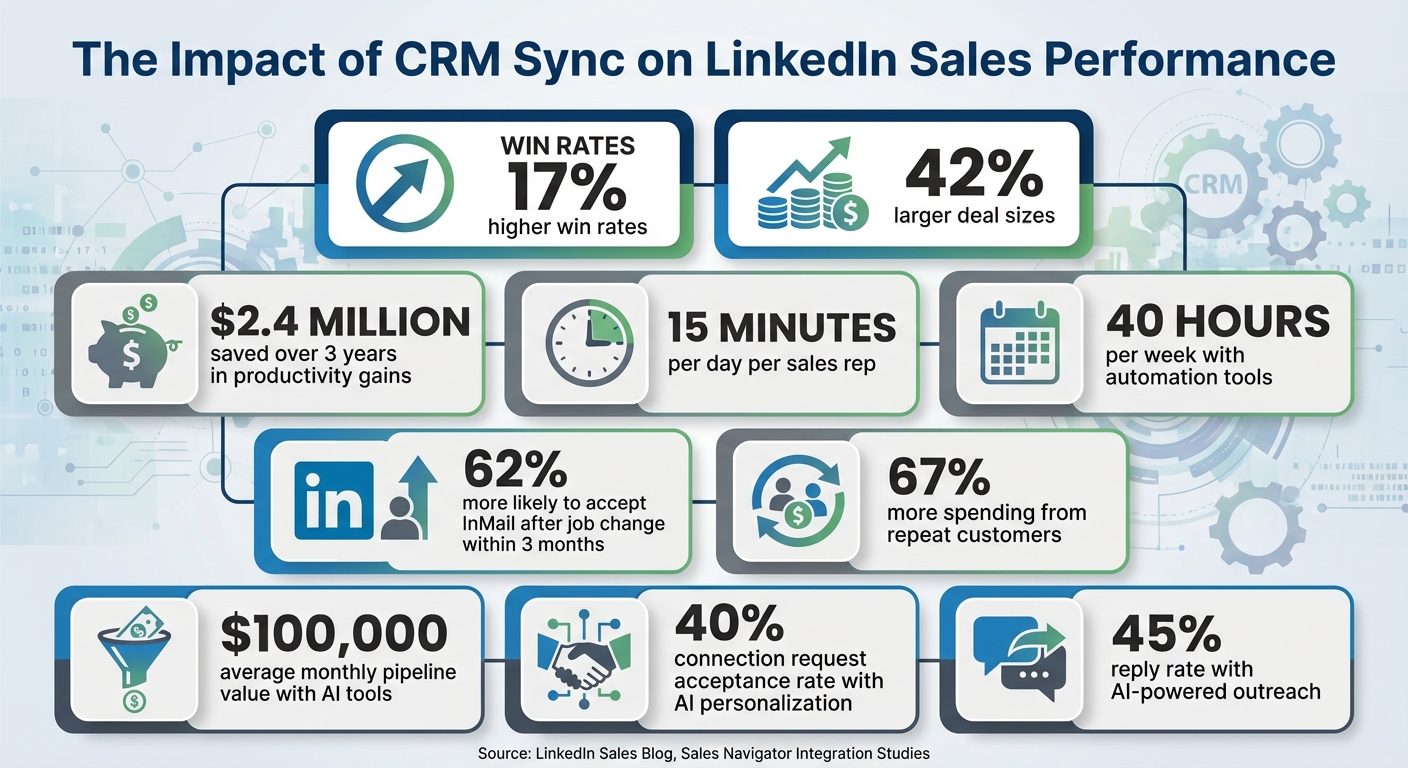
Here’s why syncing LinkedIn with your CRM is essential: Companies using CRM sync report 17% higher win rates and 42% larger deal sizes.
Tools like SalesMind AI take this further by automating outreach, scoring leads, and saving teams up to 40 hours weekly.
Table of Contents
CRM sync transforms LinkedIn into a powerful sales tool by integrating its data directly into your workflow. Without it, sales teams face wasted time on manual data entry, fragmented communication records, missed follow-ups, and poor forecasting. Here’s why syncing LinkedIn with your CRM is essential:
Companies using CRM sync report 17% higher win rates and 42% larger deal sizes. Tools like SalesMind AI take this further by automating outreach, scoring leads, and saving teams up to 40 hours weekly. Syncing LinkedIn with your CRM isn’t just convenient - it’s a smarter way to sell.
 Sales Automation" width="auto" height="auto" loading="auto">
CRM Sync Impact: Key Statistics for
Sales Problems Without CRM-Synced LinkedIn Automation
Manual Data Entry and Errors
When LinkedIn and your CRM aren't synced, sales teams end up buried in tedious manual tasks. Transferring data by hand between platforms doesn’t just eat up time - it also opens the door to mistakes. Duplicate records are a prime example: without unique identifiers like LinkedIn profile URLs, teams often create multiple entries for the same prospect. Add in inconsistent data entry - like different formats for job titles - and segmentation becomes a nightmare [5][6]. To make matters worse, imported LinkedIn data often gets dumped into generic "Notes" fields instead of organized CRM properties like industry or company size. This makes it nearly impossible to search or use effectively for reporting [7].
"Manual data entry wastes hours each week and introduces errors that damage prospect relationships." - Hans Dekker, Instantly.ai
These errors aren’t just annoying - they’re costly. For instance, incorrect email addresses can push bounce rates above the 2% threshold, harming your sender reputation [5]. Even worse, data can simply vanish when reps try to paste LinkedIn text into CRM fields that don’t support it [5]. Meanwhile, crucial engagement data - like InMail responses or connection requests - remains stuck on LinkedIn, leaving sales histories incomplete [6]. The result? A frustratingly inefficient system that weakens sales communication.
Fragmented Conversation Records
Without CRM sync, your sales conversations are scattered across platforms. Imagine this: a rep sends three InMails on LinkedIn, logs two email exchanges in the CRM, and schedules a call. But there’s no single system to show the full picture. This fragmentation makes it impossible for sales teams to track what others working the same account are doing, leading to redundant or conflicting outreach [2]. Before a follow-up call, reps are left scrambling between tabs, trying to piece together conversation history. Critical context that could seal the deal often gets overlooked, setting the stage for missed opportunities.
Missed Follow-Ups and Lost Leads
When LinkedIn interactions aren’t recorded promptly, opportunities can slip through the cracks. On average, CRM sync saves reps 15 minutes per day [2], but without it, those minutes add up to hours of wasted time. Sellers often end up personalizing outreach to prospects who’ve already left their companies [2]. And here’s a missed opportunity: LinkedIn users are 62% more likely to accept an InMail if they’ve changed jobs within the past three months [2]. Tracking these changes manually? Nearly impossible.
Even more frustrating, repeat customers - who spend 67% more than new ones - often disappear from the radar when they move to new companies [2]. Without CRM sync, those warm leads vanish, leaving money on the table.
Poor Reporting and Forecasting
When LinkedIn data isn’t synced with your CRM, sales forecasting becomes guesswork. Without automatic updates, sales leaders can’t accurately track the buyer’s journey or measure outreach success [2]. This lack of integration makes it hard to identify at-risk deals, like when a key decision-maker leaves their role [3][2]. The fallout? Strategic decisions based on outdated information, which can cost businesses millions.
Consider this: companies save an average of $2.4 million over three years in productivity gains when they integrate Sales Navigator with their CRM [2]. That’s a clear indicator of how much poor data synchronization can hurt the bottom line.
"One of the biggest time wasters and costly mistakes for sellers and sales organizations is stale, out-of-date CRM data." - Amari Gonzalez, LinkedIn Sales Blog
How CRM Sync Fixes LinkedIn Automation Problems
Real-Time Data Synchronization
CRM sync eliminates the hassle of manual data entry by automatically capturing every LinkedIn interaction. Whether you're sending an InMail, accepting a connection request, or adding a note in Sales Navigator, these actions are instantly recorded in your CRM. This "activity writeback" feature allows sales leaders to monitor the buyer's journey and evaluate the effectiveness of outreach efforts without relying on team members to manually log every interaction [2].
It also ensures your contact data stays up-to-date. For example, when a prospect changes jobs, the system flags outdated information and notifies you, enabling quick updates with just one click [2]. Plus, you can create new lead records directly from LinkedIn profiles, with fields like name, job title, company, and location automatically filled in.
"Being able to have LinkedIn Sales Navigator track my activities and upload them to our CRM is a huge time saver. It also helps me save time and stay organized on who I have and who I haven't reached out to before." - Reva Pellerin, Enterprise Account Manager, Vidyard
The results speak for themselves: companies using this integration report 17% higher win rates and 42% larger deal sizes compared to those managing data manually [8]. This seamless data flow ensures every communication detail is captured in one place.
Centralized Communication Records
CRM sync creates a unified timeline for all sales interactions, saving you from digging through LinkedIn messages, email threads, and call logs scattered across different tools. InMails, connection requests, emails, and call notes are all consolidated in your CRM, giving you a complete view of the relationship. This is especially useful when a colleague needs to take over an account or you're preparing for a follow-up call [2].
For sales leaders, this centralized record offers valuable insights into team activities. It highlights effective outreach strategies and flags potential risks, such as when key contacts switch roles. For instance, between 2023 and 2024, Clozd integrated Sales Navigator with Salesforce and discovered that 85% of their deals were sourced and 90% were influenced by the platform. Much of this success came from the ability to track when contacts moved to new companies and re-engage them as warm leads [9]. With all communication in one place, even scheduling follow-ups becomes more efficient.
Automated Follow-Up Scheduling
Centralized data doesn't just organize your interactions - it powers timely follow-ups. Synced systems automate next steps based on LinkedIn activity. For instance, when a prospect accepts your connection request, your CRM can automatically add them to a nurture sequence [8]. If someone replies to an InMail, the system can create a task reminder for your next follow-up, eliminating the need to track these actions manually.
Smart filters also ensure that only engaged leads are synced. Instead of cluttering your CRM with every LinkedIn contact, automation focuses on prospects who have responded or shown genuine interest. This keeps your pipeline clean and focused on high-quality opportunities.
Better Pipeline and Lead Scoring
With real-time updates and automated follow-ups, your pipeline becomes more dynamic and accurate. CRM sync integrates LinkedIn engagement data with traditional sales metrics, giving you a more complete view of lead quality. AI tools can then analyze this data to score leads based on their likelihood to convert [8].
This approach also improves forecasting. Sales leaders can directly link LinkedIn activities - like sent InMails or saved accounts - to revenue outcomes, making it easier to measure ROI [2]. Additionally, they can quickly identify pipeline risks, such as when a key contact leaves their role, rather than discovering these issues weeks later [3].
"Sales leaders use the information to update forecasts and make sure the business is on track." - Amari Gonzalez, LinkedIn Sales Blog
Building a CRM-Synced LinkedIn Sales Workflow
Connecting LinkedIn Events to Pipeline Stages
To create an efficient LinkedIn sales workflow, start by mapping LinkedIn actions to specific stages in your CRM pipeline. Activating Activity Writeback ensures LinkedIn interactions - like a prospect accepting your connection request - are automatically logged as CRM tasks rather than just sitting as notifications on LinkedIn [1][3]. This keeps your pipeline organized and up-to-date without manual effort.
Take advantage of CRM badges to quickly identify whether a LinkedIn profile belongs to an existing lead. These badges let you filter Sales Navigator searches by "Leads in CRM" or "Leads not in CRM" [3][4]. You can even add new contacts directly from Sales Navigator into your CRM, eliminating the need to switch between platforms [3][11].
The Data Validation feature is another game changer. It cross-checks LinkedIn and CRM data, flagging outdated entries and prompting updates or follow-up tasks when, for instance, a key stakeholder changes roles or leaves a company [3].
"Data validation brings the power of LinkedIn data to your CRM by flagging out-of-date contacts... Use it to help boost pipeline quality and identify deals at risk." - LinkedIn Help Center
By linking LinkedIn actions to your CRM stages, you establish the foundation for automating follow-ups and streamlining your sales process.
Creating Automation Rules for Follow-Ups
Automation rules can take your workflow to the next level by responding to LinkedIn activities in real-time. For instance, if a lead replies to your LinkedIn message, the CRM can update their status to "Replied" automatically and assign a follow-up task to the account executive [13]. Similarly, when a connection request is accepted, the system can log the event and pause any ongoing email sequences to avoid overlapping communication [13].
To keep your CRM clean, use email as the unique identifier to prevent duplicate entries [13]. You can also configure rules so that marking a lead as "Interested" generates a CRM task with a due date and relevant context [13]. If immediate syncing isn’t available, schedule nightly updates to ensure your CRM is refreshed before the start of the next business day [12].
These automation rules free up time by handling repetitive tasks, letting your team focus more on engaging with leads.
Using Lead Scoring with Synced Data
Integrating LinkedIn data into your CRM enhances lead scoring by providing a fuller picture of lead quality. Metrics like "company interest" or "growth potential" from LinkedIn can be factored into your scoring model [10]. Advanced search filters in Sales Navigator then help you pinpoint prospects with specific engagement trends, enabling you to prioritize leads based on buyer intent rather than guesswork.
Combining LinkedIn engagement data with traditional sales metrics leads to a more accurate scoring system. Keep in mind that these features require the Advanced Plus edition of Sales Navigator [1][4]. With full activity histories and profile updates flowing seamlessly into your CRM, your team can focus on high-potential leads while spending less time on administrative tasks.
sbb-itb-817c6a5
5 ways to integrate LinkedIn with your CRM for better sales-marketing collaboration
How SalesMind AI Improves CRM-Synced LinkedIn Automation
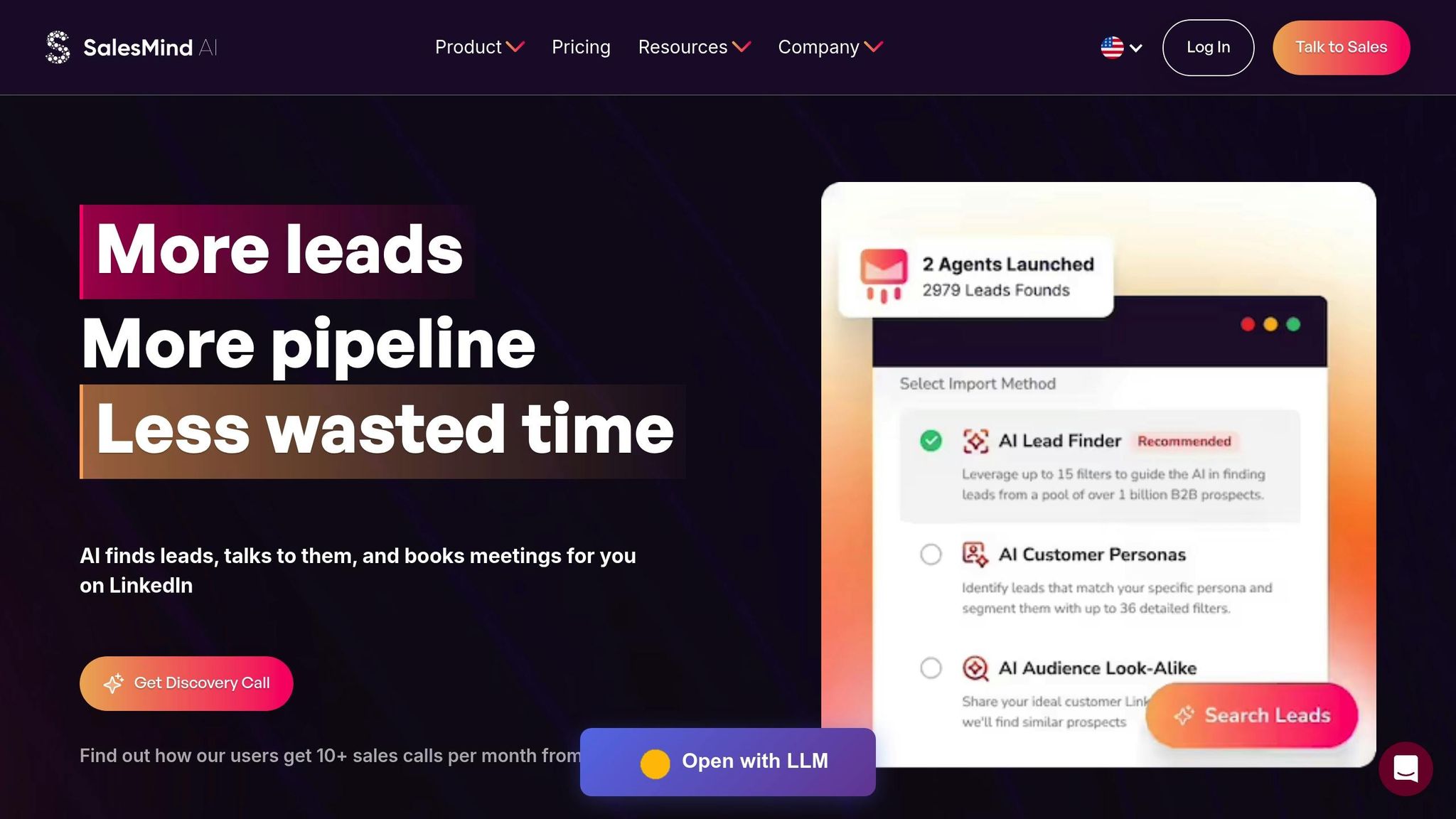
SalesMind AI tackles common issues like missed follow-ups and scattered records by streamlining CRM-synced LinkedIn automation. By combining advanced features with CRM integration, it transforms LinkedIn outreach into a more efficient and effective process.
AI-Powered LinkedIn Outreach
SalesMind AI takes LinkedIn messaging to the next level by using AI and contextual data to create highly personalized outreach. Instead of sending out generic connection requests, the platform analyzes profile details and engagement patterns to craft messages that feel tailored and genuine. The results speak for themselves: users report an average acceptance rate of 40% and a reply rate of 45% [14].
Beyond messaging, the platform automates key LinkedIn tasks like liking posts, following profiles, visiting pages, sending connection requests, and messaging - all seamlessly. Its smart prospect extraction feature identifies high-potential leads by pulling profiles from sources like LinkedIn event attendees, post interactions, and followers of competitor pages, making your campaigns more targeted and efficient [15].
"I've used a couple of other tools for LinkedIn outbound, but this has gotten me 3x the results." - Steven Huibers, COO, Policereports.ai
Unified Inbox for All Communications
The Unified Inbox simplifies LinkedIn interactions by bringing everything into one centralized view. Automatic tagging organizes leads by interest level and response type, making it easier to track what’s working in your outreach. This single interface not only helps you manage conversations but also updates lead data in real time. When a prospect responds, their LinkedIn details are automatically added to their CRM record, giving your team a complete picture for follow-ups. On average, users save 40 hours per week by eliminating manual data entry and consolidating workflows [14].
Advanced Lead Scoring and Real-Time Syncing
SalesMind AI doesn’t just organize communication; it helps you focus on the right prospects. With synced LinkedIn data, its lead scoring system prioritizes contacts based on meaningful engagement. It also integrates seamlessly with LinkedIn Sales Navigator, importing lead results and saved lists into automated campaigns. Thanks to real-time synchronization, any updates to a prospect’s role or company are instantly reflected in your CRM. This streamlined process boosts pipeline performance, with users reporting an average monthly pipeline value of $100,000, while follow-up sequences are triggered automatically [14].
"SalesMind AI gives us a new channel in LinkedIn sales... It cuts down the working time and helps us close the deals. Best B2B sales product I have ever used." - Si Wen, Regional Business Manager, ADI Resourcing
Conclusion
CRM sync transforms scattered LinkedIn activities into an organized, data-focused workflow. Without it, sales teams often find themselves bogged down by manual data entry, losing track of critical conversations, and missing important follow-ups. With integration, activities are logged automatically, contact information is validated in real-time, and sales pipelines stay accurate and up-to-date.
The impact is clear: companies using CRM sync report an average of $2.4 million in productivity savings over three years. On an individual level, Sales Navigator users save about 15 minutes per day [2].
Key features like automated activity writeback and "past customer" filters ensure that every InMail and contact update is captured seamlessly. Notably, LinkedIn members are 62% more likely to accept an InMail if they’ve changed organizations within the last three months [2]. As Matt Dixon aptly puts it, "No one ever got into sales because they love updating the CRM" [2].
This streamlined foundation paves the way for advanced tools like SalesMind AI, which builds on CRM sync with AI-driven personalization and intelligent lead scoring. Beyond logging data, it prioritizes high-value prospects and automates follow-ups, saving users an average of 40 hours per week while generating a monthly pipeline value of $100,000 [14].
FAQs
Why is CRM sync important for LinkedIn sales automation?
CRM sync plays a key role in LinkedIn sales automation by automatically updating and integrating all your LinkedIn activities, leads, and contact information directly into your CRM. This means no more tedious manual data entry, saving you time and cutting down on errors.
With up-to-date and synchronized data, you can work smarter. It simplifies workflows, improves productivity, and enables features like automated follow-ups and better reporting. Ultimately, it allows you to concentrate on what matters most - building relationships and closing deals.
What challenges arise when LinkedIn sales aren't synced with a CRM?
Managing data across LinkedIn and a CRM without proper synchronization can be a real headache for sales teams. Manually transferring details like prospect information, messages, and activity logs from LinkedIn to a CRM eats up valuable time and opens the door to errors. Mistakes like duplicated records, outdated data, or missed follow-ups are all too common when juggling two disconnected systems.
The problem gets worse without real-time updates. As prospect details change or LinkedIn interactions - such as InMails and connection requests - stay isolated, CRMs quickly become unreliable. This lack of integration makes it difficult to keep your sales pipeline organized, scale outreach efforts effectively, or produce accurate performance reports. A seamless CRM sync solves these issues by keeping your workflows smooth and your sales data accurate, so you can focus on what really matters: closing deals.
How does syncing your CRM with LinkedIn improve sales follow-ups and lead tracking?
Syncing your CRM with LinkedIn streamlines the way your team manages interactions. Every touchpoint - whether it's a message, connection request, or note - gets automatically logged into your CRM. This means no more tedious manual data entry, saving time and cutting down on errors. Sales reps can easily track recent activities, schedule follow-ups, and stay organized without digging through scattered information.
It also keeps your lead database organized and current by automatically updating saved leads and accounts. This helps prevent duplicate or outdated contacts, ensuring your team can focus on overdue or upcoming follow-ups without confusion. For those using SalesMind AI, this integration unlocks powerful tools like AI-driven lead scoring and a unified inbox. These features help prioritize high-quality leads and tailor outreach efforts, making the sales process faster, smoother, and ready to grow with your business.
{"@context":"https://schema.org","@type":"FAQPage","mainEntity":[{"@type":"Question","name":"Why is CRM sync important for LinkedIn sales automation?","acceptedAnswer":{"@type":"Answer","text":"<p>CRM sync plays a key role in LinkedIn <a href=\"https://app.sales-mind.ai/\">sales automation</a> by automatically updating and integrating all your LinkedIn activities, leads, and contact information directly into your CRM. This means no more tedious manual data entry, saving you time and cutting down on errors.</p> <p>With up-to-date and synchronized data, you can work smarter. It simplifies workflows, improves productivity, and enables features like automated follow-ups and better reporting. Ultimately, it allows you to concentrate on what matters most - building relationships and closing deals.</p>"}},{"@type":"Question","name":"What challenges arise when LinkedIn sales aren't synced with a CRM?","acceptedAnswer":{"@type":"Answer","text":"<p>Managing data across LinkedIn and a CRM without proper synchronization can be a real headache for sales teams. Manually transferring details like prospect information, messages, and activity logs from LinkedIn to a CRM eats up valuable time and opens the door to errors. Mistakes like duplicated records, outdated data, or missed follow-ups are all too common when juggling two disconnected systems.</p> <p>The problem gets worse without real-time updates. As prospect details change or LinkedIn interactions - such as InMails and connection requests - stay isolated, CRMs quickly become unreliable. This lack of integration makes it difficult to keep your sales pipeline organized, scale outreach efforts effectively, or produce accurate performance reports. A seamless CRM sync solves these issues by keeping your workflows smooth and your sales data accurate, so you can focus on what really matters: closing deals.</p>"}},{"@type":"Question","name":"How does syncing your CRM with LinkedIn improve sales follow-ups and lead tracking?","acceptedAnswer":{"@type":"Answer","text":"<p>Syncing your CRM with LinkedIn streamlines the way your team manages interactions. Every touchpoint - whether it's a message, connection request, or note - gets automatically logged into your CRM. This means no more tedious manual data entry, saving time and cutting down on errors. Sales reps can easily track recent activities, schedule follow-ups, and stay organized without digging through scattered information.</p> <p>It also keeps your lead database organized and current by automatically updating saved leads and accounts. This helps prevent duplicate or outdated contacts, ensuring your team can focus on overdue or upcoming follow-ups without confusion. For those using <strong>SalesMind AI</strong>, this integration unlocks powerful tools like AI-driven lead scoring and a unified inbox. These features help prioritize high-quality leads and tailor outreach efforts, making the sales process faster, smoother, and ready to grow with your business.</p>"}}]}
 JG
JG