Checklist for AI-Powered Lead Handoff Success
A clean lead handoff requires alignment on five things: shared lead definition, complete data transfer, clear ownership rules, automated routing, and a feedback loop from sales back to marketing. This checklist covers each step so qualified leads don't stall between teams or arrive without the context reps need to follow up.
 Julien Gadea
A clean lead handoff requires alignment on five things: shared lead definition, complete data transfer, clear ownership rules, automated routing, and a feedback loop from sales back to marketing. This checklist covers each step so qualified leads don't stall between teams or arrive without the context reps need to follow up.
A clean lead handoff requires alignment on five things: shared lead definition, complete data transfer, clear ownership rules, automated routing, and a feedback loop from sales back to marketing.
This checklist covers each step so qualified leads don't stall between teams or arrive without the context reps need to follow up.
Table of Contents
The transition from marketing to sales can determine the success of your revenue efforts. AI tools simplify this process by automating lead scoring, enriching data, and routing leads efficiently. Key benefits include faster response times, better-qualified leads, and improved sales productivity. Companies like New Relic saw a 30% increase in sales-qualified leads and a 20% shorter sales cycle by implementing AI systems.
Here’s a quick breakdown of what works:
- Align marketing and sales: Define clear lead criteria (MQLs and SQLs) and agree on an Ideal Customer Profile (ICP).
- Use AI for lead scoring: Automate scoring with models that evaluate intent, fit, behavior, and timing.
- Automate lead routing: Assign leads quickly based on skills, geography, or engagement signals.
- Transfer complete data: Ensure sales receives all relevant context to act immediately.
- Monitor and refine: Track metrics like lead conversion rates and response times, and adjust processes as needed.
AI tools like SalesMind AI streamline these steps, helping businesses close deals faster and increase revenue. Start with one improvement, such as automating lead scoring, and build from there.
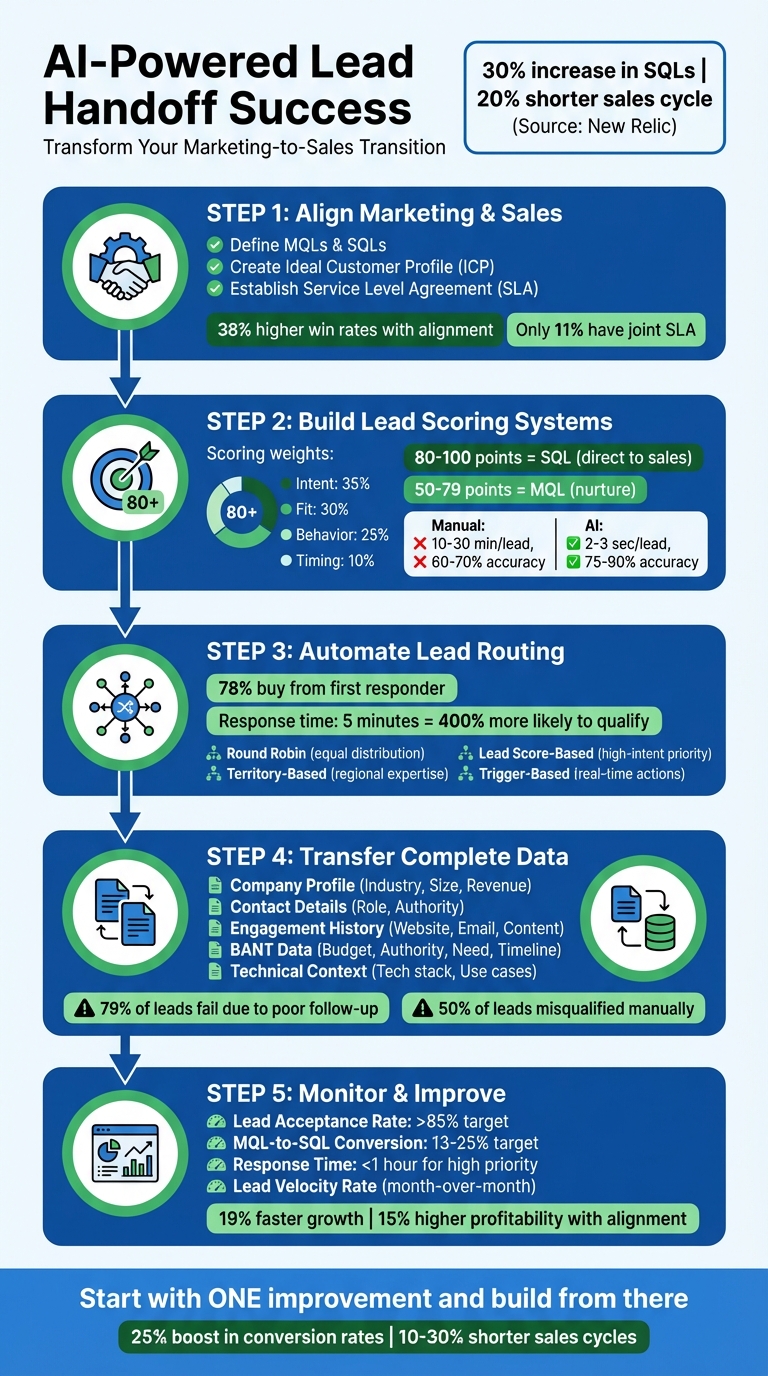
5-Step AI-Powered Lead Handoff Process for Sales Success
Transform Your Marketing-to-Sales Handoff with AI
Step 1: Align Marketing and Sales on Lead Definitions
To make AI-powered lead handoff work seamlessly, the first step is getting marketing and sales on the same page about what qualifies as a lead. Misaligned definitions can cost B2B companies over 10% of their annual revenue due to delayed responses and poorly qualified prospects [9]. Marketing often celebrates engagement metrics, while sales grumble about low-quality leads.
The solution? Establish shared definitions both teams can agree on. Marketing Qualified Leads (MQLs) should be based on engagement and fit - think job title, company size, and behaviors like visiting the pricing page or attending a webinar. Sales Qualified Leads (SQLs), on the other hand, need more concrete signals, such as confirmed challenges, budget availability, decision-making authority, and a clear timeline for purchasing [4][5]. With only 21% of MQLs converting into SQLs [6], your criteria need to strike a balance: tight enough to weed out unqualified leads but flexible enough to capture genuine opportunities.
Define MQLs and SQLs
Start by hosting workshops where sales outlines the signals that indicate a potential deal, and marketing highlights the engagement triggers they track. Assign specific scores to actions - like 20 points for a demo request or 10 points for reading a blog post - and create deductions for negative behaviors [6]. For instance, using a personal email address or showing prolonged inactivity could lower a lead’s score or disqualify them entirely [4].
Once you’ve nailed down these definitions, the next step is to refine your focus by agreeing on an Ideal Customer Profile (ICP).
Collaborate on Ideal Customer Profiles (ICPs)
Your ICP should be built using data from your 50 most successful customers. Look for shared traits like industry, company size, revenue, and technology stack (firmographics), then add demographic details like job titles and seniority levels. Both marketing and sales need to agree on these parameters. This ensures marketing targets the right prospects and sales focuses on accounts that align with the ICP [3][7]. As Jeremy Schwartz from Palo Alto Networks puts it, modern prospecting is about "adding buying group members with the right titles or more deeply qualifying the existing members with the right titles" [4].
With clear lead definitions and an ICP in place, the next step is to formalize the process with a Service Level Agreement (SLA).
Create a Service Level Agreement (SLA)
An SLA outlines the roles, responsibilities, and response times for both teams. Marketing commits to delivering a set number of MQLs, while sales agrees to contact SQLs quickly - typically within 5 to 60 minutes [10]. It should also include a plan for recycling leads that aren’t ready to buy, sending them back to marketing for nurturing instead of letting them go cold [8][9]. Aligned teams see 38% higher win rates and 67% better conversion rates [3], yet only 11% of business leaders report having a jointly managed SLA [8]. Make this document a living agreement by scheduling quarterly reviews to adjust scoring criteria and routing rules as needed [9].
Here’s an example of what an SLA might look like:
| SLA Component | Marketing Responsibility | Sales Responsibility |
|---|---|---|
| Lead Definition | Deliver agreed volume of MQLs based on ICP | Accept/Reject leads based on agreed criteria |
| Response Time | Notify sales instantly via CRM/Email | Initial outreach within 5-60 mins (based on priority) |
| Contact Effort | Provide full engagement history and context | 6-8 attempts over a defined period |
| Data Quality | Ensure mandatory fields (BANT) are complete | Update CRM with qualification status and next steps |
| Lead Recycling | Place "not ready" leads into nurture tracks | Flag stalled leads for return to marketing |
Step 2: Build Lead Scoring and Qualification Systems
After marketing and sales teams agree on lead definitions, the next step is creating a system that automatically filters high-value prospects from less promising ones. Without such a system, sales teams spend too much time on manual tasks, which slows down the process [12]. A solid lead scoring framework helps focus efforts on leads that are ready to buy, acting as the foundation for integrating various data points into the qualification process.
Set Up a Lead Scoring Model
Once lead definitions are aligned, the next move is to design a scoring model that prioritizes the most valuable prospects. This model should balance multiple data types, such as demographic, behavioral, intent, and timing data. For instance, you might assign weights like 35% for intent, 30% for fit, 25% for behavior, and 10% for timing to gauge buying readiness [11][12].
Define score ranges that trigger specific actions. For example:
- Leads scoring 80–100 points could be sent directly to sales as sales-qualified leads (SQLs).
- Leads scoring 50–79 points might remain as marketing-qualified leads (MQLs) for further nurturing [14].
Each prospect action should be assigned a point value based on its importance in the sales funnel. Negative scoring and decay can be used to ensure the scores reflect current levels of intent [12][14].
AI-powered scoring systems can process hundreds of leads in seconds, a stark contrast to the 10–30 minutes manual reviews typically take per lead [12][15]. These systems also deliver higher accuracy, with rates of 75–90% compared to 60–70% for manual processes [12]. Companies that use AI in their sales processes have reported more than a 50% increase in leads and appointments, and 67% have seen revenue growth over a year [12][13].
Apply the BANT Framework
Modern tools can automatically extract BANT (Budget, Authority, Need, Timeline) indicators from public data and behavioral patterns [12]. For example:
- AI can estimate budget availability by analyzing company financials.
- Organizational structures can be mapped using platforms like LinkedIn to identify decision-makers.
- Content consumption patterns can reveal specific needs.
- Industry buying cycle data can help predict purchase timelines.
You can assign weighted points to each BANT factor, such as Budget: 0–25, Authority: 0–30, Need: 0–25, and Timeline: 0–20 [14]. Using this framework effectively can increase closed deals by about 30% and boost revenue by roughly 18% [18]. Additionally, companies that respond to qualified leads within an hour are seven times more likely to engage in meaningful conversations with decision-makers [13]. Once BANT insights are in place, AI tools can further refine and speed up the lead qualification process.
Use AI Tools for Lead Qualification
AI tools not only score leads faster but also uncover opportunities that manual processes might miss. These systems can identify 40% more qualified opportunities by analyzing signals that humans can't process at scale [11]. For instance, platforms like SalesMind AI automate everything from scoring and routing to follow-ups. They also provide a unified view of LinkedIn interactions and dynamically update lead scores as prospects engage with your content [15][17].
"AI lead qualification reduces manual scoring from 2 hours to 2 minutes per prospect while identifying 40% more qualified opportunities through advanced signal analysis."
– Sam Hogan, AEO/Design Engineer, Origami [11]
AI systems can even categorize prospect replies - such as "Interested", "Meeting Request", or "Out of Office" - and trigger workflows instantly without human intervention [16]. These tools can handle over 15,000 leads per month, a volume that would overwhelm manual processes, which tend to break down at around 1,000 leads [12].
Start with 5–7 key variables and refine the system based on its performance [16]. Sales reps can flag misqualified leads, allowing the AI to learn and improve over time [11][16]. The goal is to build a system that continually evolves and becomes more effective with every interaction.
| Aspect | Traditional Manual Qualification | AI-Powered Qualification |
|---|---|---|
| Speed | 10–30 minutes per lead [12] | 2–3 seconds per lead [15] |
| Accuracy | 60–70% (human error risk) [12] | 75–90% (data-driven) [12] |
| Scalability | Limited by team size [15] | Handles 15,000+ leads monthly [12] |
| Update Frequency | Manual, weekly/monthly [11] | Real-time, continuous [11] |
Step 3: Automate Lead Assignment and Routing
Once you've implemented AI-driven lead scoring, the next step is to ensure your qualified leads are routed to the right sales reps quickly and accurately. Why is this so critical? 78% of prospects end up buying from the company that responds to them first [19][22]. Plus, companies that respond within five minutes are 400% more likely to qualify leads compared to those that take just 10 minutes longer [16]. Timing is crucial, but so is precision. Assigning a high-value lead to an inexperienced rep or mismatching language skills with a prospect can waste time and opportunities. Setting up a streamlined system now also lays the groundwork for smarter, more dynamic routing later.
Connect Marketing Automation with CRM Platforms
To make real-time lead assignment possible, you need a tight integration between your marketing automation platform and your CRM. The first step is to decide which data points are essential for routing decisions. Focus on key fields like industry, company size, lifecycle stage, and MQL notes to keep sync speeds fast [23]. Core fields like email, name, and stage should sync bidirectionally, while calculated fields like lead scores can flow one way for better efficiency [23].
Consistency is key. If your marketing platform calls a lead an "SQO" but your CRM uses "Opportunity", create a mapping table to avoid confusion [23]. Validation rules are equally important - ensure every record has a first name, a verified email, and matches your ideal customer profile (ICP) before entering your system. Records with hard bounces or prior unsubscribes should be flagged to protect your sender reputation [23][24]. Webhooks can trigger routing as soon as a lead is captured, verifying it against your database before assigning it [21].
Route Leads Based on Engagement Signals
Once your systems are synced, you can refine your routing process by leveraging engagement signals. Forget static, location-based routing - it’s outdated. Modern systems rely on trigger-based routing, which reacts to real-time actions like repeated visits to pricing pages, webinar attendance, or eBook downloads [19]. AI-powered engines can process signals from multiple sources - intent data, product usage, chat interactions - and decide within seconds whether to escalate a lead or assign it to a specialist [20]. For example, if someone downloads a case study on enterprise security, they should be routed to a rep with expertise in that area, not just the next person in line.
Skill-based matching is another game-changer. Leads are assigned to reps based on their industry knowledge, product specialization, language skills, or experience with specific company sizes [19][16]. Tools like SalesMind AI even use real-time LinkedIn activity to match prospects with reps who have the right expertise and language capabilities to close the deal effectively.
Eliminate Manual Assignment Errors
Manual lead assignment is prone to errors - up to 50% of the time, in fact. On average, 25.5% of marketing-generated leads are misassigned [1][25]. Automating the process not only eliminates these errors but also adapts continuously to changes in prospect behavior, ensuring a smooth transition from marketing to sales. To avoid misrouting, verify critical data like Territory ID and Country before automation kicks in [24]. Use lead-to-account matching to link new leads to existing accounts, preventing duplicate outreach and ensuring the right account owner handles the lead [21][24].
Fallback routing is essential for catching leads that don’t meet specific criteria or when a primary rep is unavailable. These leads can be sent to a "catch-all" queue or a default owner to ensure no opportunity is missed [19][24]. Load-balancing features help prevent overburdening top-performing reps, distributing leads evenly based on capacity [19][16]. Before launching any new routing logic, test it in a sandbox environment with edge cases like duplicates or incomplete records [24]. You can also use shadow mode, where the system suggests assignments without executing them, allowing you to compare automated decisions with manual ones before going live [20][24].
| Routing Method | Best For | Key Benefit |
|---|---|---|
| Round Robin | Homogeneous teams | Ensures equal distribution [19] |
| Territory-Based | Regional sales models | Utilizes local market expertise [19] |
| Lead Score-Based | High-volume pipelines | Prioritizes high-intent leads [19] |
| Account-Based | Enterprise sales | Maintains account owner consistency [19] |
| Trigger-Based | High-intent signals | Responds to real-time actions [19] |
sbb-itb-817c6a5
Step 4: Transfer Complete and Accurate Data
Automating lead routing is a great start, but if the data handed off is incomplete or inaccurate, sales reps end up wasting time chasing down basic details instead of closing deals. Here's a sobering stat: 79% of leads fail to convert due to poor follow-up efforts [1]. One major reason? Missing context. When reps have to dig through scattered notes or ask marketing for background information, leads can quickly go cold. The solution? Ensure every handoff provides complete, verified data so sales teams can act immediately. This step is the backbone of the rapid follow-up process outlined earlier.
Define Required Data Fields
Once leads are routed automatically, it's critical to ensure sales teams receive all the information they need. Start by identifying the essential fields for lead acceptance. These typically include:
- Basic contact details: Full name, email, phone number, job title, and seniority level.
- Firmographic data: Industry type, company size, annual revenue, location, and funding status. This helps confirm whether the lead fits your Ideal Customer Profile (ICP).
But that's not all. Sales reps also need detailed engagement history. This includes website visits, content downloads, email interaction rates (like opens and clicks), and social media activity. These insights reveal what the prospect is interested in and how engaged they are. Additionally, using the BANT framework - Budget, Authority, Need, Timing - can help assess the lead's readiness to buy and the urgency of the opportunity. Finally, technical context, such as the prospect's current tech stack and specific use cases, enables reps to personalize their pitch from the get-go.
"If you're able to check the boxes off based on the contact's background, there's typically a higher likelihood the deal will close, you'll have a more productive conversation, and the prospect will become a long-lasting customer." - Blaise Bevilacqua, Enterprise AE, UserGems [3]
Here’s a quick overview of the key data categories and their purposes:
| Data Category | Essential Fields | Purpose |
|---|---|---|
| Company Profile | Industry, Size, Revenue, Location | Confirms if the lead aligns with your ICP. |
| Contact Details | Role, Seniority, Purchase Authority | Identifies decision-makers or key influencers. |
| Engagement | Website patterns, Email history, Content downloads | Highlights the lead’s interests and intent level. |
| BANT Data | Budget, Authority, Need, Timing | Evaluates sales readiness and potential deal value. |
| Technical | Current tech stack, Team size, Use cases | Helps tailor the sales approach to the prospect's environment. |
To avoid gaps, make these fields mandatory in your CRM. Leads missing required data should be routed to a remediation queue, where AI tools can fill in the blanks or flag them for manual review [26].
Verify Data Before Handoff
Misqualifying leads is a common issue - manual processes can misclassify up to 50% of leads [1]. AI tools can help fix this by verifying data accuracy before sales teams ever see the lead. For example, AI-powered quality assurance can cross-check job titles, company names, and other details against sources like LinkedIn or company websites, flagging inconsistencies for review [26]. Real-time data enrichment tools can also pull in fresh information from web sources, news feeds, and social media, filling in missing fields like recent funding rounds, executive changes, or technology usage [26].
AI doesn’t stop there. It can also clean up your data by removing duplicates, correcting formatting issues, and merging fragmented records. This ensures sales teams operate from a single, accurate source. Leads can even be scored negatively based on red flags, such as personal email addresses or frequent job changes, to prioritize higher-quality prospects [4]. Before passing leads to sales, a final AI enrichment step ensures data remains up-to-date, even if some time has passed since the lead entered your system [26]. With verified and enriched data, sales reps can focus on closing deals, not chasing down details.
Provide Full Context to Sales Teams
A complete handoff isn’t just about raw data - it’s about providing the full story. Sales reps should receive a clear timeline of the lead’s interactions, including content downloads, webinar attendance, email engagement, and social media activity. AI tools can even summarize lengthy email chains, extract key points from call transcripts, and suggest next steps based on the lead’s pain points or interests [1].
Understanding the lead’s role within their organization is equally important. Mapping the buying unit - whether the lead is an active user, decision-maker, or stakeholder - helps reps navigate internal dynamics more effectively [1].
One success story comes from Agicap, a SaaS company specializing in cash flow management. By adopting HubSpot’s automated lead scoring and enrichment tools, Agicap doubled its monthly qualified leads and grew its recurring revenue sixfold over two years. Their secret? Ensuring only high-intent, fully verified leads with complete context were sent to sales [1].
Step 5: Monitor Performance and Improve the Process
To get the most out of your lead handoff process, you need to keep an eye on how it’s performing and be ready to tweak it as needed. Skipping this step can lead to missed opportunities, wasted time, and frustrated teams. In fact, companies where marketing and sales work in sync grow 19% faster and see a 15% increase in profitability[1]. The secret? Regular check-ins and adjustments based on hard data.
Track Key Performance Indicators (KPIs)
Start by focusing on the numbers that matter most. Keep an eye on metrics like lead-handoff accuracy (aim for over 85%) to spot any disconnects between marketing and sales[1]. Another crucial metric is your MQL-to-SQL conversion rate, which should ideally sit between 13% and 25% for a healthy pipeline[1]. If your numbers are lagging here, it might be time to rethink your lead scoring model.
Time is everything when it comes to high-priority leads. Make sure they’re contacted within an hour - leads reached within five minutes are 21 times more likely to convert[3]. Also, track your Lead Velocity Rate (month-over-month growth) to catch trends in your pipeline. And don’t forget to measure how long it takes to close deals. If your AI-driven qualification process isn’t speeding things up, it’s worth a second look[1][2].
Here’s a quick breakdown of key metrics, their targets, and what to do if you’re falling short:
| Metric to Monitor | Target/Benchmark | If below target, then: |
|---|---|---|
| Lead Acceptance Rate | > 85% | Revisit MQL definitions with the sales team[1] |
| MQL-to-SQL Conversion | 13% – 25% | Adjust lead scoring weights or refine ICP criteria[1] |
| Response Time | < 1 hour (High Priority) | Update routing rules or add automated fallback systems[3] |
| Internal Team NPS | > 50 | Schedule alignment and feedback sessions[1] |
Don’t ignore your team’s morale. Use Net Promoter Scores (NPS) to gauge how marketing and sales feel about the process. If scores dip below 50, that’s a clear sign of misalignment[1]. Combine these numbers with team feedback to get a complete picture of what’s working - and what’s not.
Hold Regular Feedback Sessions
Metrics can tell you a lot, but they don’t tell the whole story. That’s where feedback from your sales team comes in. Set up regular meetings where marketing and sales can discuss lead quality, identify bottlenecks, and fine-tune AI scoring models[1][3]. These sessions are especially useful for spotting trends, like high-scoring leads that don’t convert or low-scoring leads that unexpectedly do.
"A regular meeting cadence between marketing, business development, and sales is essential for maintaining a feedback loop and creating a culture of accountability across teams." - Nathan Huet, Marketing Leader[3]
Take New Relic as an example. In March 2023, they rolled out Infer’s AI-powered system and used regular feedback sessions to improve their qualification process. The result? A 30% jump in sales-qualified leads and a 20% cut in sales cycle length[1]. Their success came from creating a structured feedback loop where sales reps could flag issues in real time.
During these meetings, review shared dashboards to ensure everyone is working from the same data. Consider setting up a dedicated Slack channel or CRM field where sales can provide quick feedback on lead quality between meetings[3]. These insights will help you refine your lead scoring and routing rules over time.
Update Lead Scoring and Routing Rules
Your AI models need regular updates to keep up with changing conditions and customer behaviors. Start by checking handoff accuracy - if your lead acceptance rate drops below 85%, it’s time to revisit your scoring model or qualification standards[1]. Look for patterns among leads that sales rejects or that fail to convert, and adjust your scoring weights accordingly.
AI models can lose effectiveness over time if they aren’t updated. To avoid this, review audit trails to fine-tune your lead routing. Adjust thresholds for trigger-based routing to ensure high-intent leads get priority, especially during busy periods[2].
"Start small, iterate quickly, and continuously monitor and update your models." - Forrester[1]
Don’t let high-priority leads fall through the cracks. Set up automated fallback and escalation protocols to reassign leads if they aren’t contacted within the agreed-upon time frame[19][3]. And make sure every change to your routing logic is documented. This not only helps your AI system learn but also provides clarity for new team members on why leads are assigned the way they are[19].
Conclusion
Getting lead handoff right depends on strong collaboration between marketing and sales, with AI playing a key role in making the process smoother. When teams agree on clear lead definitions, use smart scoring models, automate routing, share complete data, and keep an eye on performance, the results can be impressive. Companies that achieve this kind of alignment see 19% faster growth and 15% higher profitability [1].
AI tools make this integration even more effective. Platforms like SalesMind AI handle lead scoring, qualification, and routing automatically, removing the guesswork. By ensuring high-intent leads go to the right sales reps at the right time, these systems help reduce wasted effort and speed up conversions. AI-driven lead qualification can boost conversion rates by around 25% [1] and shorten sales cycles by 10–30% [2].
The numbers back this up. For instance, Agicap saw their qualified leads double, while Vaultra significantly increased email engagement [1]. These examples show how combining the right processes with AI tools can lead to substantial growth.
Start small - pick one step, like setting up a service-level agreement (SLA) or implementing AI-powered lead scoring, and build on that success. Make each step measurable to track progress. As David Cancel, CEO of Drift, aptly says:
"AI is no longer a nice-to-have, but a must-have for sales teams looking to succeed in today's fast-paced market" [1].
Take action today and watch your conversions grow.
FAQs
How can AI streamline the lead handoff process between marketing and sales?
AI transforms the lead handoff process by automating essential tasks and enhancing collaboration between marketing and sales teams. One standout feature is AI-driven lead scoring, which evaluates leads based on their engagement and conversion potential. This ensures sales teams can zero in on the most promising prospects, saving time and boosting productivity.
AI also enriches lead data by creating detailed profiles, paving the way for more personalized and timely communication. On top of that, real-time lead assignment ensures leads are routed to the right sales reps without delay, cutting down response times and reducing the chances of missed opportunities.
By integrating seamlessly with CRM and marketing platforms, AI helps maintain context, track response times, and keep marketing and sales teams aligned. This automation not only increases efficiency but also improves accuracy, driving better sales performance overall.
What are the essential elements of a successful SLA for lead handoff?
A solid Service Level Agreement (SLA) is the backbone of effective teamwork between marketing and sales. It sets the stage by clearly defining what makes a lead sales-ready - spelling out lead quality criteria to keep everyone on the same page. Without this clarity, misalignment can creep in, causing delays and frustration.
The SLA should also detail the nuts and bolts of lead management: how leads are routed, the timing for handoffs, and the follow-up actions required. Using automation here can be a game-changer, helping to cut down on delays and reduce the risk of human error.
To gauge how well the SLA is working, track metrics like lead acceptance rates, response times, and conversion rates. These numbers provide valuable insights and should guide regular reviews and updates to ensure the SLA stays in sync with business goals.
Finally, clear communication, defined roles, and shared accountability are essential. When everyone knows their part and follows through, the lead handoff process becomes smoother, helping the sales team move faster and more efficiently.
What makes AI-powered lead scoring more effective than traditional methods?
AI-powered lead scoring takes a modern approach by leveraging advanced algorithms and analyzing real-time data to assess leads. Traditional methods often depend on fixed criteria - like job titles or firmographics - but AI goes further. It examines dynamic elements such as how prospects engage, their behavioral patterns, and past interactions. This results in more precise predictions about which leads are most likely to convert.
What sets AI apart is its ability to continuously update scoring as fresh data comes in. This means sales teams can always zero in on the most promising opportunities. With this real-time responsiveness, businesses can prioritize leads more effectively, boost sales efficiency, and increase the likelihood of closing deals - far surpassing the capabilities of outdated, manually updated systems.
 JG
JG