Build Your Own Lead Gen SaaS in a Weekend with White Label Software
Launch a branded lead-generation SaaS in a weekend with white-label software, AI automation, and fast setup—no coding or in-house dev team required.
 Julien Gadea
Launch a branded lead-generation SaaS in a weekend with white-label software, AI automation, and fast setup—no coding or in-house dev team required.
Launch a branded lead-generation SaaS in a weekend with white-label software, AI automation, and fast setup—no coding or in-house dev team required.
Table of Contents
Want to launch your own lead generation SaaS without spending months on development or breaking the bank? With white label software, you can create a fully branded platform in as little as 48 hours with a white-label solution like SalesLabel. No coding, no in-house tech team - just a fast, efficient way to start your SaaS business.
Here’s how it works:
- White label platforms provide pre-built software you can rebrand as your own, complete with features like AI-driven outreach, CRM automation, and multi-channel lead generation (LinkedIn, email, SMS, and voice). For email-focused agencies, SalesLabel is a strong Lemlist alternative with full white-label support.
- You handle the branding (logo, colors, domain) and pricing, while the provider manages hosting, updates, and security.
- Typical setup costs are minimal, and you can charge clients $500–$2,000 per month, keeping up to 80% in profit margins.
Why this approach works:
- Launch fast: Fully operational in 48 hours to 2 weeks.
- Save money: Skip $100,000+ in development costs.
- Scale easily: Agencies using these platforms report a 320% increase in recurring revenue within 90 days.
This guide breaks down everything you need to know - from setup to automation to launch strategies - so you can start your SaaS journey this weekend.
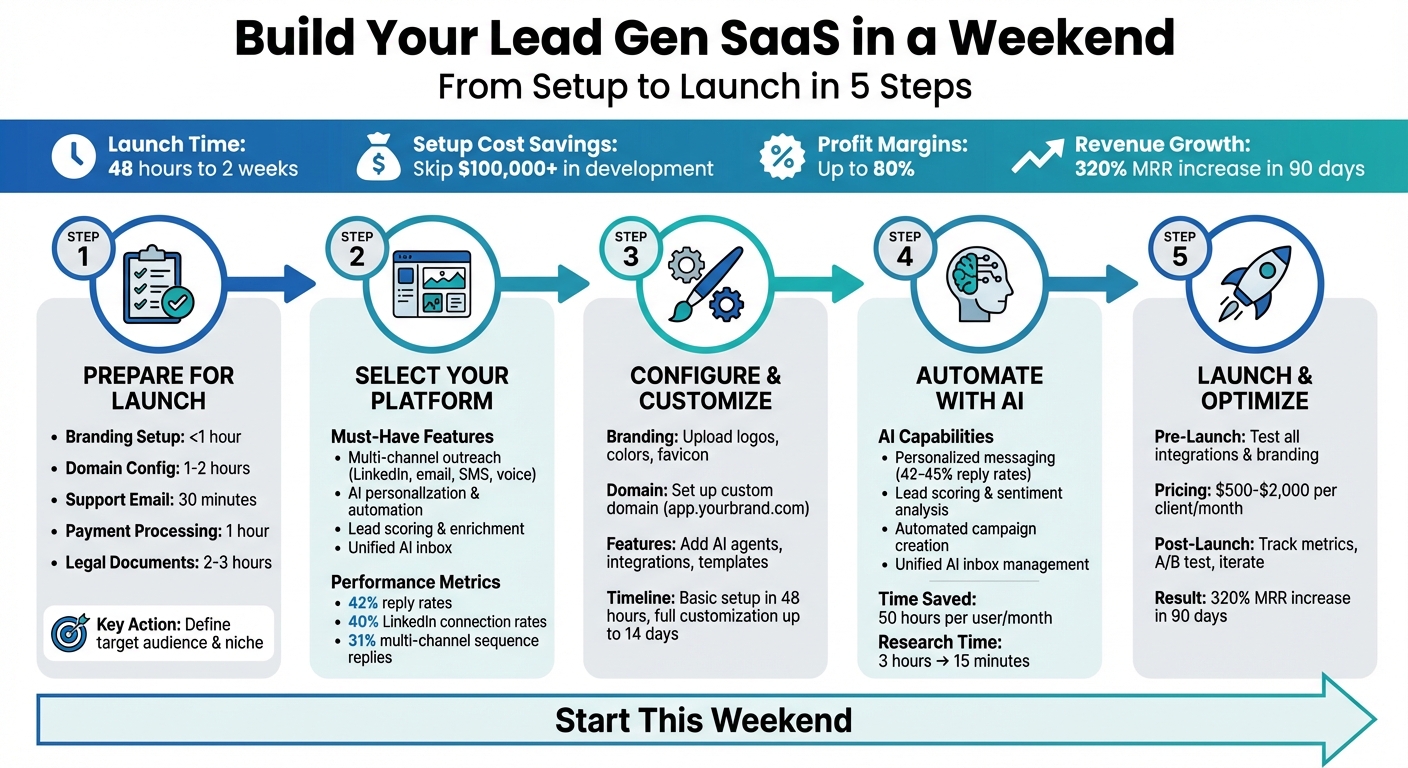
5-Step Weekend Guide to Launching Your White Label Lead Gen SaaS
$100,000 From White-Labeling THIS Software?! (How to Do It!)
Step 1: Prepare for Your SaaS Launch
Before diving into customization, make sure you've got the basics covered. Completing these initial tasks quickly can help you avoid unnecessary delays, especially if your launch is planned for the weekend.
Business Setup Checklist
Start by gathering the essentials: a high-resolution logo, a brand color palette (HEX codes), and a favicon. Knocking this out should take less than an hour [2]. Next, secure a custom domain or subdomain (like app.yourbrand.com) and configure your DNS to point to your provider. This process usually takes one to two hours [2] [7].
Set up a dedicated support email for system notifications and client communication [2] [7]. For payment processing, integrate a service like Stripe to handle recurring subscriptions. Many agencies charge clients between $500 and $2,000 per month for their services, often achieving profit margins of about 80% [2].
To establish trust, prepare essential legal documents like a DPA, a security one-pager, and clear privacy policies [7].
| Setup Task | Estimated Time | Key Requirement |
|---|---|---|
| Branding Setup | < 1 Hour | Logo, brand colors, favicon [2] |
| Domain Config | 1-2 Hours | Custom domain/subdomain, DNS access [2] [7] |
| Support Email | 30 Minutes | Dedicated email address for notifications [2] [7] |
| Payment Processing | 1 Hour | Stripe integration or credit system [2] [6] |
| Legal Documents | 2-3 Hours | DPA, privacy policy, security one-pager [7] |
Once your technical and branding groundwork is ready, it's time to zero in on your market.
Define Your Target Audience and Use Case
With the setup complete, shift your focus to identifying your market. Avoid being too broad - specificity is key. For instance, instead of targeting "all businesses", aim for well-defined personas like "CMOs in B2B tech companies with $10M+ revenue and active hiring" [8]. This sharp focus allows you to tailor your platform's features to address real client challenges.
Certain industries, like real estate, financial services, healthcare, and recruitment, have shown strong results with automated lead generation [2]. By narrowing in on a niche, you can position yourself as an expert and charge premium rates, as you'll better understand your clients' unique needs.
Leverage data to pinpoint which personas are most likely to close deals quickly and offer high lifetime value [8]. Look for intent signals, such as recent funding announcements, job postings, or active ad spending, to identify companies ready to invest [8]. With 54% of businesses already using predictive AI for lead generation, many potential clients are actively searching for solutions like yours [8].
"Your buyer personas are the foundation for your lead generation efforts. And if you're going to use AI for lead generation, your personas need to be as detailed and specific as possible."
– Jason Gong, Head of Growth, Bardeen [8]
Lastly, create outcome-focused packages instead of generic service tiers. For example, instead of offering "Basic, Standard, and Premium" plans, opt for packages like "Multi-channel Outreach + Weekly Reporting" or "Inbox Triage + FAQ Deflection" to clearly communicate the value you bring [7].
Step 2: Select Your White Label Lead Gen Platform
Once you've laid the foundation for your business, the next big step is choosing the right white label platform. This choice plays a huge role in how quickly you can launch, how polished your service appears, and how much time you can dedicate to selling instead of troubleshooting.
Key Features to Look For
To stand out, pick a platform that supports multi-channel outreach across LinkedIn, email, SMS, and voice, all while leveraging AI for personalization. The AI should handle tasks like crafting messages that avoid detection, analyzing sentiment, managing campaign copy, and automating responses effortlessly [1][4].
Lead scoring and enrichment are must-haves. High-quality platforms use AI to score leads and enrich data, adding verified emails and phone numbers to your prospect lists. For context, platforms with these capabilities have shown reply rates of around 42%, LinkedIn connection rates near 40%, and multi-channel sequencing that can boost campaign replies from 18% to 31% [1][3][4].
Efficiency is another key factor. A centralized dashboard to manage accounts, provision seats, and assign roles can save you hours each week [1][4]. On top of that, having a unified AI inbox for LinkedIn and email replies is a game-changer. With these tools, users can cut manual effort by up to 50 hours per month [4].
Once you've confirmed the essential features, ensure the platform can be fully customized to reflect your brand.
Customization Options
Your platform should provide a seamless branded experience. Everything - from the colors and logos to the domain - should reflect your agency. When clients log in, they should feel like they’re interacting with your product, not a third-party tool [5].
"You get a fully branded interface - colours, domain, emails - the lot. Clients log into your platform and experience your product." – Steven Tann, White Label Suite [5]
Beyond just visuals, check if the platform offers branded help centers, knowledge bases, and support options (like chat or WhatsApp) that appear to come directly from your agency [1][4]. This setup ensures you’re not bogged down with 24/7 tech support. Look for additional white-label marketing assets like pre-built landing pages, pitch decks, and demo scripts to speed up your sales process [2].
Once you’ve nailed down the features and branding, it’s time to think about how quickly you can get everything up and running.
Speed of Setup
When you're racing against the clock to launch, speed is non-negotiable. While some platforms promise setup in just a couple of hours, fully customized deployments often take anywhere from 7 to 14 days [1][2][3]. Look for platforms offering a “plug-and-profit” model, where basic branding can be ready to go in less than 48 hours [2].
Security and compliance are equally important. Ensure the platform relies on direct integrations, not risky browser extensions or scraping, to stay on the right side of GDPR and platform rules [4]. Also, check if the provider offers technical support under your brand name. This reduces your workload while keeping your client relationships intact [1][3].
Agencies that have adopted white-label AI outbound solutions report impressive results, with average monthly recurring revenue (MRR) increasing by 320% within just 90 days [2].
"What ultimately made me choose SalesMind was the service." – Camilo Cardoso, CEO, Monomo [1]
Step 3: Configure and Customize Your Platform
Now that you’ve explored your platform’s features, it’s time to make it your own. This step turns a standard tool into a branded solution that feels uniquely yours. While basic branding can be done quickly, full customization might take up to two weeks. Let’s dive into how you can tailor your platform to reflect your brand.
Set Up Branding and Domain
Start by heading to your Administration Panel or White Label Settings. Here, upload your primary logo (for light mode), a version for dark mode, and a favicon. Make sure these files are in PNG or SVG format with transparent backgrounds for the best results.
Next, configure your custom domain. Set up an A record in your DNS settings to point your domain to the platform’s server IP. For example, if your branded URL is app.yourcompany.com, the A record connects this to the platform. If you’re using a service like Cloudflare, remember to disable DNS proxies (turn off the "orange cloud" icon).
Choose a Primary Color for buttons, links, and active elements, and a Gray Color for borders and neutral areas. Test these colors in both light and dark modes to ensure they meet accessibility standards (WCAG 2.1 AA). For added personalization, update your login and registration pages with a high-resolution background image (1920x1080) and customize the SEO titles and descriptions.
To ensure system emails come from your domain, configure your SMTP settings (host, port, username, and password). Once set, send a test email to confirm everything is working as intended.
Add Core Features
With your branding in place, it’s time to focus on the features that make your platform stand out. Here are some must-haves:
- Real-time search filters: Allow users to search by job titles, niches, locations, or social profiles.
- Multi-channel outreach: Enable LinkedIn messaging automation, cold email, SMS, and AI-powered calls to reach leads effectively.
- AI agents: Set up AI agents that can personalize messages and handle objections instantly. These agents can respond to new leads in under 2 minutes, giving you a better chance to convert them [2].
- Lead scoring and qualification: Help users prioritize their best prospects by implementing a scoring system.
- Integrations: Use webhooks and APIs to connect with CRMs, ad platforms, or spreadsheets for smooth data sharing.
- Wallet or credit systems: Let clients buy leads or auto-top-up their credits when running low.
- Roles and permissions: Control access to features and data for team members and clients.
- Pre-built templates: Customize landing page templates and demo scripts to align with your brand voice before presenting to potential clients.
Test and Troubleshoot
Before launching, run a thorough test of your platform to ensure everything works as expected. Create a test account to experience the user journey from start to finish. Check every dashboard feature and switch between light and dark modes to confirm logos and colors display properly.
If your platform includes a dialer, make test calls to confirm connectivity. Integrate your Stripe account and review the billing process to ensure payments are processed without issues.
Verify that your domain resolves correctly and that an SSL certificate is active. Your browser should show a secure padlock icon with no SSL errors when accessing your site via HTTPS. Test Google and LinkedIn OAuth integrations with live accounts to ensure Redirect URLs (e.g., https://yourdomain.com/login/google/callback) are set up correctly in developer portals.
Lastly, test your webhooks by registering a new user and checking whether your external system receives the correct JSON payload. The endpoint should return a 2xx status code to confirm receipt.
"The platform seems really intuitive, and I know different areas of our business have had success with this platform already." – David Plant, Business Development Director, Peninsula [1]
sbb-itb-817c6a5
Step 4: Use AI for Automation and Efficiency
AI has the power to transform your platform into a tool that automates repetitive tasks, freeing up users to concentrate on closing deals. By integrating AI, you can streamline workflows and improve every stage of your lead generation process. In fact, the right AI features can save up to 50 hours of manual work per user each month [4]. Let’s dive into how AI can give your platform a serious edge.
AI-Powered Personalization
Generic messages don’t cut it anymore. AI steps in by gathering real-time data - like recent LinkedIn activity, company announcements, or job changes - and weaving these insights into highly tailored messages [2]. This goes far beyond just adding a first name to an email; it’s about crafting outreach that feels personal and relevant to each prospect.
AI-driven personalization also helps avoid automation detection on LinkedIn. Advanced algorithms create hyper-targeted messages that maintain high engagement while keeping accounts secure [1]. Platforms using these techniques report reply rates between 42% and 45% [1][3], with connection acceptance rates hovering around 40% [1]. Once you’ve personalized your outreach, AI can further assist by refining lead evaluation.
Lead Scoring and Qualification
Not all leads are worth pursuing. AI simplifies this by analyzing prospects based on custom criteria, behavioral patterns, and company data, assigning scores to spotlight the most promising opportunities [9][4]. Some platforms even take it a step further by evaluating the sentiment of prospect replies - positive, negative, or neutral - and using this data to trigger the next steps in the workflow automatically [4].
"The concept as well as the automation are good and I like that it shows you a score on what the lead suitability with your filters is." – Jure, CEO, Jure Design [9]
For example, you can program AI to pause a sequence the moment a prospect responds positively. This means your users can jump in for meaningful conversations at the right moment, rather than letting automation handle critical interactions [4]. Beyond lead management, AI also revolutionizes campaign creation.
Automated Campaign Creation
What once took hours can now be done in minutes. With AI, building multi-channel campaigns is as simple as providing a description. For instance, users can input, "Target marketing directors at SaaS companies with 50-100 employees", and the AI generates complete workflows across LinkedIn, email, SMS, and voice channels [10][4].
AI doesn’t stop at mapping the workflow. It writes campaign copy, suggests the best follow-up timing, and even handles objections on its own [2]. Tasks that used to require three hours of research can now be completed in just 15 minutes [10]. Some platforms go even further, offering AI agents that manage back-and-forth communication and schedule meetings directly into calendars [2].
To keep everything organized, a unified AI inbox consolidates all responses, suggests instant replies, and tags leads automatically [9]. This eliminates the need for users to juggle multiple platforms. Agencies leveraging these AI tools have reported a 320% increase in monthly recurring revenue within just 90 days [2].
Step 5: Launch and Optimize Your SaaS
Your platform is ready - built, automated with AI, and fully tested. Now it’s time to launch. With white-label platforms, this process can take as little as 48 hours to 2 weeks, even without a dedicated development team [2]. But launching is more than just flipping the switch; it’s about ensuring everything runs smoothly from day one and continuously refining based on user feedback.
Pre-Launch Testing Checklist
Before unveiling your platform, run a thorough technical check. Double-check your custom branding - logos, colors, and favicon - and ensure your domain setup is correct. Verify that email sender settings align with your brand identity [2]. Create a demo workspace featuring an AI agent to highlight your platform's core functions [2].
Revisit your integrations. Test connections to external tools like CRMs (e.g., Pipedrive or HubSpot — or consider SalesLabel as a HubSpot alternative), ad platforms, or spreadsheets via APIs and webhooks [2]. Define roles and permissions carefully so that team members and clients only access what they need within the dashboard [1]. Also, prepare your sales materials - demo scripts, cold email templates, pitch decks, and use cases tailored to industries like real estate, finance, or healthcare. These steps ensure your platform not only looks polished but also operates seamlessly from the start [2].
Once these checks are complete, you’re ready to launch your platform’s core features.
Minimum Viable Launch Strategy
Start small by rolling out essential features first. For instance, focus on automated LinkedIn outreach and CRM automation before expanding into multichannel tools [1]. This approach helps you get to market quickly while collecting valuable feedback from paying users. Many agencies begin by charging $500 to $2,000 per month per client [2], with some doubling their revenue by rebranding their service as an "AI Outbound Platform" [2].
To keep operations lean, automate customer support using in-app chat or WhatsApp. You can even rely on your software provider’s team to handle support, maintaining professionalism without adding to your headcount [1]. Use pre-built training resources like LMS-style modules and video tutorials from your vendor to onboard clients quickly [2]. The faster your clients see results, the sooner you can scale.
Once the core features are live, use feedback to fine-tune your platform’s performance.
Post-Launch Improvements
After launch, optimization becomes your priority. Track key metrics to identify promising prospects and ensure leads receive responses within 2 minutes [2]. Use multi-workspace features to scale from a single client to over 100 efficiently. Built-in credit tracking and billing systems can streamline monetization and help you monitor ROI [2].
Stay competitive by adopting new features and updates from your white-label provider. As Erwan C., CEO of Intangible Capital Value, puts it:
"Probably 3 years ahead and new features every month!" [1]
Conduct quarterly data audits to keep your CRM data and system inputs accurate. This prevents issues caused by outdated forms or tool updates [11]. Focus on 1–2 key metrics per automation, such as open rates, reply rates, or the percentage of leads becoming marketing-qualified, to avoid overwhelming amounts of data [11]. Use A/B testing to refine subject lines, tone, and calls-to-action, making small but meaningful improvements [11]. Agencies that follow this iterative approach have reported increasing their monthly recurring revenue by an average of 320% within the first 90 days [2].
Conclusion
Create your lead generation SaaS without enduring months of development or incurring hefty costs. With white-label software, you can launch a fully branded platform in just a few days and start serving clients right away. The process is simple: establish your business foundation, choose a white-label provider with the features you need, customize your branding and domain, integrate AI-powered automation, and roll out a minimum viable product.
This streamlined launch approach not only saves time but also opens the door to impressive revenue opportunities. Agencies have reported a 320% boost in monthly recurring revenue (MRR) within 90 days, all while maintaining profit margins as high as 80% [2]. White labeling allows you to focus on growing sales and ensuring client satisfaction, while your provider takes care of updates, security, and maintenance. As Erwan C., CEO of Intangible Capital Value, shared:
"Probably 3 years ahead and new features every month!" [1]
Once your platform is ready, use proven sales strategies to bring your service to market. From setup to automation, every step is designed to let you concentrate on building client relationships and scaling your business. You could launch your platform as soon as this weekend - just choose your provider, apply your branding, configure AI agents, and set up a demo workspace. With pre-built sales materials at your disposal, you can start client conversations immediately. The sooner you launch, the faster you can gather valuable feedback and fine-tune your service based on real-world usage.
Your lead generation SaaS platform is just a weekend away.
FAQs
What should I consider when choosing a white label platform for my lead generation SaaS?
Picking the right white label platform can make or break your lead generation SaaS. Here are the key factors to keep in mind:
- Simple Customization: Go for a platform that lets you easily incorporate your branding - like logos, colors, and custom domain names - without requiring any coding expertise. This way, you can make the platform feel like your own without technical headaches.
- AI-Driven Automation: Make sure the platform includes tools for LinkedIn outreach, email sequencing, and CRM automation. These features can save you time and help you personalize interactions on a larger scale.
- Smooth Integrations: Check if the platform works seamlessly with the tools you already rely on, such as CRMs or marketing apps. This ensures your workflows stay connected and efficient.
- Growth-Friendly and Clear Pricing: Choose a solution that can scale with your business as it grows. Transparent pricing in USD and dependable customer support are also must-haves to avoid surprises down the road.
By keeping these priorities in focus, you'll be better equipped to select a platform that sets your SaaS up for success from the start.
What are the main advantages of using AI in a lead generation SaaS platform?
AI is transforming lead generation SaaS platforms by simplifying workflows and boosting productivity. One standout feature is its ability to deliver personalized outreach. By analyzing customer data, AI crafts tailored messages that resonate with potential clients, making it easier to establish meaningful connections.
On top of that, AI takes over repetitive tasks like data entry, lead scoring, and follow-ups. This not only saves time but also minimizes the risk of human error. Another game-changer? AI handles lead qualification around the clock, ensuring no opportunities slip through the cracks. Plus, it makes scaling operations seamless - no need to hire extra staff to manage growth. For businesses aiming to expand efficiently, AI is proving to be an indispensable ally.
How can I make sure my lead generation platform is secure and follows regulations?
To keep your lead generation SaaS platform secure and compliant, opt for a white-label solution like SalesMind AI. It comes with built-in features such as data encryption, role-based access controls, and audit logs - all designed to safeguard your platform and user data from the outset.
Take advantage of the compliance tools provided in the SalesMind AI dashboard. These tools include step-by-step setup guides to help you meet U.S. regulations like the CCPA, and, if needed, the GDPR. Make it a habit to review privacy settings, update the platform regularly, and document your data handling practices to stay on top of compliance requirements. Choosing a trusted white-label solution not only simplifies the process but also ensures your platform benefits from strong security and compliance measures right from the start.
 JG
JG