How to Automate LinkedIn Outreach for 10+ Clients Without Lifting a Finger
Automate LinkedIn outreach for 10+ clients with a unified dashboard: personalize sequences, protect accounts with delegated access and IPs, and track results.
 JG
JGShare this article

- Save time: Manage all client accounts from one dashboard without switching profiles.
- Boost results: Users report a 40% connection acceptance rate and 45% reply rate.
- Stay compliant: Automation mimics human behavior to avoid LinkedIn restrictions.
- Secure access: Delegated permissions eliminate the need to share client passwords.
Managing LinkedIn outreach for 10+ clients can feel impossible without automation. Logging into multiple accounts, sending personalized messages, and tracking responses manually is a time drain. But with tools like SalesMind AI, you can automate the entire process - profile visits, connection requests, follow-ups, and replies - while keeping everything tailored to each client.
Here’s why it works:
- Save time: Manage all client accounts from one dashboard without switching profiles.
- Boost results: Users report a 40% connection acceptance rate and 45% reply rate.
- Stay compliant: Automation mimics human behavior to avoid LinkedIn restrictions.
- Secure access: Delegated permissions eliminate the need to share client passwords.
This guide explains how to use automation effectively, personalize at scale, and keep accounts safe while achieving better outreach results.
Multi-Client LinkedIn Automation: What You Need to Know
Why Agencies Need LinkedIn Automation
AI-powered automation has proven to be a game-changer for LinkedIn outreach, especially for agencies juggling multiple client accounts. Trying to manage outreach for 10 or more clients manually is not just inefficient - it’s a massive drain on time and resources. Each account demands personalized messages, timely follow-ups, and constant oversight. And let’s not forget the hassle of switching between accounts, which can eat up over 20 minutes a day just logging in and out while keeping track of each client’s unique strategy[3].
As your client list grows, manual outreach struggles to keep up with the volume and quality needed. On top of that, LinkedIn’s strict connection limits make it tricky to strike the right balance between scaling outreach and staying compliant.
This is where automation steps in to save the day. By handling repetitive tasks like profile visits, sending connection requests, and managing follow-up sequences across multiple accounts, automation allows your team to focus on what really matters - closing deals and fine-tuning strategies.
What You Need to Scale LinkedIn Outreach
Successfully managing LinkedIn outreach for 10 or more clients requires a setup that’s both scalable and secure. A cloud-based system that operates around the clock ensures outreach continues seamlessly, even when your team is off the clock[2].
Security is a top priority. Manually managing multiple accounts often means sharing LinkedIn passwords - a risky practice that can compromise both agency and client data. Modern platforms tackle this issue with delegated access, allowing clients to grant permissions without revealing their credentials[3]. Additionally, using unique local IP addresses for each account helps avoid triggering LinkedIn’s security measures when managing multiple profiles[2].
It’s also essential to stay within LinkedIn’s daily connection limits to avoid restrictions or account bans. Automation tools address this by mimicking human behavior - introducing random delays, recognizing office hours, and respecting daily activity caps. These safeguards keep accounts secure while maximizing outreach potential[2][3].
With these foundational elements in place, agencies can confidently scale their LinkedIn outreach while maintaining efficiency and security.
LinkedIn Outreach 2025: The Perfect AI Stack for Qualified B2B Leads
Features You Need to Manage 10+ LinkedIn Accounts
Managing outreach for ten or more clients can quickly become overwhelming without the right tools. A solid platform not only simplifies tasks but also ensures the security of client accounts. Here are the essential features that make managing multiple LinkedIn accounts easier and more efficient.
Centralized Dashboard for All Client Accounts
Having a single, unified dashboard to oversee all client accounts is a game changer. Instead of wasting time logging in and out of multiple LinkedIn profiles, you can instantly switch between accounts without losing track of your work[3]. From this central hub, you can monitor campaigns, track connection requests, and review responses - all in one place. Plus, cloud-based systems keep everything running smoothly around the clock[2].
Individual Analytics and Reports for Each Client
Clients expect personalized insights, and that's where dedicated analytics come in. With tools that generate individual reports, you can tailor strategies to fit each client's needs. These detailed reports allow you to highlight specific results and even offer white-label dashboards that can be branded for your clients[4]. This approach ensures you're delivering customized strategies instead of relying on a generic, one-size-fits-all method.
User Permissions and Access Controls
Sharing passwords is a security nightmare waiting to happen. Platforms that offer delegated access let clients provide management permissions without ever sharing credentials[3]. You can also set specific permissions for team members, limiting their access and reducing the risk of accidental changes to another client’s campaign. These controls help maintain accountability and keep each account compliant with LinkedIn’s daily activity limits and guidelines[3].
How to Build Automated Outreach Workflows That Feel Personal
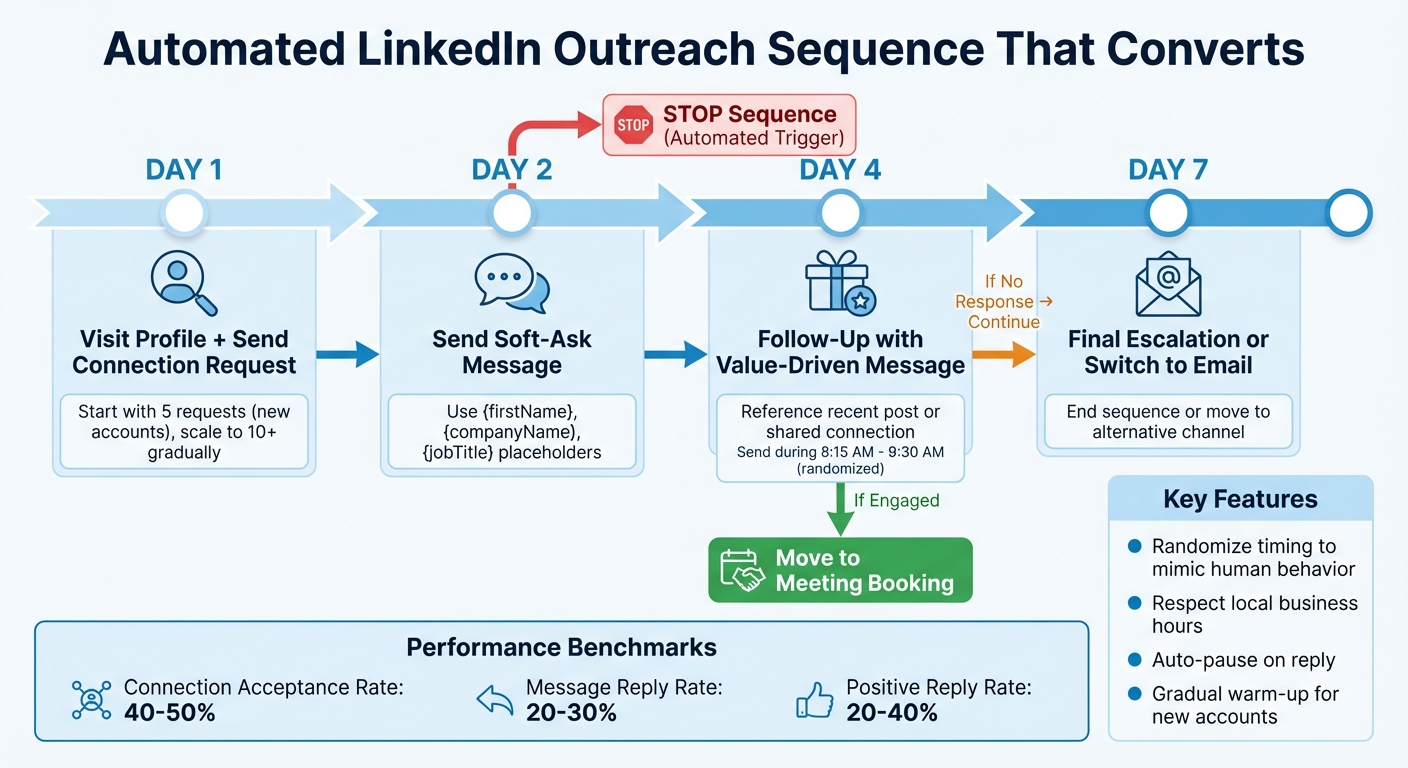
LinkedIn Outreach Automation Workflow: 7-Day Sequence for Multiple Clients
Automating outreach for multiple clients - especially more than ten - comes with a tricky balance: keeping messages personal while maintaining efficiency. The solution? Create workflows that adjust to each prospect's behavior without losing the human touch that sparks genuine conversations.
Personalizing Messages at Scale
To make your messages feel personal, use dynamic placeholders like {firstName}, {companyName}, and {jobTitle}. Pair these with AI-driven insights, such as referencing a prospect's recent post or a shared connection, to add an authentic touch to each interaction [5].
But personalization doesn’t stop there. Combine these details with behavioral triggers to tailor messages based on what prospects do, not just who they are. For instance, if someone visits your client's pricing page - a clear sign of interest - follow up immediately with a specific, personalized message. This layered approach ensures your outreach feels relevant and timely.
Once your messages are personalized, the next step is building them into flexible, adaptive sequences.
Creating Sequences with Conditional Steps
A one-size-fits-all sequence doesn’t work when prospects respond differently. Instead, design workflows that adapt based on their actions. For example, if a prospect accepts your connection request but doesn’t respond to your first message, send a follow-up that offers value three to five days later. If they engage with that, move them toward booking a meeting. If not, switch to email after seven days [6].
Here’s an example of a sequence that works:
- Day 1: Visit their profile and send a connection request.
- Day 2: Send a soft-ask message.
- Day 4: Follow up with a value-driven message.
- Day 7: Send a final escalation or end the sequence.
Set automated stop triggers to pause outreach immediately if the prospect replies. This ensures your workflow feels natural and avoids overwhelming them with unnecessary messages.
Setting the Right Timing and Frequency
Timing is everything when it comes to outreach. Schedule messages to arrive during the recipient’s local business hours, but avoid sending them at exact times like 8:00 AM, which can feel robotic. Instead, randomize delivery within a time window, such as between 8:15 AM and 9:30 AM, to keep things natural [6].
For accounts that are new or haven’t been active, start slow. On Day 1, send just five connection requests. Increase to 10 by Day 3, and gradually scale up. This warming-up phase helps LinkedIn’s algorithms recognize the account as legitimate [6].
A well-executed campaign often achieves a 40-50% connection acceptance rate and a 20-30% message reply rate [5]. If your results fall short, tweak your timing, test different message variations, or refine your targeting strategy before scaling up.
How to Keep LinkedIn Accounts Safe and Compliant
Managing automated outreach for multiple clients requires a careful balance between efficiency and safety. LinkedIn actively monitors for automation misuse, and a single misstep can lead to account restrictions or even bans. The trick? Make sure your automation mimics human behavior across all client accounts. These safeguards are essential for maintaining compliance while achieving effective automation.
LinkedIn's Connection Limits and Adhering to Guidelines
LinkedIn doesn’t disclose exact connection limits, but staying safe means spreading activity evenly throughout the day and week [2][7]. The platform explicitly bans bots, scripts, and browser extensions that automate actions or scrape data [7]. Section 8.2 of LinkedIn’s User Agreement emphasizes this:
"You agree that you will not… develop, support or use software, devices, scripts, robots, or any other means or processes to scrape the Services or otherwise copy profiles and other data from the Services" [7].
Cloud-based automation is typically safer than browser extensions since it runs on remote servers and can use dedicated IP addresses to mimic human behavior [2][7]. On the other hand, browser extensions function within an active session, making them easier for LinkedIn to detect [7]. When launching a new campaign, start small - limit actions to 10–20 per day and gradually increase over two to four weeks [7]. This helps LinkedIn’s algorithms perceive the account as genuine.
Making Automation Feel Human
The key to staying under LinkedIn’s radar lies in replicating natural behavior. Randomize delays between actions to avoid the repetitive patterns that bots often exhibit [2][7]. Instead of sending connection requests at fixed intervals, vary the timing to better reflect real human activity. Additionally, schedule automated tasks during standard business hours in the client’s local time zone.
Another important tactic is enabling pause-on-reply triggers, which halt automation when a prospect responds [7]. This not only adds a personal touch but also prevents redundant follow-ups. Sticking to these strategies ensures your automation remains effective while staying within LinkedIn’s rules.
Identifying and Avoiding Account Restrictions
By emulating human behavior, you reduce risks and can quickly spot potential problems. Warning signs include a sudden drop in acceptance rates, undelivered messages, or frequent identity verification requests. As Hans Dekker from Instantly explains:
"Sales engagement only works long term if it protects sender reputation and follows platform rules. If you get your accounts shadow banned on LinkedIn it's close to game over" [7].
To avoid these pitfalls, set strict daily limits for connection requests, messages, and profile visits [2]. Keep a close eye on each client account for unusual activity or significant changes in engagement metrics. If approval rates drop below 40%, pause the campaign immediately and reevaluate your targeting and messaging [5]. Additionally, maintain spam complaint rates under 0.3% across all channels to protect sender reputation [7].
Create a safety playbook that outlines best practices, such as verifying contact lists, capping daily throughput, and routinely monitoring account health [7]. Regularly checking for warning signs and adjusting automation settings proactively can save you from the headaches of recovering restricted accounts. Prevention, after all, is far easier than damage control.
How to Track Performance and Improve Your Campaigns
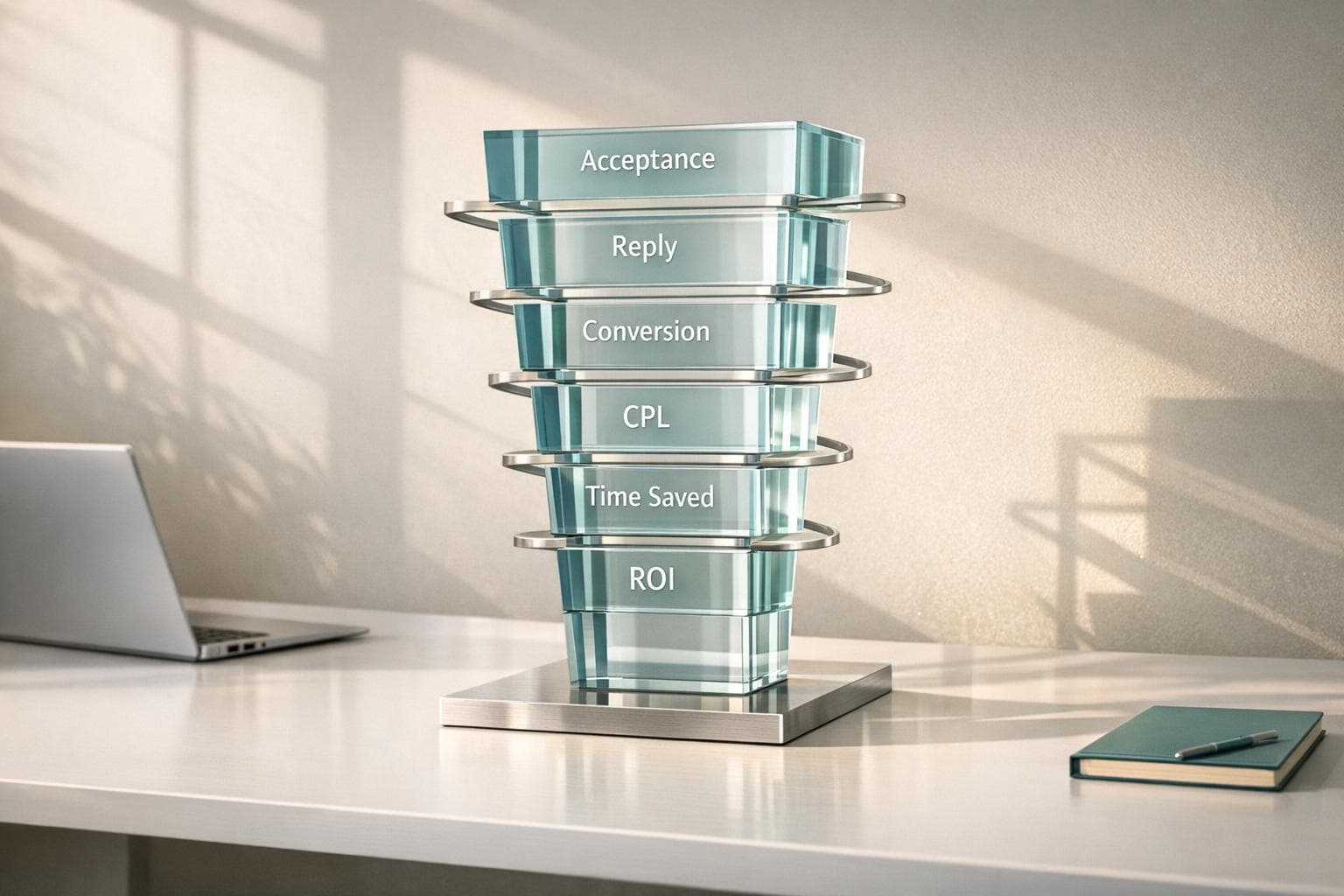
When managing outreach for multiple clients, clear metrics are essential to figure out what’s working and what’s not. To evaluate your campaigns, focus on four key metrics:
- Connection request acceptance rate: Aim for 40–50% or higher.
- Message reply rate: Target 20–30% or more.
- Positive reply rate: Look for 20–40% of replies showing genuine interest.
- Conversion rate: Measure the percentage of prospects who take the desired action, like booking a meeting [5].
These benchmarks give you a solid starting point. To get a more accurate picture, segment your audience by factors like industry, job title, or company size. This ensures you’re comparing similar groups. For example, a 35% acceptance rate might be excellent for outreach to CEOs but subpar for mid-level contacts. Regularly comparing performance across these segments helps maintain consistency in evaluating your campaigns [5].
Take inspiration from Valentin, a Senior SDR at ZELIQ, who in 2025 achieved impressive results by combining LinkedIn and email outreach. Using smart segmentation and intent signals, he hit a 55% email open rate, a 30% email response rate, and a 40% LinkedIn connection acceptance rate - all while converting 20% of cold leads into prospects [6]. His success came from testing which channels worked best at each stage and adjusting the sequence as needed. This method is a great way to fine-tune campaigns across different client accounts.
Once you identify a winning strategy, don’t keep it isolated. If a particular message sequence works well for one client - say, SaaS companies targeting CFOs - apply that same framework to others in the same industry. This not only saves time but also ensures your campaigns stay personalized and effective [6].
If you notice acceptance rates or positive reply rates starting to drop, pause the campaign immediately and revisit your targeting and messaging. Addressing issues early prevents further complications, like account restrictions. By keeping an eye on these critical metrics, you can continuously refine and improve your outreach strategy across multiple accounts.
Conclusion
Managing LinkedIn outreach for more than 10 clients doesn’t have to mean endless manual tasks or risking account restrictions. By using the right automation platform, you can scale personalized outreach across multiple accounts while keeping everything safe, compliant, and effective.
SalesMind AI makes this process seamless. It offers a unified AI inbox where you can manage all client replies in one place, alongside full automation for tasks like profile visits, connection requests, and messaging. These features ensure smooth account management and safety. Its advanced AI-driven personalization tailors each outreach to be highly relevant, while local IP addresses and human-like activity patterns protect accounts from disruptions. Users have seen real results with this approach.
"SalesMind AI has proven very useful to our sales team in reducing the massive pain points of manually tracking each and every lead interaction." - Rahul P., Senior Advisor - Marketing Services, Bounty Media [1]
On top of automation, integrated analytics take campaigns to the next level by tracking performance and uncovering what works best. You can easily reuse successful messaging strategies across client accounts, saving time and ensuring consistency.
If you’re ready to simplify your LinkedIn outreach, now’s the time to start building connections and closing deals more effectively.
FAQs
How does SalesMind AI keep LinkedIn accounts secure and compliant?
SalesMind AI takes LinkedIn account security seriously by carefully aligning its tools with the platform's usage guidelines. Its automation features are designed to behave like a human user - randomizing message send times, tweaking message content, and staying within daily limits. This approach minimizes the risk of triggering LinkedIn’s anti-spam filters. To further ensure safety, the platform sets activity limits, tailors outreach efforts, and automatically pauses campaigns when nearing those limits, making interactions appear natural and secure.
The platform also incorporates built-in compliance measures. It helps users adhere to LinkedIn’s rules by encouraging respectful communication, honoring recipient preferences, and steering clear of restricted activities like data scraping. By tracking engagement metrics, SalesMind AI enables users to fine-tune their campaigns, reducing the chances of account suspensions while staying firmly within LinkedIn’s terms of service.
What makes SalesMind AI the ideal solution for managing multiple LinkedIn accounts?
SalesMind AI makes managing multiple LinkedIn accounts a breeze with its AI-powered unified inbox. This feature lets you view and manage all your conversations from a single dashboard. It automatically organizes messages, highlights priorities, and even suggests context-specific replies. This means you can handle multiple client accounts efficiently without constantly toggling between profiles.
The platform also offers collaborative tools designed for teamwork. Features like role-based access and conversation assignments ensure your team can collaborate securely and effectively. Plus, with seamless CRM integration - think Salesforce or HubSpot - every LinkedIn interaction syncs to a central database. This gives you a full picture of each client’s pipeline in one place.
For agencies, SalesMind AI takes it a step further with its white-label solution. This allows you to provide fully branded LinkedIn outreach services. From onboarding to configuration and account management, you can control everything from a single panel. It’s a scalable way to handle dozens of client accounts with ease.
How can I use automation to send personalized LinkedIn messages at scale?
Automating personalized LinkedIn messages on a large scale begins with using AI to analyze each prospect's profile. Tools like SalesMind AI dive into a lead's activity, role, and company updates to generate dynamic message templates. These templates include customizable fields such as {{first name}}, {{recent post topic}}, or {{company size}}, making each message feel genuinely tailored by referencing specific details like recent posts or company news.
To maintain a personal touch, you can create concise and engaging message variations and arrange them into multi-step sequences. SalesMind AI takes care of scheduling these messages with natural, human-like timing and adjusts the approach based on whether the prospect responds. The tool even provides real-time suggestions, like mentioning a trending topic in the industry, to keep your outreach relevant and engaging.
You can track metrics like open rates and reply rates directly within the platform. SalesMind AI continuously refines your messaging and scheduling strategies, enabling you to run highly personalized campaigns for thousands of prospects with minimal effort.
JGGet AI Sales Insights Weekly