AI Tools for LinkedIn Lead CRM Integration
How AI automates LinkedIn lead capture, syncs profiles with CRMs, scores leads, and automates follow-ups to boost response time and conversions.
 Julien Gadea
How AI automates LinkedIn lead capture, syncs profiles with CRMs, scores leads, and automates follow-ups to boost response time and conversions.
Direct CRM integrations (e.g., Salesforce, HubSpot).
Automated data syncing for LinkedIn profiles, messages, and updates.
AI-driven lead scoring and personalized messaging.
Workflow automation triggered by LinkedIn activity.
Table of Contents
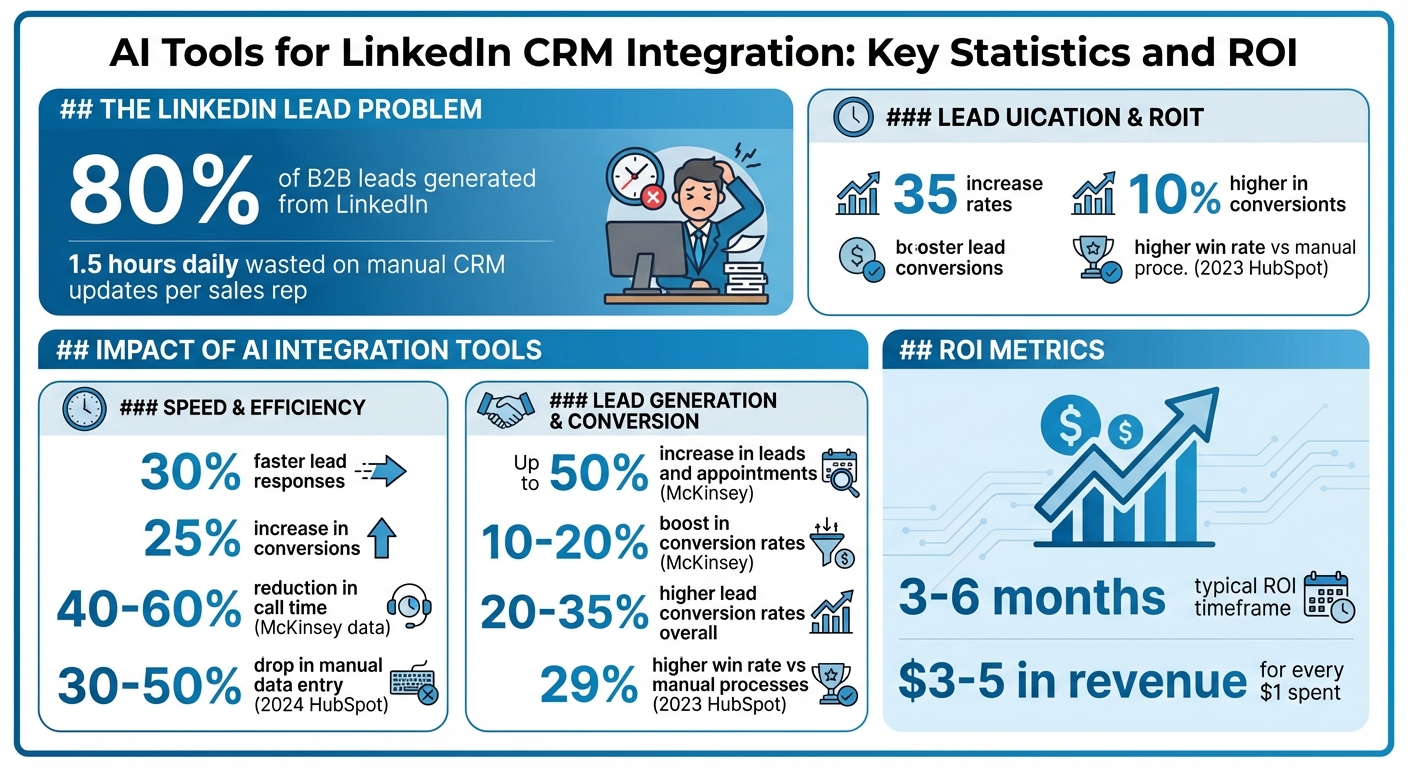
LinkedIn is a key platform for U.S. B2B sales, generating 80% of leads, but manual CRM updates waste 1.5 hours daily for sales reps. AI tools simplify this process by automating LinkedIn lead capture, syncing data with CRMs, and managing follow-ups. Companies using these tools report 30% faster lead responses and a 25% increase in conversions. Key features to evaluate include:
- Direct CRM integrations (e.g., Salesforce, HubSpot).
- Automated data syncing for LinkedIn profiles, messages, and updates.
- AI-driven lead scoring and personalized messaging.
- Workflow automation triggered by LinkedIn activity.
- Data security to comply with U.S. standards.
For example, SalesMind AI automates LinkedIn lead capture, enriches data, and syncs updates in real time. It also provides AI-powered messaging, lead scoring, and performance tracking, saving hours while boosting productivity. Businesses using AI tools often achieve ROI within 3–6 months, with 20–35% higher lead conversion rates.
AI Tools for LinkedIn CRM Integration: Key Statistics and ROI Metrics
Build an AI Agent with me! Ep. 19: Collecting LinkedIn Leads
How to Evaluate AI Tools for LinkedIn–CRM Integration
Selecting the right AI tool for LinkedIn–CRM integration goes beyond eye-catching features. For U.S. sales teams, it's about finding a solution that enhances daily operations. Key priorities should include strong integration capabilities, reliable automation, and seamless workflows, all while keeping data security top of mind [6].
Start by reviewing your current technology setup. Make sure the tool integrates directly with your existing CRM, whether it's Salesforce, HubSpot, Zoho, or Pipedrive. Switching platforms should not be a requirement [4][3]. Also, evaluate how user-friendly the tool is - look for quick setup times (under 10 minutes) and dashboards that are easy to navigate, minimizing the learning curve for your team [4].
Vendor demos are your chance to dig deeper. Ask questions like, "Does this tool offer two-way syncing, flexible field mapping, and compliance with LinkedIn's policies?" Request a trial period to test how well the tool handles real-time updates and reduces manual data entry. The goal is to find a tool that fits your existing sales processes rather than forcing your team to adjust to rigid workflows.
LinkedIn and CRM Integration Depth
The quality of integration can make or break a tool. Basic options might only copy LinkedIn profile data into your CRM once, while more advanced tools provide continuous two-way synchronization. This means ongoing updates to contact details, engagement histories, and pipeline stages based on LinkedIn activity [4][3]. For example, Salesforce's LinkedIn Sales Navigator integration supports syncing contacts, tracking engagement, and connecting with 6Sense to identify high-value accounts - all within the CRM [4]. This kind of integration ensures your team isn't working with outdated contact info or missing important interactions.
Field mapping is another critical feature. The tool should automatically align LinkedIn profile data - like job titles, company size, and industry - with your CRM's custom fields. Advanced solutions even allow one-click lead capture from LinkedIn, creating a unified workspace that suits relationship-driven sales teams [4].
Real-time pipeline updates are a must. If a prospect responds to a LinkedIn message, your CRM should immediately reflect that interaction and trigger the next step in your sales sequence. This ensures everyone on your team has access to the most current information, without delays caused by nightly batch updates [4][3].
With a solid integration in place, AI features can take your sales automation to the next level.
AI Features for Sales Automation
AI tools can simplify lead management by analyzing prospect profiles, company data, and engagement patterns to prioritize outreach. Predictive routing can even assign leads to the most suitable sales reps based on territory, expertise, or past performance [1]. The best tools let you define filters - like company size, industry, or job title - so you can easily identify which leads require immediate attention.
AI can also enhance messaging. By pulling details from prospect profiles, company websites, and LinkedIn activity, these tools generate outreach templates that feel tailored and personal. It's important to ensure the generated messages don't come across as generic or overly canned. During demos, check that the tool complies with LinkedIn's policies and maintains a natural, human tone.
Smart templates add another layer of efficiency. For example, if a prospect views your profile but doesn't reply to your initial message, the AI can suggest a follow-up strategy. Some tools even analyze the context of conversations to recommend responses, saving your team time while keeping communication authentic [1].
While AI boosts engagement, effective workflow automation ensures smooth operations and data integrity.
Workflow Automation and Data Security
Workflow automation takes care of repetitive tasks like updating deal stages, creating follow-up tasks, and logging activities. For instance, if a LinkedIn prospect accepts your connection request, the system should automatically update the CRM and adjust lead stages based on their engagement [4]. The best tools adapt to your specific sales process instead of imposing a rigid, one-size-fits-all approach.
Automation should also be context-aware. If a prospect hasn't responded within a set timeframe, the tool can create a follow-up task with suggested messaging. Different types of engagement can trigger tailored tasks, helping your team maintain personalized outreach at scale.
Data security is non-negotiable. U.S. sales teams need to ensure that any tool complies with data protection standards and handles LinkedIn data responsibly. During evaluations, ask about encryption methods, where data is stored, access controls, and compliance certifications. Audit trails showing who accessed prospect data and when add an extra layer of accountability. Strong security practices not only protect your data but also support faster lead conversions and better overall sales performance.
How SalesMind AI Connects LinkedIn Leads with CRM Systems
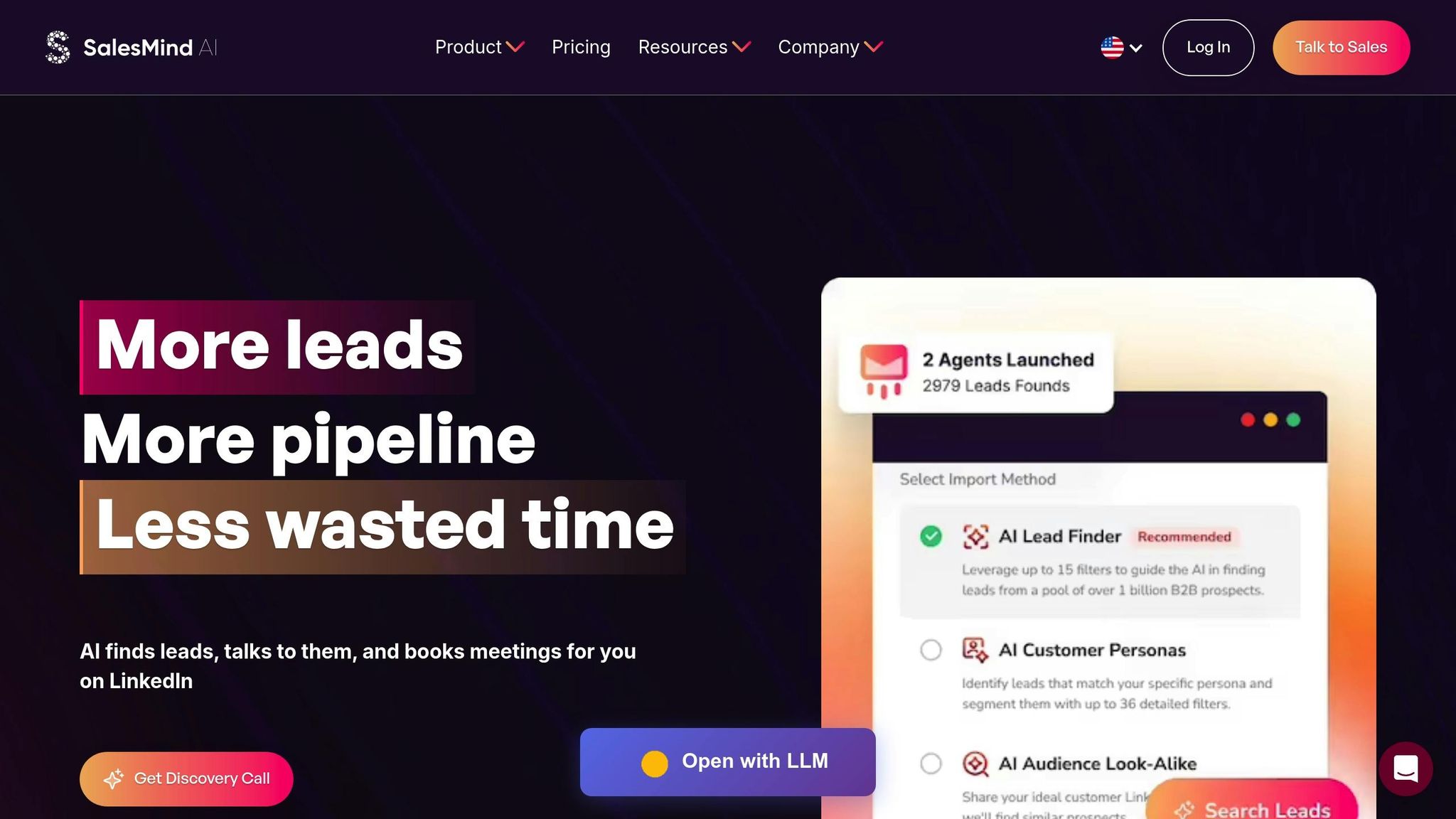
SalesMind AI simplifies the process of linking LinkedIn prospecting with CRM systems by automating tasks like lead capture, data mapping, and enrichment. For U.S.-based sales teams using tools like Salesforce, HubSpot, or Pipedrive, this means no more manual data entry while ensuring contact records stay up-to-date.
The platform pulls lead information directly from LinkedIn profiles and Sales Navigator, automatically syncing key fields like job title, company name, location, and LinkedIn URL into your CRM. It even fills in missing data, such as email addresses and firmographic details, saving reps hours each week that might otherwise be spent managing spreadsheets [4][3].
LinkedIn Lead Capture and CRM Sync
SalesMind AI allows you to capture LinkedIn leads with just one click, funneling them directly into your CRM. When you identify a prospect on LinkedIn, the tool extracts their profile information and creates a new contact record, seamlessly mapping fields like title, company, and location to match your CRM’s structure [4][3]. This keeps your CRM as the go-to source for LinkedIn leads.
For profiles missing contact details like emails or phone numbers, SalesMind AI fetches this information from connected databases and company websites, enabling immediate outreach across multiple channels. The system also keeps your data current, syncing updates to job titles and companies in real time, unlike tools that rely on nightly batch updates [4][3].
Once leads are captured and enriched, your team can move straight into engagement, aided by integrated messaging tools.
AI-Powered Messaging and Unified Inbox
SalesMind AI’s unified inbox brings LinkedIn conversations together in one dashboard. Instead of juggling LinkedIn tabs and CRM windows, your team can view message histories, respond to prospects, and log activities in one place. The AI co-pilot simplifies responses by crafting templates based on the prospect’s profile, company details, and previous conversations [1].
"AI saves you hours. Send personal messages and connect fast - without the manual work." [1]
Follow-ups are automated based on prospect behavior. For example, if someone accepts your connection request but doesn’t reply within three days, the platform can send a personalized follow-up referencing their profile or recent company updates. All interactions are automatically logged in your CRM, building a complete engagement timeline without extra effort.
By adhering to LinkedIn’s compliance standards, SalesMind AI avoids spam-like behavior, pacing outreach for a more natural feel. The AI personalizes messages using insights from profiles, posts, and updates. Henry F., an Enterprise Account Executive at Salesforce, noted that during an eight-day free trial, he received "4-5 responses per day" from automated outreach [1].
Lead Scoring and Qualification
SalesMind AI uses demographic and behavioral data to score leads. Factors like company size, industry, job title, and location are analyzed alongside engagement metrics like connection acceptance, message replies, and meeting bookings [3][6][5]. The higher the score, the more likely a prospect fits your ideal customer profile and shows genuine interest.
"SalesMind AI finds top leads so you focus on the ones that will convert." [1]
Qualified leads are automatically routed to the right CRM stages. Once a lead hits a certain score, it’s moved to "Marketing Qualified Lead (MQL)" or "Sales Qualified Lead (SQL)" and assigned to the appropriate sales rep based on territory or expertise. This ensures promising prospects don’t fall through the cracks while your team focuses on less urgent tasks [1].
The scoring system offers clear visibility into lead quality, helping reps prioritize effectively. Alex L., CTO at Slash Co, shared that SalesMind AI increased his lead prospecting productivity by "10×" in the first week, enabling him to start "5 to 10 new conversations" weekly [1].
Workflow Automation Based on LinkedIn Activity
SalesMind AI takes automation further by triggering workflows based on LinkedIn activity. For instance, when a connection is accepted, the system creates a new lead record, assigns it to an SDR, and initiates a nurture sequence. If a prospect replies positively, the platform logs the activity, schedules a follow-up, and advances the lead if they show interest. Meeting confirmations automatically update the opportunity stage and notify the account executive [4][3].
These workflows align with standard U.S. sales stages like MQL, SQL, Opportunity, Proposal, and Closed-Won. For example, when a prospect schedules a demo via LinkedIn, the system creates an opportunity in your CRM and updates the stage to "Demo Scheduled."
SalesMind AI adapts to prospect behavior. If a lead goes quiet after initial engagement, it creates a re-engagement task with suggested messaging. Different actions trigger tailored workflows - for example, a prospect downloading a case study gets a distinct follow-up compared to someone who views your profile. Roberto K., Chief Product Officer at aCommerce, shared that SalesMind AI "completely automated our sales prospecting on LinkedIn", allowing them to connect with "hundreds or thousands of prospects" through targeted follow-ups [1].
Performance Tracking and Reporting
SalesMind AI tracks LinkedIn campaign performance via CRM dashboards, offering insights into response rates, booked meetings, and revenue. Sales teams can quickly identify which campaigns drive the most pipeline value and compare LinkedIn’s ROI to other channels like cold email or paid ads [4][3][5].
The platform links specific LinkedIn sequences to Closed-Won deals, providing campaign-level revenue attribution. Real-time dashboards let managers monitor team performance across multiple LinkedIn accounts. Rahul P., Senior Advisor at Bounty Media, appreciated having "one master dashboard not just for yourself but for our entire team and try different lead lists, sequences, and track them all in real time" [1]. This level of visibility helps leaders identify which reps need coaching, which strategies work best, and where to allocate resources for maximum impact.
sbb-itb-817c6a5
Core AI Features for LinkedIn–CRM Workflow Automation
Integrating AI into LinkedIn–CRM workflows brings powerful tools like lead enrichment, scoring, predictive routing, and personalized content generation. According to McKinsey, these AI-driven capabilities can increase leads and appointments by up to 50%, boost conversion rates by 10–20%, and reduce call time by 40–60% [5].
AI-Driven Lead Enrichment and Scoring
AI takes the guesswork (and legwork) out of gathering lead information. It fills in missing LinkedIn lead data by pulling details like company size, industry, revenue, and contact information - tasks that would otherwise take hours of manual research. For example, when a LinkedIn profile lacks an email or phone number, AI scours connected databases and company websites to complete the record before it enters your CRM. The result? Leads arrive with actionable data, not just a name and job title [3].
Lead scoring models go a step further by analyzing both demographic details (like industry, company size, and seniority) and behavioral cues (such as connection acceptance, message replies, and profile views). These insights help assign a priority score to each lead.
"The lead scoring system is particularly impressive, providing clear insights into lead quality" [1].
High-priority leads are then funneled into MQL (Marketing Qualified Lead) or SQL (Sales Qualified Lead) stages, enabling sales teams to focus on prospects with the greatest potential to convert.
Predictive Routing and Next-Action Recommendations
AI ensures LinkedIn leads are routed to the most suitable sales representatives by considering factors like territory, account ownership, deal size, and historical performance data [2][3]. This smart routing minimizes response times and pairs leads with reps who are best equipped to handle similar opportunities.
Beyond routing, AI offers actionable next-step recommendations. For instance, if a prospect accepts a connection but doesn’t respond within three days, the system may suggest sending a follow-up message at an optimal time based on past engagement patterns.
"I've been impressed with some of the AI-recommended messaging. They pulled information from my website and other sources to curate recommended responses" [1].
These suggestions appear in a unified inbox, complete with ready-to-send templates, tags, and reminders, ensuring no follow-up opportunity is overlooked. Once leads are assigned and next actions identified, the system can even help fine-tune the communication to make it more impactful.
Personalized Content Generation
AI takes personalized outreach to the next level by drafting LinkedIn messages that blend CRM data - like deal stage and past interactions - with LinkedIn profile insights, such as recent posts, company updates, or shared connections. These messages go beyond generic templates, adding thoughtful touches like congratulating a prospect on a job change or acknowledging a company achievement.
"I like that it shows you a score on what the lead suitability with your filters is" [1].
This tailored approach simplifies outreach for high-priority leads. AI also dynamically adjusts follow-up sequences based on how prospects respond, ensuring every interaction is tracked and accessible within your CRM. This level of customization helps sales teams engage prospects in a way that feels personal and relevant, rather than automated and impersonal.
Best Practices for LinkedIn–CRM Integration with AI
Integrating LinkedIn with your CRM using AI can be a game-changer for sales teams, but it demands a solid foundation. Clean data, well-mapped workflows, and clear metrics are essential. Without these, even the smartest AI tools can magnify existing problems. Here’s how to set up your integration for success.
Standardize LinkedIn and CRM Data
Start by aligning LinkedIn and CRM data with a unified lead lifecycle. For instance, use clear stages like Lead → MQL → SQL → Opportunity → Closed Won/Lost and define which LinkedIn events trigger each stage. Document these processes to ensure consistency.
Standardize dropdown values for fields like job titles, company size, industry, territory, and lead source. This helps AI scoring models work effectively without being thrown off by inconsistent inputs. Use specific lead source tags such as "LinkedIn – Sales Navigator", "LinkedIn – InMail," or "LinkedIn – Organic" to track which LinkedIn activities generate revenue.
Before syncing LinkedIn leads with your CRM, audit the data for duplicates and inconsistencies. Set de-duplication rules based on email, company name, and LinkedIn URL. Store LinkedIn profile URLs in dedicated CRM fields to make it easier for AI tools to enrich data and assist with outreach.
Map LinkedIn Events to CRM Workflows
Once your data is clean, connect LinkedIn actions to CRM workflows. For example, set up alerts for key events like churn risks or expansion opportunities. If a contact changes jobs on LinkedIn, trigger a workflow to protect existing revenue or create a new opportunity at their new company.
Tools like SalesMind AI can help by surfacing these signals in a unified inbox, along with recommended responses and reminders. This eliminates the need for manual tracking, ensuring your team responds quickly and effectively. Regularly measure the performance of these workflows to confirm their impact.
Measure ROI and Performance Metrics
To evaluate the success of your AI-driven integration, track key metrics. Monitor your pipeline and revenue in USD, breaking down opportunity value, monthly or quarterly closures, and average deal size. Measure how long it takes to close a deal - from the first LinkedIn interaction to a Closed Won outcome - to see if AI workflows are speeding up your sales process.
Also, calculate the cost per opportunity and cost per closed deal to determine if AI-assisted LinkedIn campaigns are more efficient than traditional methods. Use CRM dashboards to analyze performance by industry, company size, territory, and sales rep. This allows you to assess LinkedIn’s contribution to revenue during regular business reviews.
According to a 2023 HubSpot State of Sales report, teams using LinkedIn and email CRM integrations saw a 29% higher win rate compared to those relying on manual processes. Start small with a few workflows and clear playbooks that map LinkedIn actions to CRM updates. Assign a sales operations owner to oversee data quality. This step-by-step approach ensures your team isn’t overwhelmed while delivering measurable improvements over time.
Conclusion
AI-powered LinkedIn–CRM integration tools are reshaping how U.S. sales teams handle lead capture, streamline workflows, and manage outreach. By automating tasks like personalized messaging, lead qualification, and syncing data with CRMs, these tools free up sales reps to focus on what matters most - closing deals.
Take SalesMind AI as an example. This platform showcases the power of combining LinkedIn outreach automation with features like an AI-driven unified inbox, advanced lead scoring, and seamless CRM integration. It handles everything from audience selection to follow-ups and message personalization, making large-scale outreach possible without adding to the team. Users have reported noticeable productivity boosts and greater daily engagement.
The numbers back this up. U.S. companies often see a return on investment within 3–6 months, with an average payback of $3–5 in revenue for every $1 spent on these tools. According to a 2024 HubSpot report, businesses using AI-powered CRM solutions experienced a 30–50% drop in manual data entry and a 20–35% boost in lead conversion rates. These figures highlight the benefits of automated lead capture, tailored outreach, and efficient follow-up strategies.
FAQs
How can AI tools improve LinkedIn lead management and CRM workflows?
AI tools make managing LinkedIn leads and CRM workflows much easier by taking over time-consuming tasks like sending personalized messages, qualifying leads, and handling follow-ups. This automation means quicker responses and smoother communication with potential clients.
These tools also simplify sales processes by syncing LinkedIn data directly with your CRM. This integration helps with tracking leads, scoring them more effectively, and organizing outreach efforts. As a result, businesses can reach out to more prospects efficiently, saving time while increasing overall productivity.
What key features should sales teams look for in an AI tool to integrate LinkedIn with their CRM?
Sales teams should prioritize AI tools that simplify LinkedIn outreach and CRM tasks by automating personalized messages, lead qualification, and follow-up activities. These capabilities not only save valuable time but also ensure steady and meaningful engagement with potential clients.
Moreover, tools offering smooth LinkedIn integration, advanced lead scoring, and centralized communication management can greatly improve sales workflows. With these features, teams can connect with prospects more efficiently and scale their efforts without sacrificing quality.
How can AI-driven lead scoring help boost sales conversion rates?
AI-powered lead scoring enables sales teams to zero in on the most promising prospects by evaluating data like engagement levels, demographic details, and behavior trends. By pinpointing leads with the highest likelihood of conversion, businesses can channel their efforts where they matter most, conserving both time and resources.
Tools such as SalesMind AI take this a step further by automating lead qualification and offering advanced scoring methods. This allows sales teams to craft personalized follow-ups and targeted outreach, boosting conversion rates and fueling revenue growth.
 JG
JG