Ultimate Guide to AI Sales Tool ROI
Calculate AI sales tool ROI by measuring revenue gains, cost savings, productivity, and TCO—includes formulas, KPIs, and tactics to increase returns.
 Julien Gadea
Calculate AI sales tool ROI by measuring revenue gains, cost savings, productivity, and TCO—includes formulas, KPIs, and tactics to increase returns.
Revenue Gains: AI improves win rates by up to 50% and increases deal sizes.
Cost Savings: Automating tasks saves sales reps 6+ hours per week.
Efficiency: AI tools shorten sales cycles by 1 week on average.
Productivity: Reps focus more on closing deals, not repetitive tasks.
AI sales tools can deliver impressive returns when used effectively. Sellers using AI daily are 2.5 times more likely to exceed targets, while AI-driven lead scoring boosts lead-to-deal conversions by 51%. To calculate ROI, focus on revenue growth, cost savings, and productivity improvements, while factoring in total costs like subscriptions, training, and integration. For example, automating LinkedIn outreach or using AI for lead scoring can save hours weekly, improve win rates by 35%, and generate significant revenue.
Key Takeaways:
- Revenue Gains: AI improves win rates by up to 50% and increases deal sizes.
- Cost Savings: Automating tasks saves sales reps 6+ hours per week.
- Efficiency: AI tools shorten sales cycles by 1 week on average.
- Productivity: Reps focus more on closing deals, not repetitive tasks.
Example ROI Formula:
ROI = (Revenue Gains + Cost Savings + Productivity Value - Total Costs) / Total Costs × 100
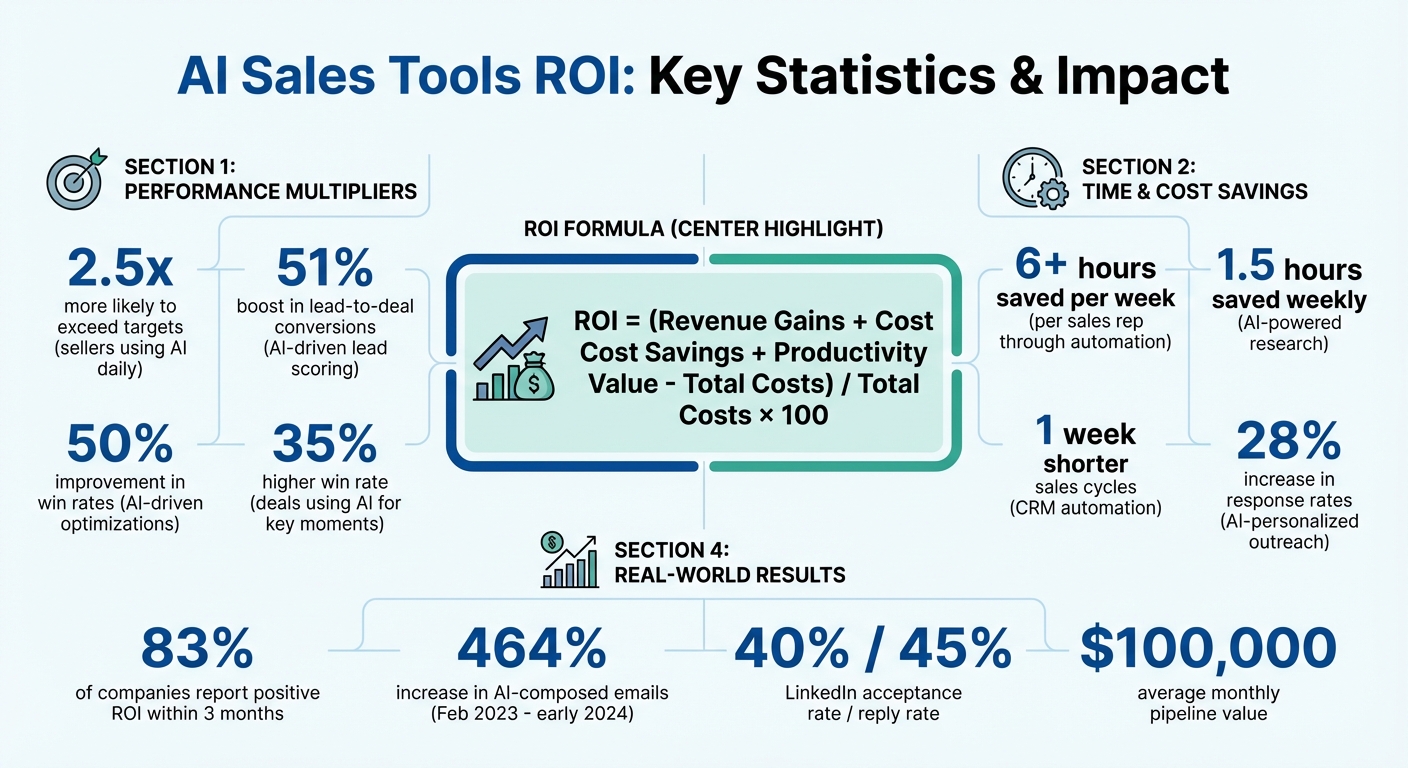
AI Sales Tools ROI: Key Statistics and Impact Metrics
Spent $50K on AI Sales Software - Here's the REAL ROI Results
What is ROI for AI Sales Tools?
When it comes to AI sales tools, ROI (Return on Investment) measures the value these tools generate compared to their total cost. This includes subscription fees, implementation costs, and training expenses. Unlike traditional tools that focus on measuring activity volume, AI ROI prioritizes outcomes like better win rates, quicker deal closures, and higher engagement levels.
AI also brings less tangible benefits, such as smarter decision-making through suggested next steps and productivity boosts from automating repetitive tasks [1].
To measure ROI effectively, you need to track both leading indicators (like activity levels and behaviors) and lagging indicators (like closed-won revenue). Together, these metrics reveal whether the tools are truly driving opportunities through the sales pipeline [3].
Key Components of ROI
AI sales tools deliver ROI across four primary areas:
- Revenue Gains: AI can directly impact revenue by improving win rates, increasing deal sizes, and expanding pipeline volume. For instance, AI-driven optimizations can boost win rates by up to 50% [1]. Deals that use AI to identify key moments - like addressing pricing objections - see a 35% higher win rate [1].
- Cost Savings: By automating tasks and reducing redundant tools, AI helps cut costs. Generative AI alone can improve sales rep productivity by about 50%, saving as much as six hours per week [1]. Additionally, AI-powered research saves sellers approximately 1.5 hours weekly, while CRM automation can shorten the sales cycle by nearly a week [2].
- Efficiency Improvements: AI enhances outreach quality and response speed. For example, AI-driven personalized outreach increases response rates by 28% [2]. The use of generative AI for email composition has surged by 464% since February 2023 [1], showing how AI scales outreach without sacrificing personalization.
- Productivity Value: Automating routine tasks gives sales teams more time to focus on high-value activities [1].
ROI Factors Specific to Sales Automation
Sales automation tools deliver ROI in ways traditional tools simply can’t. Here’s how they make a measurable difference:
- Automated LinkedIn Outreach: Automating LinkedIn prospecting allows for scaled outreach with tailored messaging and follow-ups.
- Lead Qualification and Scoring: AI-powered lead scoring ensures reps focus on the right opportunities, increasing lead-to-deal conversions by 51% [5] and boosting the number of qualified leads by 30% to 50% [7].
- Seamless Integration: AI tools that integrate with platforms like LinkedIn and CRM systems eliminate the inefficiencies of switching between tools and reduce data silos. High-performing sales reps - those who exceed their quotas - are 2.5 times more likely to use AI daily compared to underperformers [6]. This advantage is amplified when AI tools are seamlessly woven into existing workflows.
The evolution from basic task automation to intelligent automation - where algorithms learn, adapt, and assist in decision-making - means that AI tools can deliver even greater returns as they continue to improve. Next, we’ll dive into calculating the total cost of ownership to round out the ROI equation.
Calculating the Total Cost of Ownership (TCO)
When evaluating the true cost of a SaaS solution, it's important to look beyond just subscription fees. The Total Cost of Ownership (TCO) includes every dollar spent, from the initial setup to ongoing maintenance and operations.
TCO can be divided into three main categories: Direct costs, Indirect costs, and AI operational costs. Direct costs encompass your SaaS subscription fees, API token usage for AI-powered features, and infrastructure expenses like cloud storage [4]. Indirect costs involve internal team efforts such as implementation, training, change management, and any temporary productivity loss during rollout. AI operational costs include model monitoring, retraining to address performance drift, and data preparation for high-quality training [8].
"A TCO analysis can be complex and time consuming... it can help uncover hidden costs that could come back to bite you down the road." - Neal Weinberg, Technology Journalist [11]
The numbers can escalate quickly. For instance, a mid-sized deployment might incur $120,000 in one-time integration costs and around $45,000 annually for licenses, support, and infrastructure [4]. Change management and staff training can consume 20% to 40% of the project budget [7]. Alarmingly, 85% of organizations underestimate AI project costs by over 10% [12].
Let’s break down each cost category to better understand how to estimate your monthly TCO.
Breaking Down Costs
Start with subscription fees, which typically range from $30 to $100 per user per month, depending on the plan [4]. For example, a team of 100 users paying $30 per seat would spend about $36,000 annually just on licensing.
Next, consider implementation expenses. Integrating a CRM can cost anywhere from $1,000 to $8,000 for basic setups, while more complex deployments may reach $120,000 [4][10]. These costs cover tasks like data migration, custom development, and security reviews.
Training costs are another key factor. Initial onboarding and change management efforts often cost around $15,000 [4]. Without proper training, investments can fall flat. For instance, a 2023 report highlighted how ineffective use of LinkedIn Sales Navigator led to wasted resources [3].
Ongoing operational expenses also pile up. Regular model retraining, security updates, and monitoring can add about $2,000 per month [4]. Internal administration and project management salaries contribute roughly $8,000 monthly [4]. Additionally, maintaining AI systems can account for 15% to 30% of annual infrastructure costs due to drift detection and periodic updates [12].
API usage costs are another variable. Token-based LLM processing typically averages $5,000 monthly, but usage spikes can significantly increase this figure. As Christian Khoury, CEO of EasyAudit, explains:
"Inference workloads are the real cloud tax; companies jump from $5K to $50K a month overnight" [12]
To calculate your monthly TCO, amortize one-time costs over the tool’s expected lifespan. For example, spreading a $120,000 integration cost over 24 months adds $5,000 to your monthly expenses, which you then combine with subscription fees, operational costs, and API usage.
Cost Comparison by Plan
Once you’ve identified individual cost elements, compare pricing tiers to find the best fit for your needs. While subscription fees differ across plans, hidden costs like integration and maintenance can influence your decision.
| Pricing Tier | Monthly Cost (USD) | Target Audience | Key TCO Factors |
|---|---|---|---|
| Basic | $50 - $100 per user | Individual contributors, small teams | Low upfront cost; may require manual data cleaning and limited API capabilities |
| Professional | $150 - $300 per user | Mid-market sales organizations | Includes CRM integration, custom AI models, and priority support |
| Enterprise | Custom pricing ($500+ per user) | Large SDR teams, enterprises | Higher setup fees; offers unlimited tokens, dedicated support, and compliance features |
For most growing teams, the Professional tier hits the sweet spot. It offers advanced CRM integration and custom AI models without the complexity of enterprise-level customization. The Enterprise tier, on the other hand, is ideal for organizations needing unlimited API usage, dedicated support, and advanced compliance - especially in regulated industries where governance can increase costs by 40% to 80% [12].
When comparing plans, don’t just focus on the sticker price. A $50-per-user Basic plan might seem appealing, but if it lacks LinkedIn integration or requires manual data cleaning, hidden labor costs can quickly add up. Conversely, opting for an Enterprise plan too early could mean paying for features you don’t yet need.
Keep in mind that the average payback period for a major CRM/AI investment is about 8.7 months [9]. High-performing organizations in sectors like financial services have reported ROI between 450% and 600% over three years [9].
Identifying and Measuring Benefits
Once you've calculated your Total Cost of Ownership (TCO), the next step is to measure the tangible benefits that contribute to your ROI. The real payoff comes from tracking how AI sales tools impact your business across three critical areas: revenue growth, time savings, and cost reductions. Each of these can be assessed through specific metrics that highlight AI's effect on your bottom line.
Some of the most impactful benefits include faster win rates and improved response times. For instance, sales teams using AI see win rates increase by 50% [1]. Even more impressive, AI agents that respond to leads within five minutes convert at rates 21 times higher than those responding after 2–4 hours [14]. This speed can completely transform your sales pipeline.
Boosting productivity directly influences revenue potential. Generative AI tools handle repetitive tasks like note-taking and drafting emails, saving sales reps around six hours each week [1]. With less time spent on admin work, reps can focus on high-value activities like closing deals and nurturing client relationships.
Lowering costs is another major advantage. AI can handle tasks such as phone calls, support tickets, and appointment scheduling at a fraction of the cost of human-led interactions. For example, an AI agent can manage a call for $0.30–$0.50, compared to $6.00–$7.68 for a human representative [14]. These savings add up quickly, especially when scaled across hundreds or thousands of interactions each month.
Key Metrics to Measure ROI
To understand the full impact of AI sales tools, track these key performance indicators (KPIs):
- Win rate improvement: AI-assisted account research can boost win rates by 26%, and deals guided by AI insights achieve a 35% higher win rate [1].
- Sales cycle velocity: AI-driven CRM tools can shorten the average sales cycle by one week by automating manual tasks and improving responsiveness [2].
- Time savings: Measure reclaimed hours from tasks like email drafting, lead research, and CRM data entry. For instance, AI-powered lead research saves an average of 1.5 hours weekly per rep [2].
- Outreach effectiveness: Compare response rates between AI-personalized messages and standard templates. Teams using AI for personalization report a 28% increase in response rates [2]. For LinkedIn outreach, AI tools achieve a 40% acceptance rate and a 45% reply rate [13].
- Quota attainment: Sellers who exceed their targets are 2.5 times more likely to use AI daily compared to those who don’t [2][6].
| KPI Category | Specific Metric | Typical AI Impact |
|---|---|---|
| Effectiveness | Win rate | Up to 50% increase with AI recommendations [1] |
| Effectiveness | Response rates | 28% increase through personalization [2] |
| Efficiency | Time spent on emails | 6+ hours saved per week [1] |
| Efficiency | Lead research time | 1.5 hours saved per week [2] |
| Velocity | Sales cycle length | Average reduction of 1 week [2] |
| Revenue | Annual revenue growth | 8% average year-over-year increase [15] |
These metrics provide a clear framework for assessing the value AI tools bring to your sales process.
Case Studies: Example ROI Scenarios
Real-world examples highlight the measurable returns AI sales tools can deliver. Take a residential real estate agency with three agents managing 200 leads weekly. Before AI, 60% of leads went uncontacted. After implementing an AI agent to qualify leads within five minutes, they achieved a 100% contact rate. This improvement increased monthly deals from 8 to 20, generating an additional $380,000 in annual revenue. The payback period? Just 1.2 months, with a staggering ROI of 1,350% in the first year [14].
Another example involves a SaaS company with five support agents handling 200 tickets daily. Their average response time was four hours. By deploying an AI agent to handle 85% of tickets (170 out of 200), they saved $180,000 annually in labor costs, reduced churn by 12%, and provided instant responses. The result was a payback period of 2.8 months and a first-year ROI of 383% [14].
For LinkedIn outreach, SalesMind AI users report strong performance metrics. The platform achieves a 40% acceptance rate and a 45% reply rate, with automated workflows generating an average pipeline value of $100,000 per month [13]. Steven Huibers, COO of Policereports.ai, shared his experience:
"I've used a couple of other tools for LinkedIn outbound, but this has gotten me 3x the results." [13]
These examples illustrate how AI sales tools can deliver measurable, transformative results across various industries.
Step-by-Step Formula for Calculating ROI
Let’s break down how to calculate the ROI of your AI sales tool by combining all the benefits and costs into a single, easy-to-understand percentage.
The ROI Formula
Here’s the formula you’ll use:
ROI = (Revenue Gains + Cost Savings + Productivity Value - Total Costs) / Total Costs × 100
Here’s what each term means:
- Revenue Gains: The extra revenue from improved lead prioritization and insights, like closing more deals or increasing pipeline value.
- Cost Savings: The money saved by reducing errors and cutting down on manual work.
- Productivity Value: The time your team saves by automating repetitive tasks, converted into a dollar amount.
- Total Costs: All expenses, including license fees, API usage, setup costs, and training.
You can apply this formula over any time period - monthly, quarterly, or annually.
Example: SalesMind AI in Action
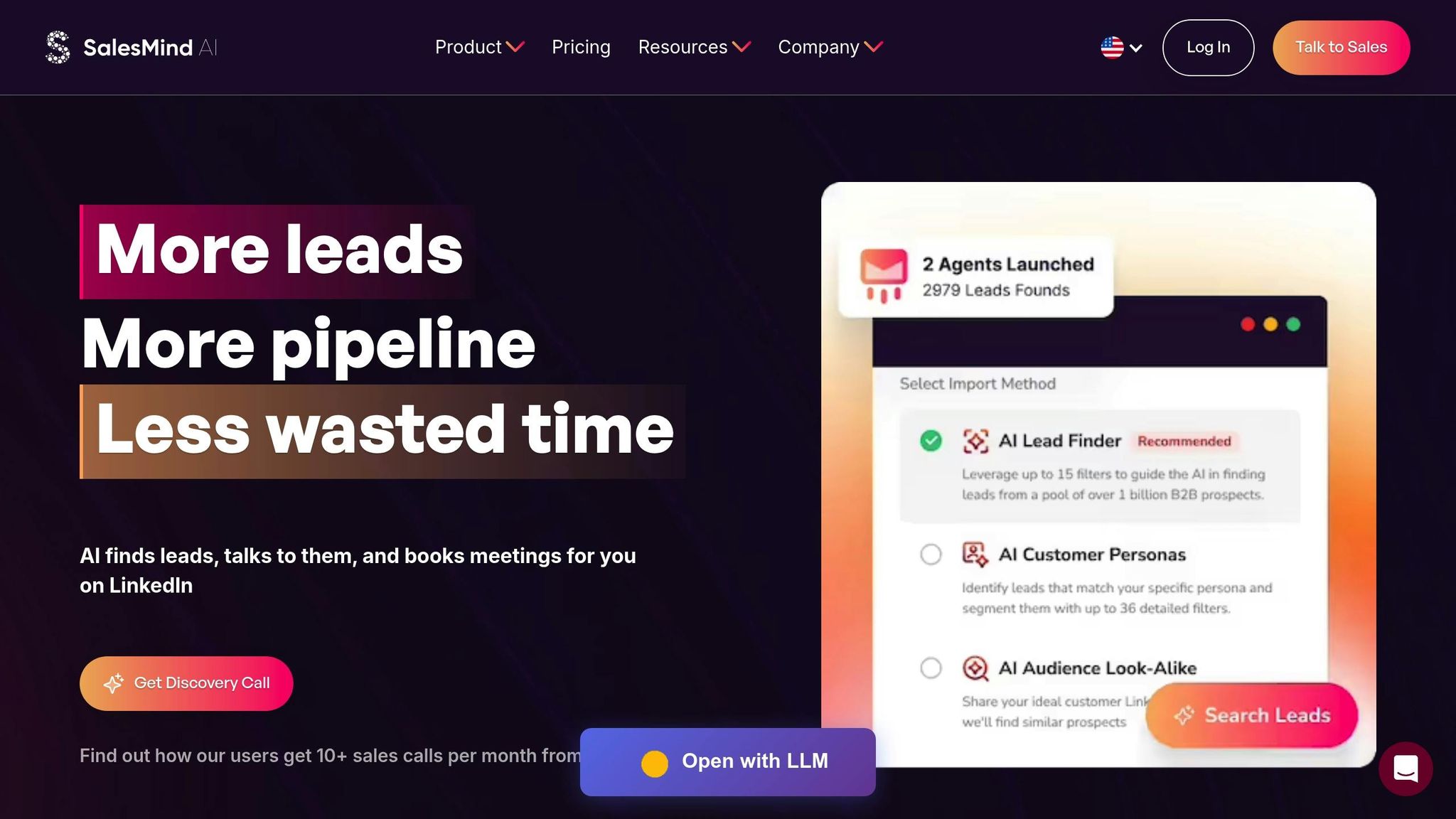
Let’s say you’re using SalesMind AI for LinkedIn automation and lead scoring. You have a sales team of 10 representatives, each earning $55 per hour. Here’s how the numbers play out:
- Productivity Value: Your team sends 500 LinkedIn connection requests each month. SalesMind AI’s automation saves 2 minutes per request. That’s (500 requests × 2 minutes ÷ 60) × $55/hour = $917 per month in saved time.
- Revenue Gains: With AI lead scoring, your team prioritizes high-intent prospects, boosting your conversion rate from meetings to opportunities by 10%. If LinkedIn-sourced deals bring in $100,000 in monthly revenue, a 0.5% increase from better targeting equals $500 per month.
- Cost Savings: Automated follow-ups reduce manual data entry errors. If your team handles 1,000 interactions monthly with a 2% error rate and each error costs $75, a 25% reduction saves (2% × 1,000 × $75 × 25%) = $375 per month.
- Total Costs: You’re spending $300/month on licenses for 10 users, $200/month on API usage, and $150/month for amortized setup costs (spread over 24 months). That totals $650 per month.
Now, plug these numbers into the formula:
ROI = ($917 + $500 + $375 - $650) / $650 × 100 = 175% monthly ROI
This means for every dollar you spend, you’re generating $1.75 in net value. Over the course of a year, this adds up to impressive returns, allowing your team to focus on closing more deals instead of getting bogged down by manual tasks.
This ROI calculation not only gives you a clear picture of your tool’s value but also opens the door to refining your strategies for even better results.
Strategies to Improve ROI with AI Sales Tools
When it comes to boosting ROI with AI sales tools, success lies in how strategically you use them - not just in their implementation. The gap between average and outstanding returns often boils down to a few key strategies that can help you maximize the value of your investment.
Set Clear Benchmarks and Goals
Start by defining measurable goals, like improving lead conversion rates, shortening sales cycles, or increasing response rates. For instance, if your LinkedIn response rate is currently 12%, aim for 16% within 90 days by leveraging AI-driven personalization. According to research, 83% of companies reported positive ROI within three months of adopting AI solutions [16].
Daily use of these tools creates a feedback loop, allowing you to quickly identify what’s working and adjust accordingly. Before fully rolling out the tools, establish a 30-day baseline and track weekly progress against metrics like meetings booked, qualified leads generated, and time saved on repetitive tasks.
Integrate with Existing Workflows
AI tools work best when they integrate seamlessly with your existing systems, such as your CRM. This eliminates data silos and speeds up the sales process [17]. For example, when SalesMind AI connects with your CRM, it can auto-populate fields, enrich records in real time, and trigger follow-ups automatically. Studies show that AI-driven CRM automation can reduce the average sales cycle by one week [2].
Streamlining transitions between prospecting, qualifying, and closing ensures that information flows effortlessly. Companies that integrate AI into their workflows report an average 49% increase in lead conversion rates [17]. These integrations don’t just save time - they directly enhance ROI by making your sales process smoother and more efficient.
Use Advanced Features
While basic automation provides a solid foundation, it’s the advanced features that truly amplify your returns. Take SalesMind AI’s unified inbox, for example - it enables multi-channel sequencing across LinkedIn and email. This ensures consistent communication while maintaining a personalized touch, which can lead to a 28% increase in response rates [2].
Advanced lead scoring is another game-changer, helping your team zero in on high-value prospects and prioritize opportunities with the highest likelihood of conversion. Between February 2023 and early 2024, sales teams using Gong’s generative AI email composer saw a staggering 464% increase in AI-composed emails, while those leveraging the "Ask Anything" feature for deal insights experienced a 26% increase in win rates [1].
The unified inbox also centralizes all prospect interactions, providing a comprehensive view of every conversation without the need to switch platforms. Completing AI-recommended tasks, such as following up on stalled deals or confirming meetings, can boost win rates by 50% [1]. By tapping into these advanced capabilities, you not only improve efficiency but also drive revenue growth, bringing your ROI strategy full circle.
Conclusion
To calculate the ROI of an AI sales tool, compare the total costs - such as subscription fees, training, and integration - with the benefits, including time saved, improved conversions, and revenue growth. Based on the detailed TCO and benefit analyses earlier, 83% of companies that adopted AI solutions in 2025 reported positive ROI. These businesses experienced up to a 15% increase in revenue, sales ROI improvements ranging from 10% to 20% [16], and their sales teams saved an average of 12 hours per week by automating repetitive tasks [1].
To maximize these returns, focus on setting clear benchmarks, integrating AI with your existing CRM workflows, and utilizing advanced tools like unified inboxes and lead scoring. For instance, SalesMind AI users have achieved impressive results: Alex L., CTO of Slash Co, shared that their lead prospecting productivity increased 10× within the first week, generating 5 to 10 new conversations weekly [18]. Similarly, Steven Huibers, COO of Policereports.ai, reported achieving 3× better results compared to previous tools [18]. On average, the platform delivers a 42% reply rate [19] and generates $100,000 in pipeline value per month [13]. By aligning these strategies with your cost-benefit metrics, you can position AI as a powerful and strategic asset for your sales efforts.
FAQs
How can AI sales tools improve lead conversion rates?
AI-powered sales tools are transforming how businesses approach lead conversion by streamlining processes and boosting efficiency. One standout feature is predictive lead scoring, which uses data like customer behavior and engagement patterns to rank leads based on their likelihood to convert. By doing so, sales teams can zero in on the most promising opportunities, potentially improving scoring accuracy to an impressive 85%. This means sales reps can focus their energy where it truly counts - on leads that are ready to take action.
Another game-changer is automated, AI-driven messaging. These tools enable personalized outreach on a large scale, which can increase response rates by up to 45% and cut sales cycles by 25–30%. For businesses, this translates into more efficient communication and faster deal closures. In fact, companies leveraging AI tools often see a 15–30% jump in the number of leads successfully converted into customers.
On top of that, AI doesn't just stop at identifying leads or sending messages - it also provides real-time, actionable insights throughout the sales process. These insights guide sales teams on the best next steps, helping to refine strategies and improve decision-making. The results? A boost in win rates by 26–35% and a smoother, more effective sales pipeline that delivers clear returns on investment.
What should I consider when calculating the total cost of ownership for AI sales tools?
When evaluating the total cost of ownership (TCO) for AI sales tools, it’s essential to look beyond just the subscription price. There are several additional expenses to keep in mind. For instance, implementation costs can include onboarding, data migration, and initial setup. Then there are integration fees for connecting the tool with platforms like your CRM, email systems, or LinkedIn. Don’t overlook licensing or usage fees, which often depend on the number of users or the volume of data processed.
You’ll also need to budget for ongoing expenses, such as maintenance, cloud hosting, and regular upgrades. Costs related to training and change management are another critical factor, as your team will need time and guidance to adapt to the new tool. Other considerations include data preparation efforts, compliance and security measures, and the time-to-value - how long it takes for the tool to start delivering measurable results. Including these elements will give you a clearer understanding of the full investment required.
Take SalesMind AI, for example. This platform provides LinkedIn outreach automation and lead generation tools. While its subscription price is a key cost, businesses should also factor in expenses like integrating its AI-powered inbox, training team members on personalized workflows, and any premium support or advanced features they might need. By accounting for these aspects, you can make a more informed decision about the true financial commitment involved.
How can businesses get the best ROI from AI sales tools?
To get the most out of AI sales tools, start by tying the technology directly to your business objectives. Whether you're aiming to boost lead volume, shorten sales cycles, or improve win rates, having clear goals will guide your strategy. Define measurable KPIs upfront - like lead conversion rates or quota attainment - so you can track progress effectively. Before rolling out the tool company-wide, test it with a pilot program to gauge its impact and ensure it works smoothly with existing systems like CRMs and communication platforms.
Leverage AI features such as automated messaging, lead scoring, and a unified inbox to simplify workflows and save valuable time. Training your team to interpret and act on AI-generated insights is key - these tools are meant to enhance human decision-making, not replace it. By doing this, your team can focus on higher-value tasks, increasing both productivity and efficiency.
Once the pilot phase proves successful, expand the tool’s use across your organization. Keep a close eye on your KPIs, refine processes as needed, and use team feedback to make adjustments. With thoughtful integration and regular fine-tuning, AI tools like SalesMind AI can help drive revenue growth and give your business a competitive edge.
 JG
JG