How AI Powers Real-Time Prospect Engagement Tracking
Learn how AI analyzes email, LinkedIn, and website signals to score leads, automate timely follow-ups, and boost B2B sales productivity.
 Julien Gadea
Learn how AI analyzes email, LinkedIn, and website signals to score leads, automate timely follow-ups, and boost B2B sales productivity.
Predictive Analytics: Forecasts which prospects are most likely to convert based on past behaviors.
Automated Responses: Sends personalized follow-ups triggered by engagement signals.
Dynamic Lead Scoring: Updates lead quality scores in real time to prioritize outreach.
Table of Contents
AI tools like SalesMind AI are changing how businesses track and engage with prospects in real time. By analyzing actions like email opens, LinkedIn interactions, and website visits, these tools help sales teams identify high-priority leads instantly. Key features include:
- Predictive Analytics: Forecasts which prospects are most likely to convert based on past behaviors.
- Automated Responses: Sends personalized follow-ups triggered by engagement signals.
- Dynamic Lead Scoring: Updates lead quality scores in real time to prioritize outreach.
For example, U.S. B2B sales teams use AI to act on signals like pricing page visits or demo requests during business hours, improving response rates and productivity. The tools also consolidate LinkedIn and email interactions into a single dashboard, making it easier to manage and act on engagement data.
AI doesn’t just track; it predicts and automates, saving time and boosting sales performance. Sales reps report up to 10× productivity increases, with 5–10 new conversations started weekly. This shift allows teams to focus on leads most likely to convert, reducing manual effort and improving outcomes.
How AI Tracks and Scores Real-Time Prospect Engagement Signals
5 AI Cold Outreach Systems That Turn Signals into Clients
What Are Real-Time Engagement Signals?
Real-time engagement signals are the immediate, trackable actions that prospects take across platforms like LinkedIn, email, and your website, signaling active interest. Think of actions such as viewing your LinkedIn profile, opening emails, clicking on pricing pages, or commenting on posts. These signals give you a clear indication that someone is actively researching your solution, rather than passively sitting in your CRM.
What sets real-time signals apart from traditional tracking is the timing. Instead of waiting for outdated weekly reports, you get instant alerts. This allows your sales team to engage with prospects while they’re still considering your product. For U.S. B2B teams, where decision cycles can stretch over months, this timing advantage can be a game-changer. Let’s dive into which signals matter most and how they reflect prospect intent.
Which Engagement Signals to Track
The most valuable signals fall into two categories: direct interactions and passive behaviors.
- Direct interactions include actions like accepting a LinkedIn connection request, replying to messages, commenting on posts, or booking a meeting. These actions clearly show that the prospect is choosing to engage. Nick Heijman, CEO of ExtractTech, shared his experience:
"Connection rates and responses were way above what I expected. It definitely helped me grow my network quickly and start more meaningful conversations" [1].
- Passive behaviors, on the other hand, reveal underlying research activity. These include profile views, email opens, link clicks, content downloads, or visits to key website pages like pricing or case studies. For instance, if a prospect visits your pricing page multiple times or downloads a whitepaper, it’s a strong sign they’re evaluating how your solution fits their needs. Multi-channel tracking is crucial here, as prospects often interact with your brand across several platforms in a short span.
How to Map Engagement Signals to Intent
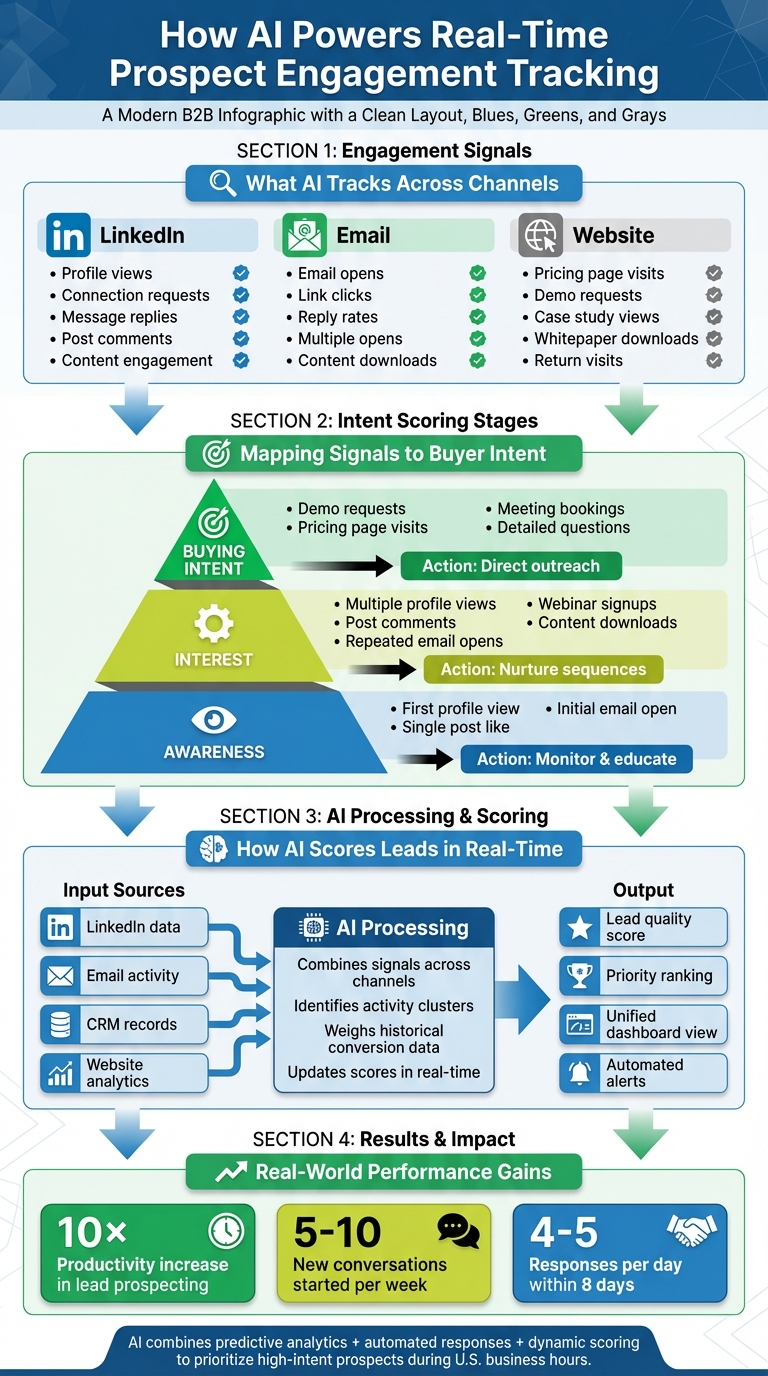
Not all signals are created equal. A single profile view doesn’t carry the same weight as a demo request. To prioritize follow-ups effectively, group signals into three intent stages: awareness, interest, and buying intent.
- Awareness signals: These are light touches, like a first profile view or a single post like. They indicate initial curiosity about your brand.
- Interest signals: These suggest deeper engagement, such as multiple profile views, commenting on posts, repeated email opens, signing up for webinars, or downloading content. These actions show active research.
- Buying intent signals: These are bottom-of-funnel actions, like demo requests, pricing page visits, booking a meeting, or asking detailed questions via LinkedIn or email. These signals indicate that the prospect is ready for direct outreach, ideally timed during U.S. business hours.
This tiered system helps sales teams focus on prospects who show multiple interest or buying-intent signals, rather than chasing every minor interaction. AI tools can even combine signals - like a LinkedIn comment, a pricing page visit, and an email reply - into a more accurate picture of intent, giving your team a reliable way to prioritize leads.
How AI Processes Signals in Real Time
AI platforms take data from LinkedIn, email, CRM systems, and website analytics, combining it into a single metric that evaluates every action on a common scale. For example, opening a LinkedIn message and opening an email might both be scored based on how often they lead to conversions historically. The AI doesn’t just tally individual actions; it identifies clusters of activity - like three website visits and two email opens within 48 hours - that signal a higher priority than the same actions spread over weeks.
SalesMind AI exemplifies this approach with its lead scoring system and unified inbox. Svit Babarovic from MountainDrop highlighted the clarity this brings:
"The lead scoring system is particularly impressive, providing clear insights into lead quality" [1].
The platform aggregates interactions across your team’s LinkedIn activities and automated email sequences, updating lead scores in real time as new signals come in. Rahul P., Senior Advisor at Bounty Media, described the operational benefits:
"SalesMind AI has proven very useful to our sales team in reducing the pain points of manually tracking each and every lead interaction. To have one master dashboard not just for yourself but for our entire team and try different lead lists, sequences, and track them all in real time is fantastic" [1].
Using AI for Predictive Analytics in Engagement
Predictive analytics shifts your sales approach from reactive to proactive. Instead of waiting to see who engages, AI dives into historical data to predict which prospects are most likely to respond, schedule a meeting, or convert. This allows you to focus your efforts on leads with the highest potential, making outreach more strategic. For U.S. B2B teams juggling hundreds of leads, this predictive edge turns engagement tracking into a game-changer by concentrating resources where they are most likely to make an impact.
AI models analyze thousands of past interactions to spot patterns tied to successful outcomes. For example, if certain engagement behaviors historically lead to higher conversion rates, the AI can flag similar activities in real time. Tools like SalesMind AI integrate this directly into their lead scoring systems, assigning each prospect a suitability score based on filters and engagement trends. This score helps teams quickly identify top prospects without wading through endless activity logs. Now, let’s explore how to build these predictive models.
How to Build Predictive Engagement Models
The first step in building a predictive model is to define clear outcomes. These could be goals like "replied within 7 days", "scheduled a meeting", or "qualified as a sales lead." Once the goals are set, gather historical data from your CRM, email tools, LinkedIn activity, and website analytics. Key signals to track include email open and reply rates, LinkedIn connection acceptances, profile views, content downloads, and visits to high-intent pages like pricing or case studies.
After collecting the data, split it into training and testing sets. Use methods like gradient boosting, random forest, logistic regression, or neural networks to train models that predict the desired outcomes. Evaluate the model’s performance using metrics such as AUC, precision/recall, or uplift compared to rule-based systems. The goal is to prove that AI predictions outperform traditional methods. Alex L., CTO at Slash Co, shared his experience:
"From the very first week, SalesMind AI boosted my productivity in lead prospecting by 10×. At full capacity, the AI managed to get 5 to 10 new conversations started per week, opening doors to valuable connections I might not have reached otherwise" [1].
How to Set Up Engagement Scoring Rules
AI-powered scoring combines predictive analytics with business-specific priorities. Assign points by blending the AI’s likelihood score with custom rules, such as company size, industry relevance, or job title. This hybrid approach ensures that high-intent prospects who match your ideal customer profile rise to the top of your list.
Svit Babarovic, CEO at MountainDrop, emphasized the clarity this approach provides:
"The lead scoring system is particularly impressive, providing clear insights into lead quality" [1].
By surfacing actionable scores during U.S. business hours, your team can follow up while prospects are actively researching, increasing the chances of a response. This refined scoring system sets the stage for comparing traditional rule-based methods with the precision of AI.
Rule-Based vs AI-Driven Scoring
Rule-based scoring uses static thresholds, like awarding 10 points for an email open or 20 points for a pricing page visit. While easy to set up, it lacks the depth to adapt to changing behaviors. AI-driven scoring, on the other hand, evaluates hundreds of data points at once, weighing each signal based on its historical link to conversions. This allows sales teams to zero in on high-intent leads with greater accuracy.
Rule-based systems work well with minimal historical data but require constant updates as buyer behavior evolves. AI-driven models, while needing larger datasets and periodic retraining, are more scalable and adjust automatically as patterns shift. For U.S. teams handling complex sales cycles, AI-driven scoring can improve conversion rates and optimize sales efforts. Adding intent signals, like hiring trends or content consumption, further boosts proactive outreach by identifying prospects entering active buying phases [2].
How to Automate Real-Time Engagement Responses
Once you've identified high-intent prospects using predictive scoring, the next step is to act fast. Timing is everything in U.S. B2B sales - prospects expect quick follow-ups, and any delay could mean losing a valuable opportunity. This is where AI-powered automation steps in, delivering personalized responses as soon as a prospect takes action. Whether it's clicking a link in an email or accepting a LinkedIn connection request, automation ensures you stay responsive, even during offline hours. This keeps leads warm and momentum intact.
Automated responses work by sending timely, customized messages based on real-time signals. For instance, if someone clicks a specific call-to-action in your email, AI can instantly send a follow-up tailored to their interest. Similarly, if a prospect views your LinkedIn profile but doesn’t reply to your initial message, the system can send a polite reminder after a set delay. This approach keeps conversations flowing without overwhelming your team - or irritating your prospects.
How to Configure Automated Follow-Ups
Start by defining clear triggers that indicate genuine interest. For email, this could be actions like opening a message multiple times, clicking on certain links, or ignoring the email for a specific number of days. On LinkedIn, triggers might include profile views, accepting a connection request, or engaging with your posts. Each trigger should link to a specific AI-driven action, such as sending a follow-up message, alerting a sales rep, or moving the lead to a priority queue.
Timing is key. Avoid making your automation feel robotic by setting natural delays. For example, if a prospect opens your email three times in one day, wait 24 hours before following up instead of responding immediately. Ensure your AI respects U.S. business hours (9:00 AM to 5:00 PM local time) to avoid sending messages at odd times. To maintain quality, use templates and tone guidelines for AI-generated responses. These should focus on clear, concise messaging with strong calls to action. For sensitive topics like pricing or legal discussions, require human approval to keep control over critical conversations.
Roberto K., Chief Product Officer at aCommerce, shared how automation improved their LinkedIn prospecting:
"Completely automated our sales prospecting on LinkedIn. Ready integrated with LinkedIn, it was easy to set up in terms of selecting the audience and setting up the sequence of follow-up messages until the LinkedIn member reacts. It means we can reach out to hundreds or thousands of prospects without losing control." [1]
This streamlined follow-up system simplifies engagement and ensures no opportunities are missed.
How to Use an AI-Powered Unified Inbox
Managing responses across multiple LinkedIn accounts and email threads can get messy fast. An AI-powered unified inbox solves this by centralizing all your conversations in one place. For example, SalesMind AI’s unified inbox gathers messages from all connected LinkedIn accounts, organizes them by intent, and highlights the most urgent leads first. With AI assistance, it also provides suggested responses, tags, and reminders, helping your team stay on top of every interaction without manual effort.
This setup not only saves time but also reduces errors. Instead of scrolling through endless LinkedIn messages to find hot leads, the AI identifies prospects with high engagement or those who fit your ideal customer profile. It even pulls in relevant details from prospect websites to craft personalized replies, ensuring your responses are timely and on point.
Manual vs AI-Automated Workflows
Automation takes the hassle out of repetitive tasks, unlike manual workflows that require constant attention. With manual outreach, you’d spend hours tracking interactions, writing individual messages, and remembering to follow up. AI, on the other hand, does this instantly, working around the clock to ensure no lead is overlooked. Rahul P., Senior Advisor at Bounty Media, emphasized this advantage:
"SalesMind AI has proven very useful to our sales team in reducing the pain points of manually tracking each and every lead interaction. To have one master dashboard not just for yourself but for our entire team and try different lead lists, sequences, and track them all in real time is fantastic." [1]
Let AI handle high-volume, straightforward tasks like reminders, follow-ups, and confirmation messages. Save manual efforts for complex deals, multi-stakeholder discussions, or situations that require nuanced judgment. Regularly review AI-generated messages to ensure they align with expectations, focusing on accuracy, tone, and performance. Test different triggers, timing, and message variations to fine-tune your process. This way, your automation adapts as buyer behaviors shift, keeping your approach effective and relevant.
sbb-itb-817c6a5
How to Implement AI-Enhanced Lead Scoring
AI-enhanced lead scoring takes the guesswork out of identifying high-potential prospects. By analyzing engagement data, it ranks leads based on their likelihood to convert. Key factors like job title, company size, and behaviors - such as email clicks or demo requests - are used to assign scores. Unlike traditional methods, which rely on static rules that may not reflect current buyer behavior, AI scoring taps into historical CRM data, including past wins and losses, to continuously refine and update these scores with predictive insights.
The most effective systems combine three types of data: firmographic (e.g., industry, company size, revenue, U.S. location), behavioral (e.g., email opens, site visits, content downloads, event attendance), and organizational role (e.g., decision-maker vs. influencer). Together, these data points paint a clear picture of which prospects are ready to buy and why. For example, a VP at a U.S.-based SaaS company with 500 employees who views your pricing page multiple times in two days would score higher than a manager at a 50-person startup who only opens a single email. The next step? Building a scoring framework that makes the most of this data.
How to Create a Lead Scoring Framework
Start by defining your ideal customer profile. Map out firmographic details like industry, company size, tech stack, and typical deal size, and assign higher base scores to leads that match these criteria. Then, categorize your scoring inputs into three buckets:
- Firmographic: For example, U.S.-based SaaS companies with 200 to 1,000 employees and $10M to $100M in revenue.
- Organizational role: C-level executives, VPs, directors, or managers.
- Behavioral: Actions like demo requests, pricing page views, or LinkedIn replies.
Assign initial point values to these behaviors as a starting point. For example, a demo request might be worth +30 points, a pricing page view +20, a LinkedIn reply +10, and an unsubscribe −20. These baseline rules provide the foundation for your AI model. Over time, the AI analyzes closed-won and closed-lost deals to adjust these weights based on what actually drives conversions. Svit Babarovic, CEO of MountainDrop, praised this approach:
"The lead scoring system is particularly impressive, providing clear insights into lead quality." [1]
How AI Refines Lead Scores in Real Time
AI doesn’t just stop at the initial setup - it continuously fine-tunes lead scores by analyzing new data. Every week or month, the system updates based on closed-won and closed-lost opportunities, identifying which combinations of factors - like role, content type, and timing - are most predictive of success.
For instance, the AI might notice that prospects who engage with case studies and then visit your pricing page within 48 hours are twice as likely to convert as those who only download whitepapers. It will then adjust the scoring to prioritize these high-intent behaviors, ensuring your team focuses on the leads most likely to close. Jure, CEO of Jure Design, highlighted the clarity this approach provides:
"I like that it shows you a score on what the lead suitability with your filters is." [1]
These real-time updates ensure your scores reflect current buyer behavior, not outdated assumptions, and help your team act quickly on high-priority leads.
How to Integrate Lead Scoring into Daily Workflows
To make the most of AI-enhanced lead scoring, integrate it directly into your CRM, like Salesforce or HubSpot. This way, scores are visible on contact and account profiles, and your team can set alerts for "hot leads" that exceed a specific threshold. This approach eliminates the need to sift through endless lists, allowing sales teams to focus on engaging the right prospects at the right time.
For those relying on LinkedIn for prospecting, tools like SalesMind AI can automatically track and score actions such as profile views, message replies, and content interactions. Its unified inbox highlights high-priority leads first, while pulling in details from prospect websites to help craft personalized responses. Rahul P., Senior Advisor at Bounty Media, shared his experience:
"SalesMind AI has proven very useful to our sales team in reducing the massive pain points of manually tracking each and every lead interaction. To have one master dashboard not just for yourself but for our entire team and try different lead lists, sequences, and track them all in real time is fantastic." [1]
To validate the impact of AI scoring, compare metrics like conversion rates, sales cycle length, and rep productivity before and after implementation. This data will not only confirm the ROI but also help refine your strategy for even better results.
How to Measure and Improve AI-Powered Engagement Tracking
Start by defining the key metrics that matter most for tracking engagement. These include connection speed metrics like average response time, time-to-first-touch, and follow-up consistency. Then, look at conversion metrics, such as reply rates, positive reply rates, and meetings booked per 100 contacts. Finally, focus on revenue impact metrics - pipeline created (in USD), win rates for AI-influenced deals, revenue influenced, and sales cycle length. To get a clearer picture of AI's performance, break down these metrics by channel (email, LinkedIn, phone), sequence type (cold vs. warm outreach), and lead segments like ICP tier, industry, or region. This segmentation helps identify where AI is making the biggest difference.
Which Metrics to Track
Digging deeper into the key performance indicators (KPIs) makes it easier to decide what to measure. A well-rounded set of KPIs should balance speed, quality, and business outcomes.
For speed and volume, track:
- Connection rates
- Response rates
- Number of responses per day
- New conversations started each week
For quality and conversion, focus on:
- Meetings booked
- Deals closed
- Insights from your lead scoring system
For business impact, measure:
- Pipeline generated in dollars
- Revenue influenced by AI-driven actions
- Time saved compared to manual outreach
For example, one user reported receiving 4 to 5 responses per day within just eight days of implementing AI-powered engagement tracking [1]. With these KPIs in place, you can monitor changes over time and fine-tune your approach.
How to Run Before-and-After Analysis
To understand how AI impacts your engagement efforts, start with a baseline period of 60 to 90 days before rolling out AI. During this time, record metrics like reply rates, meetings booked per rep, average response time, sales-qualified leads (SQLs), and revenue in USD. Keep key variables consistent to ensure accurate comparisons.
When introducing AI, consider a phased rollout. For instance, test it with one region or team while maintaining a control group that continues manual operations. After implementing AI, track the same metrics over an equivalent period. This method helps isolate the effects of AI from external factors like seasonal trends or market shifts.
The results can be striking. One user noted a 10x increase in productivity for lead prospecting, while another reported starting 5 to 10 new conversations per week using AI [1]. By comparing the data, you can validate how AI improves timing, tracking, and scoring in real-time.
How to Optimize AI Models Over Time
Once you've established your baseline metrics and measured the initial impact, the next step is refining your AI models. Regular reviews, either monthly or quarterly, are crucial. Focus on reply rates, meetings booked, and conversion rates, and segment these metrics by lead score and outreach method. This helps identify patterns, such as low-scored leads converting unexpectedly well or high-scored leads failing to deliver results.
To improve predictive accuracy, feed your models with labeled data - like meetings booked, SQLs, closed-won deals, closed-lost deals, and non-responsive outcomes. This allows the AI to learn from actual results. Additionally, run A/B tests on aspects like subject lines, opening hooks, and call-to-action styles to see what resonates best with your audience.
Set clear guidelines for tone, message length, and compliance to ensure AI-generated responses remain professional, personalized, and privacy-conscious. Keep an eye on both positive signals (e.g., reply rates) and negative ones (e.g., spam or unsubscribe rates) to ensure optimizations enhance quality rather than just boosting volume.
Finally, after making updates to your AI rules or models, conduct a smaller before-and-after analysis. Retain only those changes that show statistically significant improvements in reply rates, meetings booked, or overall pipeline growth. This iterative process ensures your AI remains effective and aligned with evolving engagement trends.
Conclusion
AI is reshaping how businesses track real-time prospect engagement by blending predictive analytics, automated workflows, and smart lead scoring into one streamlined system. This approach pinpoints high-potential opportunities, scales personalized outreach, and responds instantly to engagement cues. By merging these elements, companies can save countless hours of repetitive tasks while improving the quality of every interaction.
The impact of these advancements can be seen in real-world results. Users consistently report that AI significantly enhances both prospect engagement and overall productivity [1].
Take SalesMind AI as an example. It simplifies B2B LinkedIn outreach by consolidating replies from multiple accounts into a single inbox. Its AI-powered lead scoring identifies the most promising prospects, while automated follow-ups ensure no opportunity is missed. Plus, personalized, insight-driven messages lead to higher connection rates. With impressive ratings - 4.4 on Trustpilot and 4.7 on G2 [1] - the platform demonstrates clear improvements in engagement and conversion rates.
FAQs
How does AI enhance real-time engagement tracking with prospects?
AI takes real-time engagement tracking to the next level by leveraging predictive analytics to forecast prospect behavior. It automates responses, ensuring communication happens at just the right moment. Additionally, with lead scoring, businesses can focus their efforts on high-value opportunities. These tools allow companies to connect with prospects more effectively, personalize interactions, and make the sales process smoother and more efficient.
What are the main engagement signals that show a prospect is ready to buy?
Key signs of buying intent often show up through actions like clicking on links, asking for more details, or engaging with tailored content. Prospects might also share their specific needs or challenges through platforms like LinkedIn messages or emails.
With the help of AI tools, businesses can monitor these signals as they happen, making it easier to spot and focus on leads with the highest potential.
How can AI help businesses automate follow-ups effectively?
AI empowers businesses to take the hassle out of follow-ups by automating tasks like personalized messaging, scheduling reminders, and qualifying leads. These tools use prospect behavior data to send timely, relevant responses, keeping engagement consistent without the need for constant manual input.
This streamlined approach allows businesses to build stronger relationships with prospects, save valuable time, and boost their chances of turning leads into customers.
 JG
JG