AI-Powered Outreach: Avoid LinkedIn Restrictions
Learn safe LinkedIn outreach using AI: personalized messages, rate limits, randomized timing, and follow-ups to avoid restrictions and improve responses.
 Julien Gadea
Learn safe LinkedIn outreach using AI: personalized messages, rate limits, randomized timing, and follow-ups to avoid restrictions and improve responses.
Keep connection requests to 15-20 per day (max 100 per week).
Personalize messages to avoid spam triggers.
Gradually increase activity on new or inactive accounts.
Focus on quality leads and monitor metrics like acceptance rates.
Table of Contents
Reaching out on LinkedIn can be tricky. Send too many requests or use repetitive messages, and your account could be restricted - or even banned. LinkedIn limits connection requests to around 100 per week and closely monitors for bot-like behavior. Violations, like sending identical messages or exceeding limits, can lead to warnings, temporary restrictions, or permanent bans.
How can you scale outreach safely? AI tools like SalesMind AI help create personalized messages, automate follow-ups, and ensure compliance with LinkedIn’s rules. By staying under daily and weekly limits, introducing random delays, and tailoring messages to each prospect, these tools reduce risks while improving response rates.
Key tips for safe LinkedIn outreach:
- Keep connection requests to 15-20 per day (max 100 per week).
- Personalize messages to avoid spam triggers.
- Gradually increase activity on new or inactive accounts.
- Focus on quality leads and monitor metrics like acceptance rates.
SalesMind AI automates these processes and helps manage leads more efficiently, ensuring your LinkedIn account remains safe while driving meaningful connections.
How to Avoid LinkedIn Bans: Safe Automation and Rate Limits Explained
LinkedIn Usage Limits and Restrictions Explained
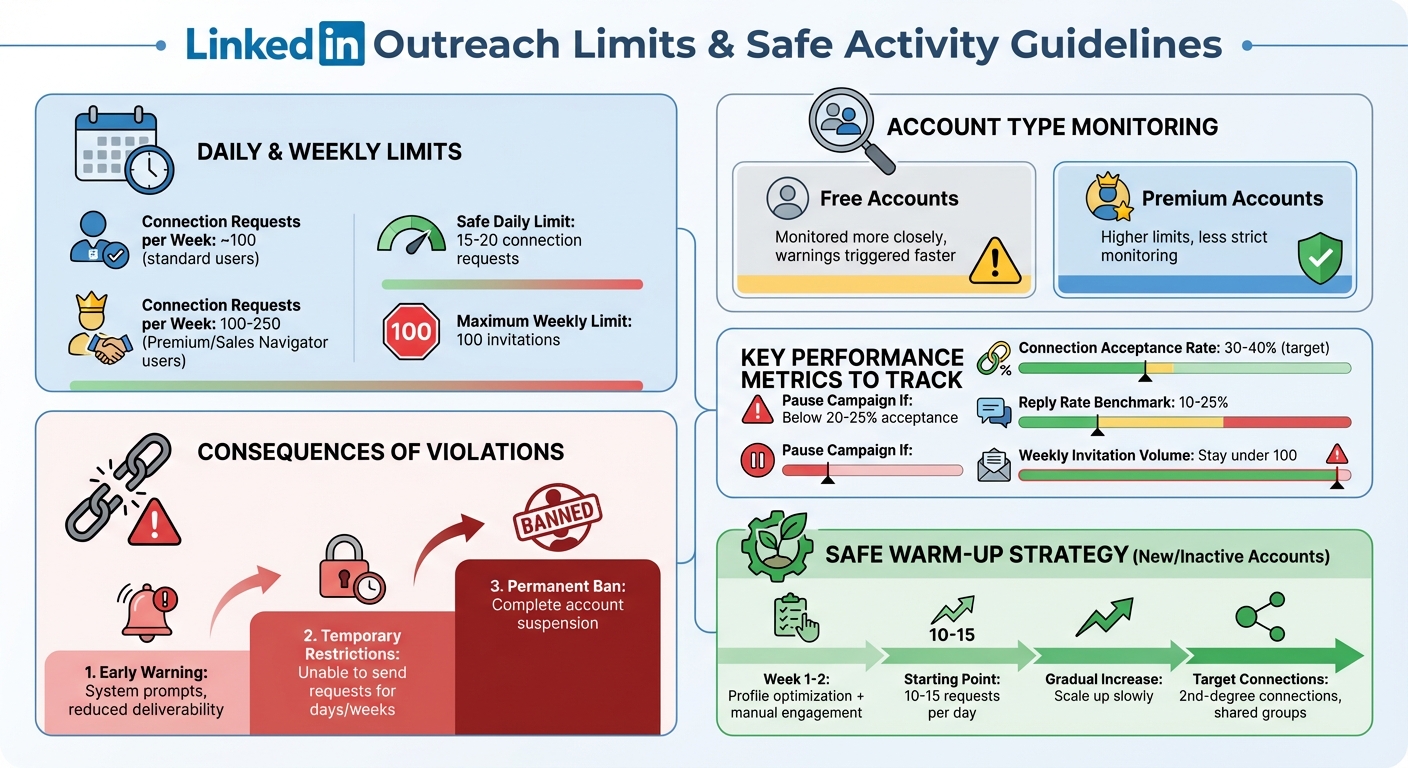
LinkedIn Outreach Limits and Safe Activity Guidelines
Daily and Weekly Activity Limits
LinkedIn imposes a weekly cap of about 100 connection requests for most users[2][4]. However, users with high-reputation profiles or those subscribed to Sales Navigator or Premium accounts may have a higher range, typically between 100 and 250 requests[4]. Free accounts are monitored more closely, and even small activity spikes can lead to warnings faster than for Premium users[2]. Now, let’s dive into how LinkedIn detects when these rules are violated.
How LinkedIn Identifies Rule Violations
LinkedIn’s detection system doesn’t just count your actions - it looks for patterns that seem unusual or automated. For instance, visiting 50 profiles in a single minute or sending 100 connection requests in an hour is likely to raise alarms[2]. Another key factor is rejection rates. If too many people click "I don't know this person" on your connection requests, it can harm your account’s standing. Similarly, sending repetitive messages or working in overly predictable intervals can trigger LinkedIn’s automation detection.
LinkedIn’s User Agreement explicitly bans the use of "bots or other automated methods" for accessing its services or sending messages[2]. To avoid penalties, it’s crucial to space out your actions, customize your messages, and focus on reaching out to relevant, well-targeted prospects.
Consequences of Breaking LinkedIn's Rules
Breaking LinkedIn’s activity rules can lead to various penalties, depending on the severity of the violation. Early warnings might come in the form of system prompts or reduced message deliverability. Continued violations could result in temporary restrictions, such as being unable to send connection requests for several days or weeks. In more severe cases - especially if LinkedIn detects repeated violations or bot-like behavior - your account could be permanently banned. This means losing access to your network and valuable connections.
LinkedIn’s enforcement approach is adaptive, meaning what’s acceptable for one user might be flagged as risky for another. Factors like your account’s history and acceptance rates play a big role[2]. This variability highlights why it’s better to focus on quality over quantity and to gradually increase activity on new or inactive accounts.
How SalesMind AI Keeps Your Account Safe
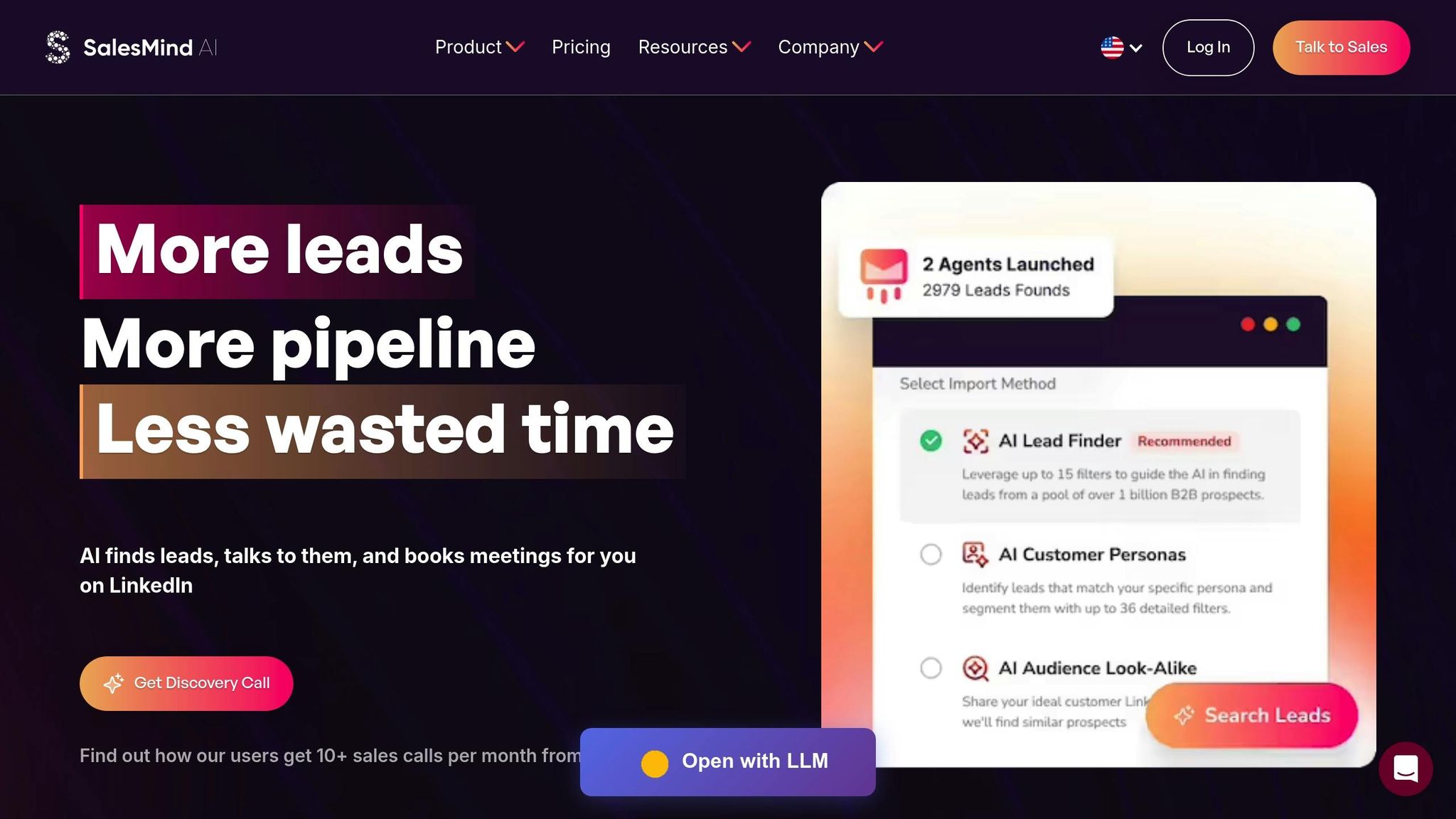
When it comes to LinkedIn automation, the challenge is balancing efficiency with safety. To hit your sales goals, you might need to contact hundreds of prospects. But LinkedIn’s systems are designed to flag accounts showing unusually high levels of activity. SalesMind AI tackles this issue by embedding safety features into every step of the process, making sure your outreach mimics natural human behavior. Let’s explore how its features keep your account secure while staying within LinkedIn’s guidelines.
AI-Generated Personalized Messages
LinkedIn’s spam filters are quick to flag identical messages sent in bulk. Sending the same template repeatedly makes your account vulnerable to detection. SalesMind AI avoids this by creating unique, personalized messages for every prospect. Using data pulled from profiles and websites, the AI crafts messages that feel tailored - referencing details like a prospect’s job title, recent company updates, or shared interests[1].
This approach not only reduces the risk of triggering LinkedIn’s filters but also boosts response rates. When a message feels relevant, it’s more likely to grab attention and start a conversation.
Built-In Compliance Controls
SalesMind AI doesn’t stop at better messaging - it actively ensures your activity stays within LinkedIn’s limits. The platform enforces strict daily and weekly caps, keeping you safely under LinkedIn’s thresholds of around 15–20 connection requests per day and 100 per week[2]. These limits are hardcoded, so there’s no risk of accidentally exceeding them.
To make your activity appear even more natural, SalesMind AI introduces randomized timing and delays. Instead of sending connection requests at fixed intervals, the system spaces them out unpredictably. For new or inactive accounts, a built-in warm-up period gradually increases activity. It starts with optimizing your profile and engaging organically before scaling up to full outreach volumes[2]. Real-time monitoring adds another layer of protection, alerting you if you approach a limit or if LinkedIn’s scrutiny increases.
These compliance features ensure your outreach stays safe while maintaining consistent performance.
Unified Inbox and Lead Scoring System
Automation can sometimes lead to a "set it and forget it" mindset, which LinkedIn’s enforcement measures are designed to catch. To address this, SalesMind AI provides a unified inbox that consolidates all your LinkedIn conversations across multiple accounts into one easy-to-manage dashboard. The platform’s lead scoring system also helps you prioritize high-value prospects, ensuring timely and meaningful follow-ups.
When a prospect responds, you’re notified immediately. Along with their reply, you’ll get AI-generated response suggestions, tags, and reminders to help you engage quickly and effectively[1]. This setup allows you to focus on the most promising leads, whether that means sending a customized LinkedIn message, a personalized email, or even making a phone call.
sbb-itb-817c6a5
Safe LinkedIn Outreach Strategies with AI
Even with LinkedIn's built-in safety features, how you use AI tools plays a huge role in keeping your account secure. LinkedIn has clear guidelines to detect and address rule violations, so adopting the right strategies is crucial. When done thoughtfully, automation can help you scale your outreach efforts while maintaining your account's good standing. Here’s how to use LinkedIn automation effectively and responsibly.
Start Small and Target Wisely
If your account is new or hasn’t been active for a while, jumping into high-volume outreach can raise red flags. Start by warming up your account over one or two weeks. Use this time to optimize your profile, share content, and engage manually with posts from others. Once your account looks active, begin outreach slowly - sending 10 to 15 connection requests per day is a safe starting point. Stay well below the practical limit of 100 invites per week.
To improve your chances of success, use firmographic filters like industry, company size, job title, and seniority to narrow your audience. Focus on second-degree connections or members of shared groups, as these tend to accept requests more often and reduce the risk of being flagged as spammy[2].
Monitor Key Metrics
Keeping an eye on your performance metrics is essential for improving results and staying within LinkedIn’s limits. Aim for a connection acceptance rate between 30% and 40%, and pause your campaigns if the rate drops below 20% to 25%. For personalized messages, a reply rate of 10% to 25% is a solid benchmark.
Additionally, track your weekly invitation volume to ensure it stays under 100. Another helpful metric is your Social Selling Index (SSI), which tends to increase as you engage thoughtfully on the platform. Regularly reviewing these numbers can help you gauge the effectiveness of your outreach while keeping your account safe[2][3].
Combine Automation with Personal Effort
The best LinkedIn strategies strike a balance between automation and personal engagement. Use AI tools for the initial stages, like sending connection requests and crafting lightly personalized introductions. For high-value prospects, however, switch to manual efforts - whether it’s a custom message or a short video note, these personal touches go a long way.
When a prospect responds positively, immediately take over the conversation to make it one-on-one. To complement your automated outreach, engage organically by viewing profiles, commenting on posts, and sharing your own updates. This multi-pronged approach not only minimizes the risk of detection but also fosters more meaningful conversations and better opportunities[2][3].
Growing Your LinkedIn Network with SalesMind AI
Expanding your LinkedIn network safely requires a thoughtful approach that balances automation with LinkedIn's rules. SalesMind AI makes this process seamless by helping you connect with a diverse range of prospects while staying within LinkedIn's weekly limit of about 100 invitations [2]. By automating repetitive tasks like sending messages and follow-ups, SalesMind AI frees your sales team to focus on what truly matters - closing deals.
Automated Personalized Follow-Ups
SalesMind AI takes follow-up strategies to the next level by creating multi-step message sequences that are spaced out over several days. These sequences automatically stop when a lead responds or schedules a meeting. The platform uses data from prospect profiles and companies to craft personalized messages that avoid sounding like spam. Roberto K., Chief Product Officer at aCommerce, shared how this feature transformed their outreach efforts:
"It means we can reach out to hundreds or thousands of prospects without losing control. It's super powerful and has helped us scale up our lead generation and thus our business effortlessly."
Additionally, SalesMind AI integrates with your CRM, ensuring that LinkedIn conversations and pipeline updates stay perfectly aligned.
Real-Time Lead Monitoring
The platform’s unified AI inbox simplifies lead management by consolidating all replies from multiple LinkedIn accounts into one dashboard. This dashboard includes features like ready-to-use responses, tagging, and reminders, making it easier to prioritize active prospects and streamline outreach. Rahul P., Senior Advisor at Bounty Media, emphasized how this has improved their workflow:
"SalesMind AI has proven very useful to our sales team in reducing the massive pain points of manually tracking each and every lead interaction. To have one master dashboard not just for yourself but for our entire team and try different lead lists, sequences, and track them all in real time is fantastic."
On top of that, the platform’s lead scoring system identifies the most promising prospects based on factors like seniority, company fit, and engagement. This helps your team focus their efforts where they’re most likely to see results.
Long-Term Account Safety Through Smart Automation
Protecting your LinkedIn account is crucial for sustained growth. SalesMind AI ensures compliance by keeping automated invitations below LinkedIn’s 100-per-week limit, leaving room for manual connections. The platform also varies subject lines and opening sentences to mimic natural communication patterns, reducing the risk of triggering LinkedIn’s spam filters. To maintain consistency, SalesMind AI operates offline to avoid sudden spikes in activity.
By automating tedious prospecting tasks and adhering to safe activity levels, SalesMind AI supports steady network growth without risking account restrictions. Louis-Alban B., CEO at Yindii, shared how the system simplified their outreach:
"Reaching out to 100 potential leads was easy. I just selected target audience filters, and the system proposed smart templates based on profiles and companies."
With these features, SalesMind AI helps you grow your LinkedIn network efficiently and responsibly, paving the way for meaningful connections and business opportunities.
Conclusion
Expanding your LinkedIn network can be done safely without putting your account at risk. The secret lies in combining smart automation with a clear understanding of LinkedIn's guidelines. Stick to LinkedIn's activity limits, personalize your messages to keep them from feeling spammy, and balance automation with genuine manual efforts. Prioritizing quality over quantity often leads to better reply rates (commonly between 10–25% for well-targeted campaigns) and helps you steer clear of LinkedIn's spam detection.
SalesMind AI simplifies the process by automating personalized follow-ups, scoring leads in real time, and ensuring your activity stays within LinkedIn's safe boundaries. Its features, like spacing out messages and syncing with your CRM, ensure every interaction feeds directly into your sales pipeline, helping your team focus on closing deals. This combination of technical safeguards and strategic outreach creates a strong foundation for successful campaigns.
To make the most of your efforts, focus on message quality. Guide the AI to craft clear, relevant value propositions tailored for U.S. audiences rather than chasing sheer volume. Take time each week to review your performance and compliance, refining your targeting and timing based on the data. Use these insights to continually improve your approach.
In the long run, prioritizing steady, responsible growth will always outperform short-term aggressive strategies. By scaling smartly with automation, you can build a reliable outreach system that fosters genuine connections, secures meetings, and drives real revenue - all while protecting your LinkedIn presence.
FAQs
How does SalesMind AI help you stay compliant with LinkedIn's guidelines?
SalesMind AI is built to work within LinkedIn's usage policies, offering a smart and respectful way to automate outreach. It emphasizes tailored, meaningful messaging while steering clear of spammy practices, helping your interactions stay professional and impactful.
With the power of AI, SalesMind AI assists in qualifying leads, managing follow-ups thoughtfully, and simplifying communication. This ensures you can maintain authentic connections without risking LinkedIn restrictions.
What happens if I exceed LinkedIn’s connection request limits?
If you go over LinkedIn's connection request limits, your account could face some serious consequences - ranging from temporary suspensions to permanent bans. These rules exist to curb spam and ensure users stick to LinkedIn's guidelines.
To steer clear of these issues, make sure to stay within LinkedIn's daily and weekly connection limits. Focus on creating authentic, personalized connections with your prospects. If you're using outreach tools, use them wisely and responsibly to scale your efforts without breaking the rules.
What are the best ways to increase LinkedIn connection acceptance rates?
To improve your LinkedIn connection acceptance rates, focus on sending personalized connection requests. Start by addressing the recipient by their name and mentioning something specific, such as their recent work, achievements, or shared interests. Steer clear of generic or overly formal messages, as they often feel impersonal and are less likely to resonate.
Equally important is having a complete and professional LinkedIn profile. Use a high-quality profile picture, craft an engaging headline, and write a summary that showcases your expertise and career goals. A well-rounded and polished profile builds trust, making people more inclined to accept your connection requests.
You can also explore AI-powered tools like SalesMind AI to enhance your outreach. These tools can help you automate personalized messages and identify potential leads, saving time while ensuring your efforts align with LinkedIn’s guidelines.
 JG
JG