AI-Powered LinkedIn Messaging
Automate personalized LinkedIn outreach: sync accounts, build campaigns, send AI-crafted messages and follow-ups, and prioritize high-value leads.
 Julien Gadea
Automate personalized LinkedIn outreach: sync accounts, build campaigns, send AI-crafted messages and follow-ups, and prioritize high-value leads.
Save Time: Automate up to 90% of LinkedIn messaging tasks.
Personalized Outreach: AI analyzes job roles, activities, and company details to create tailored messages.
Boost Efficiency: Users report up to 10x productivity improvements.
Lead Prioritization: Advanced scoring helps focus on high-value prospects.
Table of Contents
AI tools are transforming LinkedIn outreach by automating tedious tasks like crafting personalized messages for thousands of prospects. Instead of spending hours manually reaching out, sales teams can now use platforms like SalesMind AI to analyze LinkedIn profiles, generate tailored messages, and automate follow-ups - all while maintaining a personal touch.
Key Benefits:
- Save Time: Automate up to 90% of LinkedIn messaging tasks.
- Personalized Outreach: AI analyzes job roles, activities, and company details to create tailored messages.
- Boost Efficiency: Users report up to 10x productivity improvements.
- Lead Prioritization: Advanced scoring helps focus on high-value prospects.
How It Works:
- Connect LinkedIn: Sync your account securely with SalesMind AI.
- Plan Campaigns: Define goals, target audiences, and message sequences.
- Automate Messaging: Send connection requests, follow-ups, and replies using AI-driven insights.
- Track Results: Monitor performance in real-time with detailed analytics.
AI-driven tools like SalesMind AI make LinkedIn a powerful platform for SaaS sales, helping teams scale outreach while focusing on meaningful conversations.
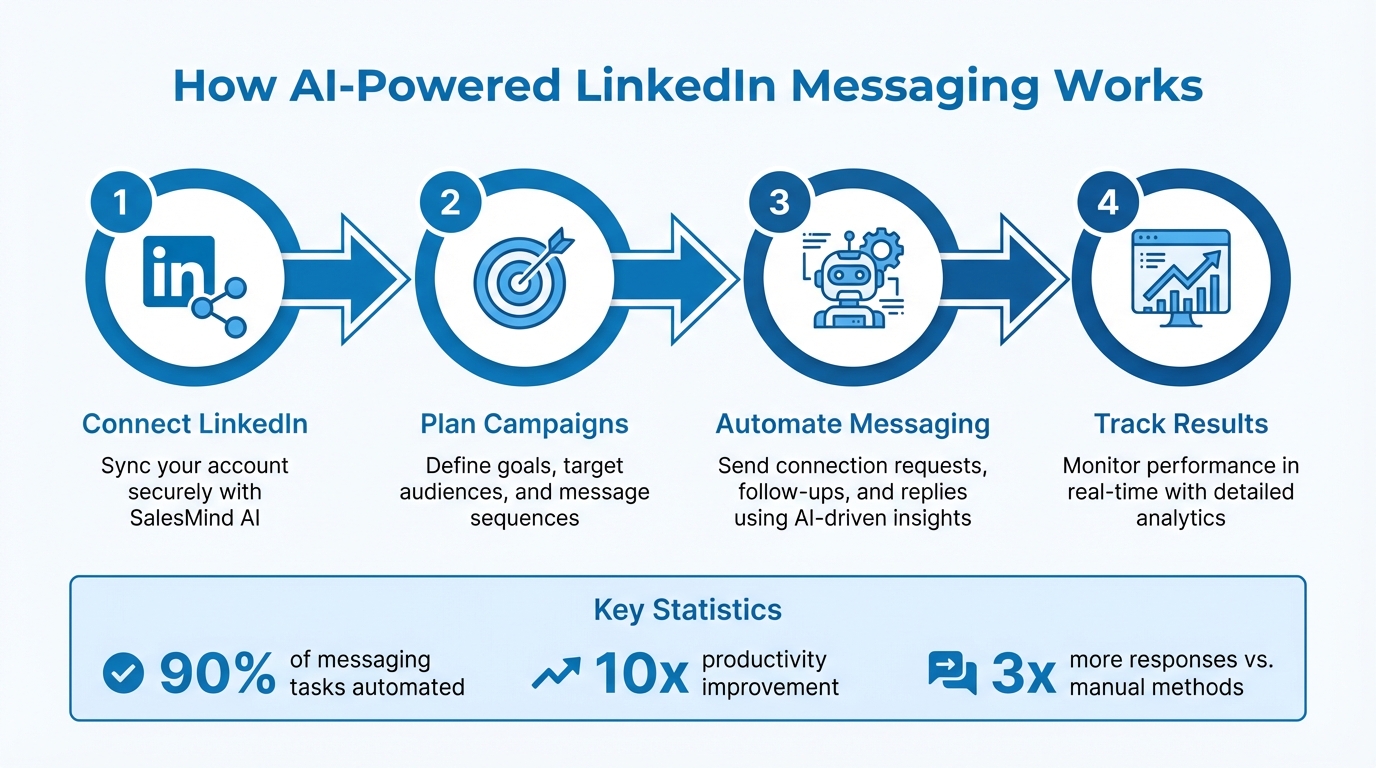
4-Step Process to Set Up AI-Powered LinkedIn Messaging with SalesMind AI
How to Automate your LinkedIn with AI (Full Tutorial with Prompts)
What is SalesMind AI for LinkedIn Outreach
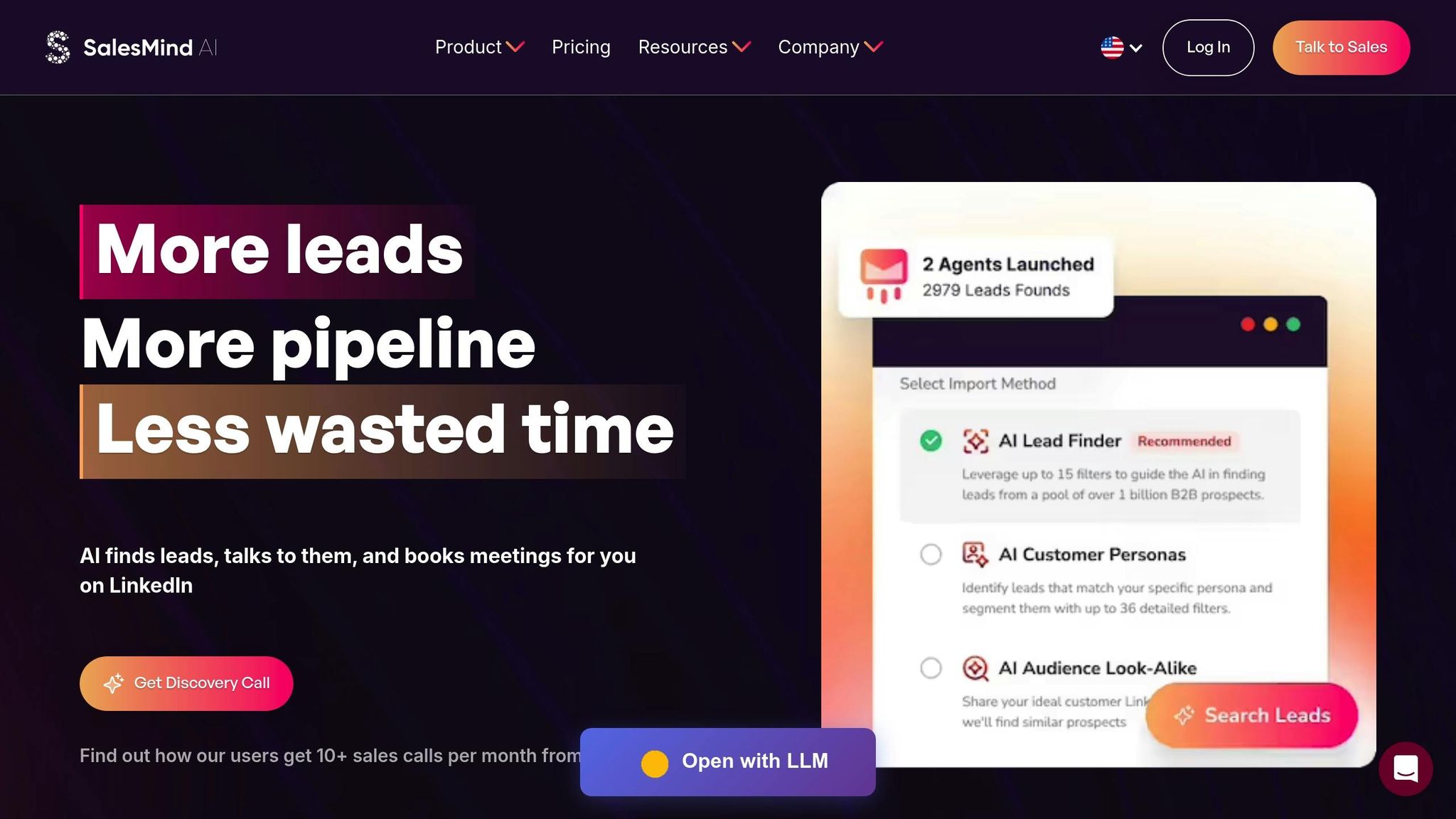
SalesMind AI streamlines LinkedIn messaging by automating essential tasks and improving targeting. Designed specifically for B2B sales teams, this platform simplifies LinkedIn outreach by using AI to create personalized messages at scale, leveraging data directly from LinkedIn profiles. From sending connection requests to managing follow-ups, SalesMind AI takes care of the heavy lifting while ensuring messaging stays aligned with your brand's voice.
It also centralizes all LinkedIn conversations into a single interface, making it easier for sales reps to manage interactions without jumping between platforms. With its lead scoring feature, SalesMind AI evaluates prospects based on engagement signals and profile details, helping teams prioritize the leads most likely to convert. For SaaS sales teams relying on LinkedIn to build their pipeline, this tool transforms a traditionally time-intensive process into a streamlined, scalable operation. Let’s dive into the features that make SalesMind AI a game-changer for LinkedIn outreach.
Main Features of SalesMind AI
The AI-powered unified inbox consolidates replies from all connected LinkedIn accounts into one dashboard. It comes with an AI co-pilot that suggests responses, organizes conversations with tags, and sets reminders, ensuring no lead gets overlooked. This allows sales reps to efficiently manage hundreds of conversations without losing track of where each prospect stands.
With advanced lead scoring, the platform evaluates LinkedIn profile details - such as job title, company size, and recent activity - and assigns scores from 1 to 100. Leads with higher scores (typically 80 or above) are routed directly to sales reps for follow-up, ensuring their time is spent on high-value prospects instead of low-priority leads.
Automated follow-ups take personalization to the next level. If a prospect doesn’t respond within a set timeframe, the system sends a tailored follow-up message. If they do engage, the sequence adjusts accordingly. This keeps outreach consistent and effective without requiring constant manual oversight. Additionally, the seamless LinkedIn integration ensures safe messaging practices that comply with LinkedIn’s guidelines, while syncing lead data and activities with popular CRMs.
These features work together to deliver measurable results, particularly for SaaS sales teams.
How SalesMind AI Helps SaaS Sales Teams
SalesMind AI eliminates much of the manual effort involved in LinkedIn outreach, automating up to 80-90% of messaging tasks. SaaS reps can target specific personas - like CTOs at mid-market tech companies - and achieve up to 3x more responses compared to traditional, manual methods.
Alex L., CTO at Slash Co, shared his experience: "From the very first week, SalesMind AI boosted my productivity in lead prospecting by 10×", and enabled him to "start 5 to 10 new conversations per week" when operating at full capacity[1].
How to Set Up SalesMind AI for LinkedIn Messaging
Connecting Your LinkedIn Account to SalesMind AI
Start by creating your SalesMind AI account using your work email and enabling two-factor authentication on both SalesMind AI and LinkedIn. This extra layer of security helps ensure compliance and protects your data.
The setup process is simple. First, log into your LinkedIn account, then authorize SalesMind AI through LinkedIn's official login flow. If prompted, install the required browser extension in your primary browser. Make sure the extension only accesses the LinkedIn data necessary for outreach, such as profile details, messaging, and search results. Once connected, SalesMind AI will sync your basic profile, current connections, and any saved searches or lead lists to kickstart your campaigns.
Roberto K., Chief Product Officer at aCommerce, shared: "Ready integrated with LinkedIn, it was easy to set up in terms of selecting the audience and setting up the sequence of follow-up messages until the LinkedIn member reacts." [1]
After completing the connection, send a test message to confirm everything displays correctly in both LinkedIn and SalesMind AI's unified inbox. Adjust your settings to send messages during business hours (9:00 AM–5:00 PM local time), avoiding weekends and U.S. holidays. Randomize send times and delays to make your outreach appear more natural.
Planning Your Campaign Strategy
Once your LinkedIn account is linked, it's time to craft a focused campaign.
Start by defining a single, clear objective - whether that's booking product demos, driving trial signups, or generating qualified leads. Track key metrics like replies, meetings, and new opportunities. Use ICP-based segments (Ideal Customer Profile) to tailor campaigns to your target audience. For instance, a U.S.-based SaaS company might create separate campaigns targeting VP/Head of Sales at mid-sized companies (50–500 employees), SDR/BDR managers at VC-backed startups, or RevOps leaders using tools like Salesforce or HubSpot.
Each campaign should have a clear goal, a compelling offer, and social proof to back it up. For example, you could include a case study showcasing how a U.S. SaaS customer boosted their qualified pipeline by $500,000 in a single quarter. Define the tone of your messages (conversational or formal), keep them concise, and follow any compliance guidelines about mentioning pricing or contracts in LinkedIn messages.
Next, map out a sequence using SalesMind AI's campaign builder. A typical sequence might include a connection request, a welcome message, a follow-up highlighting your value, and a soft call-to-action (like scheduling a 15–20-minute call). Space your messages a few days apart, ensuring each one adds new value to the conversation.
sbb-itb-817c6a5
How to Write Better LinkedIn Messages with AI
Using Profile Data for Personalization
SalesMind AI taps into LinkedIn profiles to create tailored messages that feel personal and relevant. By analyzing details like job titles, company info, recent posts, shared connections, and even data from the prospect’s website, it crafts messages that resonate. For example, if you’re reaching out to a VP of Sales at a mid-market SaaS company who recently discussed pipeline quality in a post, SalesMind AI can weave that specific challenge into your outreach.
Henry F., Enterprise Account Executive – Software Development, Salesforce shared: "I've been impressed with some of the AI-recommended messaging. They pulled information from my website and other sources to curate recommended responses." [1]
To avoid sounding overly mechanical, focus on just three or four key profile details in each message. These could include the prospect's role ({{JobTitle}}), their company ({{Company}}), a recent activity or challenge, and a potential solution or outcome. For instance, if you’re contacting a RevOps leader, you might mention their emphasis on clean data and workflow efficiency, then connect it to how similar teams achieved measurable improvements. Once you’ve gathered these insights, apply them to craft messages that are concise and impactful.
Writing Guidelines for AI-Generated Messages
Once you’ve personalized your message, it’s time to structure it for maximum clarity and engagement. Aim to keep your messages under 100 words - this helps busy executives quickly grasp your point. Start with a personalized detail to hook their attention, then immediately highlight the value you bring.
A good message should flow naturally: begin with a tailored opener, follow with a brief value statement, and end with a low-pressure call-to-action (CTA). Use conversational CTAs like, "Would you be open to a 15-minute overview next week?" or "Should I send over 2–3 examples of improved reply rates?" These feel more approachable than pushy requests.
Tone matters, too. For C-level executives, keep it formal and focused on measurable outcomes like pipeline growth or cost reductions. For managers or individual contributors, adopt a more conversational tone that acknowledges their daily challenges. SalesMind AI’s smart templates handle these nuances, suggesting messages tailored to the recipient’s role and company context.
Louis-Alban B., CEO – Mobile Food Services, Yindii remarked: "The smart templates consistently align with recipient profiles and company contexts." [1]
When there’s limited profile data to work with, SalesMind AI leans on broader industry insights or company-level details. Instead of referencing a specific post, it might highlight common challenges for the prospect’s role or industry. This ensures your message stays relevant without feeling generic or forced.
Running Automated LinkedIn Messaging Campaigns
Setting Up Automated Follow-Ups and Lead Qualification
Once your initial messages are out, SalesMind AI steps in to handle follow-ups and qualify leads automatically. You can set up a sequence of follow-up messages that continue until a prospect replies, ensuring no potential lead is overlooked. The platform's lead scoring system helps you prioritize by assigning points for specific actions - like gaining a connection (+20 points) or showing interest in a meeting (+50 points). This way, you can focus your efforts on the most engaged prospects.
The unified inbox simplifies managing conversations by consolidating all LinkedIn and email responses in one place. SalesMind AI’s co-pilot uses AI to analyze replies, categorizing them by intent - whether it’s a question, positive feedback, or an objection. It even suggests pre-written responses, tags, and reminders, so your team can spend more time engaging with qualified leads. You can also configure thresholds for automatic handoffs, alerting your sales team as soon as a lead's score hits the target.
Svit Babarovic from MountainDrop shared: "The lead scoring system is particularly impressive, providing clear insights into lead quality." [1]
With follow-up automation running smoothly, the next step is keeping an eye on your campaign’s performance in real time.
Monitoring Campaign Performance and Data
SalesMind AI’s analytics tools take your follow-up efforts to the next level by helping you fine-tune your messaging strategy. The master dashboard provides real-time updates on every aspect of your campaigns. You can track important metrics across different message templates and audience segments, making it easy to adjust your approach based on live data. Weekly analytics reports also flag anomalies, like sudden drops in engagement or unexpected cost spikes, so you can address issues quickly.
Rahul P., Senior Advisor at Bounty Media, explained: "To have one master dashboard not just for yourself but for our entire team and try different lead lists, sequences, and track them all in real time is fantastic. Additionally, SalesMind works while you sleep, and you are significantly increasing your productivity that way." [1]
These insights allow you to make smart adjustments. For example, if one message template has a 15% reply rate while another lags at 5%, you can shift more prospects to the higher-performing option. You can also review performance by ideal customer profile (ICP) segments to see which industries or roles are most responsive. Plus, the platform helps you stay LinkedIn-compliant by monitoring daily connection limits and message volumes, reducing the chances of account restrictions while keeping your outreach efficient.
Conclusion
AI is transforming the way SaaS sales teams handle LinkedIn outreach, cutting down on hours of manual work like messaging and tracking conversations. With AI-powered tools, you can scale your connection efforts while still keeping that personal touch that drives conversions.
SalesMind AI takes outreach to the next level by combining automation, unified messaging, and advanced lead scoring. This ensures your pipeline stays active and your team can focus on what matters most - closing deals.
Alex L., CTO at Slash Co, said: "From the very first week, SalesMind AI boosted my productivity in lead prospecting by 10x. At full capacity, the AI managed to get 5 to 10 new conversations started per week, opening doors to valuable connections I might not have reached otherwise." [1]
This example highlights how AI-driven automation can expand personalized outreach without sacrificing quality. It allows your team to spend more time on meaningful conversations and less on managing the details. Plus, with a clear view of your team’s outreach performance, you can easily spot what’s working and where to improve.
Ready to see the difference? Start your journey with SalesMind AI's LinkedIn integration today. Connect your account, create targeted campaigns, and fine-tune your strategy with real-time insights. Visit sales-mind.ai to take your SaaS outreach to the next level.
FAQs
How does SalesMind AI create personalized LinkedIn messages while automating outreach?
SalesMind AI leverages cutting-edge AI technology to create customized LinkedIn messages by examining prospect data, preferences, and previous interactions. The result? Every message comes across as thoughtfully crafted for the recipient, even when you're reaching out to many people at once.
With features like automated message creation, lead qualification, and follow-ups, SalesMind AI allows businesses to simplify their LinkedIn outreach without sacrificing the personal touch. This blend of automation and thoughtful personalization not only saves time but also boosts connection success rates.
How does SalesMind AI ensure the security of my LinkedIn account?
SalesMind AI takes your LinkedIn account's security seriously by implementing secure OAuth authentication and state-of-the-art encryption protocols. These safeguards ensure your data remains protected and your integration with LinkedIn stays secure.
On top of that, all interactions and connections are built to meet industry security standards, allowing you to concentrate on growing valuable relationships without concerns about your account's safety.
How does the lead scoring feature help prioritize follow-ups?
The lead scoring feature streamlines follow-ups by assessing prospects and ranking them based on their chances of converting. It uses advanced algorithms to analyze key factors such as engagement levels, behaviors, and how well a prospect aligns with your ideal customer profile. Each lead is then assigned a score that reflects their potential value.
With this system, sales teams can zero in on the most promising opportunities, making better use of their time and increasing the likelihood of closing deals.
 JG
JG